
Introduction
Point a code-reasoning model at a codebase and it reads through it far faster than I can, then hands back a long list of things that look like bugs. Generating that list is the easy part now, but most of it is noise. Almost every candidate falls apart the first time I try to trigger it against a real build, and the handful that survive still have to be proven before they count as findings. Getting from that list to a proven bug is the slow, deliberate part of the job.
In this post I walk through the workflow that I use to close that gap, and two real bugs it has produced. Both are now fixed in Angular and rated HIGH severity:
- CVE-2026-68945: a server-side render cache that could hand one visitor’s response to the next visitor, skipping the backend’s authorization check entirely.
- CVE-2026-69151: a translation-file path that let lower-trust text compile into a live JavaScript event handler, turning a localization bundle into a script-injection vector.
These two are the CVEs I can name today; more from the same process are still working through coordinated disclosure.
Neither came from asking a model to “find bugs.” Both came from a disciplined loop: work out the rules a project’s code must never break, from its patch history and its own design, then keep the model’s attention on one small piece of code at a time, drive it through four focused audit passes, and believe nothing until I have proven it myself in a real runtime. The model does the reading and the guessing. I own the threat model, the runtime, and the final call.
That division of labor, not the automation, is what holds the whole thing together. The rest of this post builds it up, starting with why the obvious shortcut (just asking a model to find bugs) doesn’t work.
Why “Find All the Vulnerabilities” Fails
Ask a large language model (LLM) to “find security bugs in this repository” and it will answer at length, confidently – and almost none of it will be worth acting on.
What comes back is a list of plausible-looking weak points with no sense of which ones an attacker can reach, textbook bug patterns matched onto code that never runs, and not one claim that the model has tried to disprove. Separating the real from the decorative lands right back on you, now scaled up to the length of the model’s output.
A bare request gives the model no notion of reachability, no trust boundary, and no idea which bug classes a maintainer would actually accept. That means it falls back on the only thing it can do: it matches shapes that look like vulnerabilities and reports them with even confidence, whether they sit on a hot path or in dead code. The model writes clean, persuasive analysis, but nothing in the request forces it to be true.
Constrain the request to a single testable claim, anchored in the target’s own history, and the same model behaves differently:
Recent accepted vulnerabilities in this component involved validation/use mismatches. A patch introduced cumulative length validation in one path. Identify sibling paths that still validate entries independently while dispatching batches to a backend that consumes cumulative state. Demonstrate or refute this in the product runtime, with a negative control and a fixed-version comparison.
Now the model has a reachability target, a boundary that defines impact, and a claim that can be caught when it’s wrong. This still generates candidates, but each one arrives with the terms of its own refutation attached.
The difference between the two prompts is not the model or its size, but the question. And a good question starts from a threat model.
Threat Modeling: Rules the Code Must Never Break
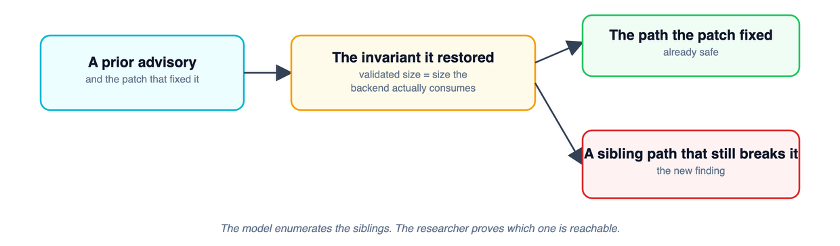
Before I send any code to a model, I build a compact threat model from the project’s own security history: its advisories, its commits, its patch diffs. The point isn’t only to re-hunt old bugs. It’s to learn how the software expects its data to behave, so I can then look for places where that assumption quietly fails.
The output of that work is a short list of invariants. An invariant is a one-sentence rule the code assumes is always true and that a bug would break, for example, “the byte count validated at the perimeter must equal the amount the backend actually consumes.” That is the whole idea. An old validation-patch advisory becomes exactly that kind of rule. An advisory about a use-after-free (a bug where code keeps using an object after it’s been freed) becomes “no object may keep using itself after calling a callback that can destroy it.”
While an invariant is the rule the code must hold, once a bug shows that rule being broken, a variant is any other location where the same rule is broken in the same way.
Prior reported bugs make the hunt richer, because each one hands you an invariant the code already got wrong and a family of variants to chase, but they are not required. Where there are none, you derive the invariants from the code’s own contracts, a cache key that must stay unique or a trust boundary that must hold. This is where a model and an expert outrun what either does alone: the model maps the sinks and their connections across the whole surface far faster than a person could, while the researcher decides which invariants matter and where they break. The threat model is the method, and the pairing is what makes it powerful.
This is also why “find a use-after-free” is a useless prompt, while “determine whether this callback can free the parent object before the next line reads a member of it” is a good one. The first is a bug category, the second a specific claim a model and I can both test.
Nothing about this is specific to open-source. The method is the same whether the target is a public repository, a client’s proprietary codebase, or a closed black box, and what changes is only how much of the history is handed to you. Open-source projects give it away in public commits and advisories, which is why the examples in this post are open-source. On a closed target, you assemble the same ground truth yourself from decompiled interfaces, architecture documents, past vendor disclosures, and dynamic traces, and that is the slower, harder version of the identical work. A model can’t invent a threat model from nothing, and it works only from the evidence you give it.
Context Discipline: The Token Budget
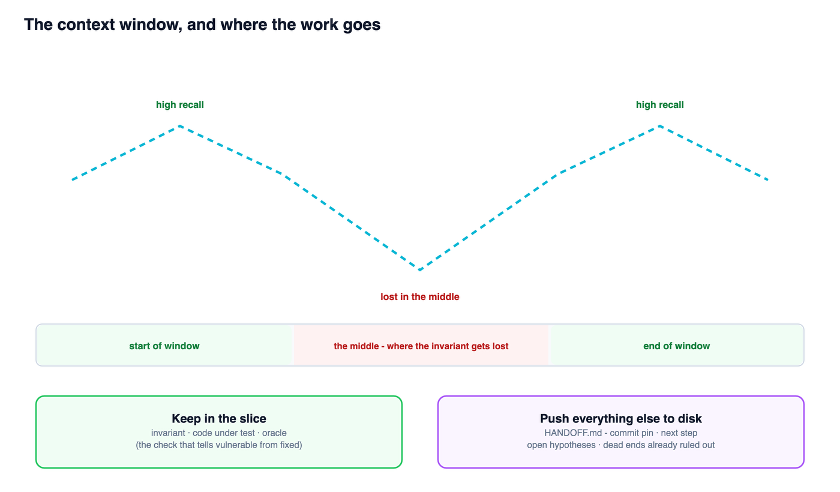
Compressing history into an invariant is wasted effort if the model loses that invariant halfway through the job, which is exactly what happens when you ignore how its context works. A model doesn’t have your repository open the way an editor does. On every turn it sees one block of text – your prompt, the conversation so far, the code you pasted, the tool output that came back – and nothing else. That block is the context window, measured in tokens (roughly ¾ of a word each), and it is finite. Almost every failure I hit traces back to how that budget gets spent. The most relevant reasons for context failure are these three:
Lossy compaction. When a conversation nears the window limit, the tooling summarizes older turns to make room. Summaries keep the story (“found a validation gap”) and throw away the specifics upon which a finding depends: the exact line number, the build flag, the crash offset. After a couple of rounds of this, a session can sound completely confident while no longer holding a single piece of usable evidence. That’s the most dangerous failure mode, because nothing looks broken.
Degraded recall in the middle. A model recalls what sits at the start and end of a long context far better than what is buried in the middle. The effect has a name, “lost in the middle,” and it has outlasted several generations of far larger context windows. A 2025 context rot study found every one of eighteen frontier models still degrading as their input grew. That is the problem here, because the invariant, the one thing that has to hold from the first turn to the last, is exactly what sinks into that middle while the model keeps reasoning as if it still had it.
Cache invalidation. Reasoning over a large context is only affordable because the tooling caches the processed prefix. Churn the conversation and that cache goes cold, and every turn starts paying the full cost of reading everything again.
The fix is not a bigger window. That just moves the limit without solving the recall decay. The fix is to keep the working slice small enough that the invariant, the code under test, and the oracle (the check that separates a vulnerable build from a fixed one) all fit in the high-recall region at once. Everything else goes to disk.
Before I pause a session, I write a short HANDOFF.md at the repository root – the pinned commit, the current artifact, the live hypotheses, the dead ends already ruled out – so the next session resumes without re-deriving state. If that note runs longer than a page, the slice was too big and I split it.
The Four Audit Passes
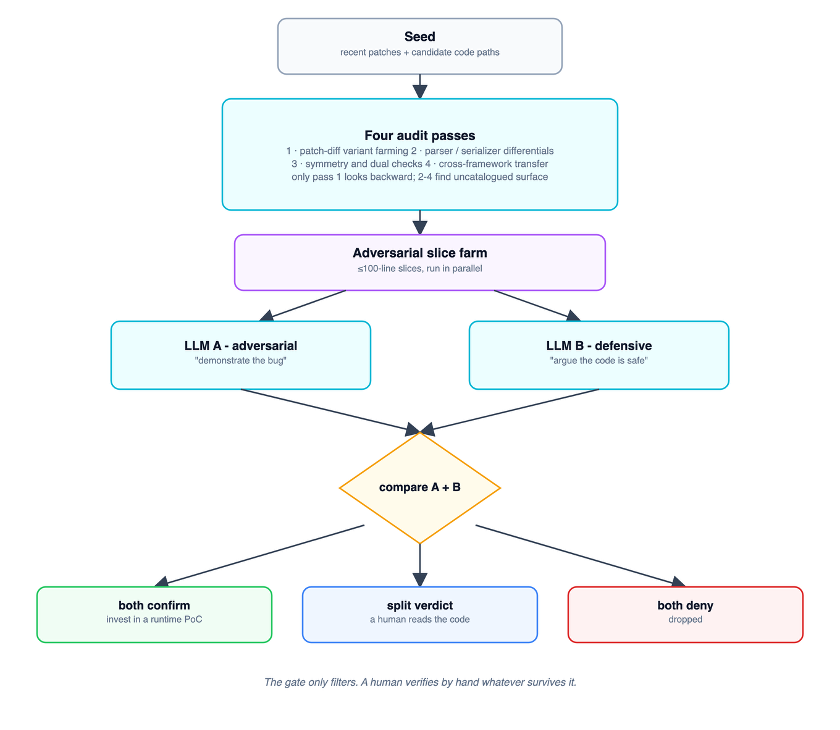
With a threat model in hand and a list of candidate code paths to check, I run the model through four audit passes. Each one has its own input and its own output.
- Patch-diff variant farming. A patch shows the exact line the maintainers changed, and the code around it shows the neighborhood they left alone. I ask the model to find sibling paths that still contain the old, pre-patch logic. This is my highest-yield pass by a wide margin.
- Parser and serializer differentials. When a system implements the same concept more than once – two URL parsers, two header processors, two cache-key generators – those implementations can disagree, and the disagreement is a bug. I list the pairs and ask for inputs where they produce different results, aiming at request smuggling, server-side request forgery (SSRF), or cache confusion.
- Symmetry and dual checks. For every input-validation check, I look for its output twin: the cache layer, serializer, or redirect handler that’s supposed to enforce the same rule on the way out. A missing twin is a strong candidate.
- Cross-framework transfer. Once a bug pattern works in one target, I test sibling frameworks for the same underlying assumption. If it replicates, that’s a class-level design flaw, not one project’s slip.
Only the first pass looks backward at patches. The other three go looking for attack surface nobody has catalogued yet.
Those passes hand back a list of candidate bugs. I cut each surviving candidate down to a slice of under a hundred lines and send it through a dual-model gate, where one session is prompted to prove the bug exploitable and another, handed the same slice with no prior context, is asked to prove it safe. This is not a vote, because two runs of the same model share the same blind spots. I treat it as a disagreement detector instead.
When both sessions call the bug real, it still owes me a runtime proof; when both call it safe, I drop it; and a split, which flags the non-obvious edge cases, is the most useful of the three. The gate only filters, though, and whatever comes out of it I verify by hand, reading the code and reproducing the behavior myself, because two models agreeing is not proof.
What a Verified Finding Looks Like
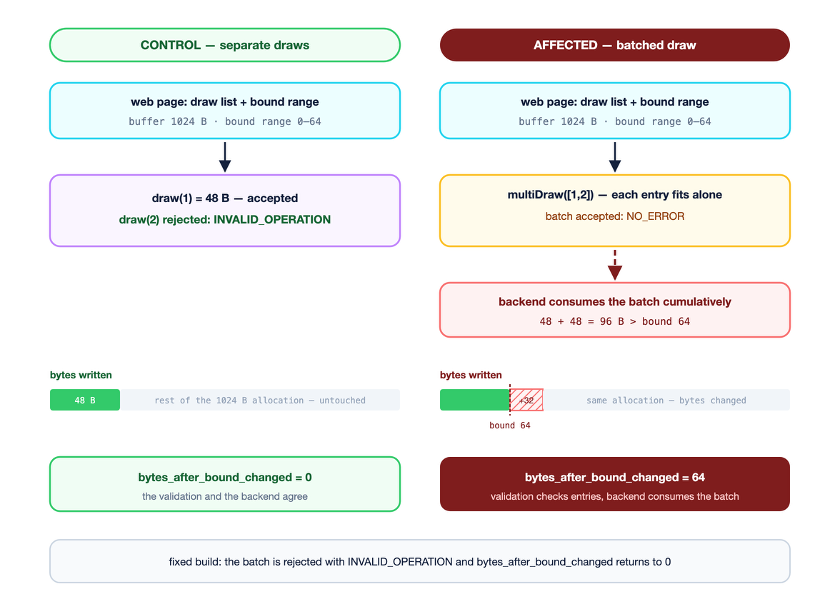
Before any of this touches a runtime, each candidate gets a spec card, four lines that fix exactly what is being claimed and what would prove it. Here’s one, from a sanitized browser-graphics example – a validation/use mismatch, where the check validates each draw command on its own but the backend runs the whole batch and walks the write cursor past the allowed buffer:
Invariant:  ValidateBatch must validate the cumulative byte count
            consumed by SubmitBatch, not the largest single entry.
Attacker:   A web page controls the draw list and the bound range.
Oracle:     The second draw must fail if draw1 + draw2 exceeds the
            bound range. A vulnerable build writes past the range;
            a fixed build returns an API error.
Stop:       Do not claim High unless the write crosses an allocation,
            ownership, process, origin, or authority boundary.
The oracle is the line that does the work, the exact condition that tells a vulnerable build from a fixed one. Here the oracle is checked across three runs, and the contrast between them is the proof:
separate_draw_control:    second_draw_error = INVALID_OPERATION
                          bytes_after_bound_changed = 0

batched_draw_vulnerable:  batch_error = NO_ERROR
                          bytes_after_bound_changed = 64

batched_draw_fixed:       batch_error = INVALID_OPERATION
                          bytes_after_bound_changed = 0
The first run is the negative control, where single checks reject the bad bounds. The second shows the bypass under batched execution, and the third confirms the fix. One log line would prove nothing, but the contrast across all three is what a triager can trust.
This example shows one more thing: because the writes stayed inside memory the calling page already owned, this was a constrained primitive (a real but limited capability), not full memory corruption. That distinction is the difference between a Medium and a High, and I’ll come back to it. The productive next question is never “can I make this proof-of-concept louder?” It’s “where else does this invariant fail?”
Two Real Findings in Angular
Here’s the method producing real, accepted bugs, both reported, confirmed, and patched upstream. One came from a forward-looking differential, the other from a patch variant.
CVE-2026-68945: two requests, one cache key
Advisory: GHSA-jhpw-976m-542j. Rated HIGH (CVSS v4.0) by the assigning authority.
The assumption, from history. Angular’s server-side rendering (SSR) builds the page on the server before sending it to the browser, and it caches the HTTP responses it fetches so the browser can reuse them during hydration instead of re-fetching. Any cache like that rests on one rule.
The invariant. Two HTTP requests that could receive security-distinct responses must never share a cache key.
The hypothesis (Pass 2, serializer differential). If the code builds cache keys by turning request parameters into a string, is there more than one way to write “the same” string? There was. The key generator joined repeated parameters with commas, so two genuinely different requests collapsed onto one key:
GET /api?role=user&role=admin   →  key "role=user,admin"
GET /api?role=user,admin        →  key "role=user,admin"
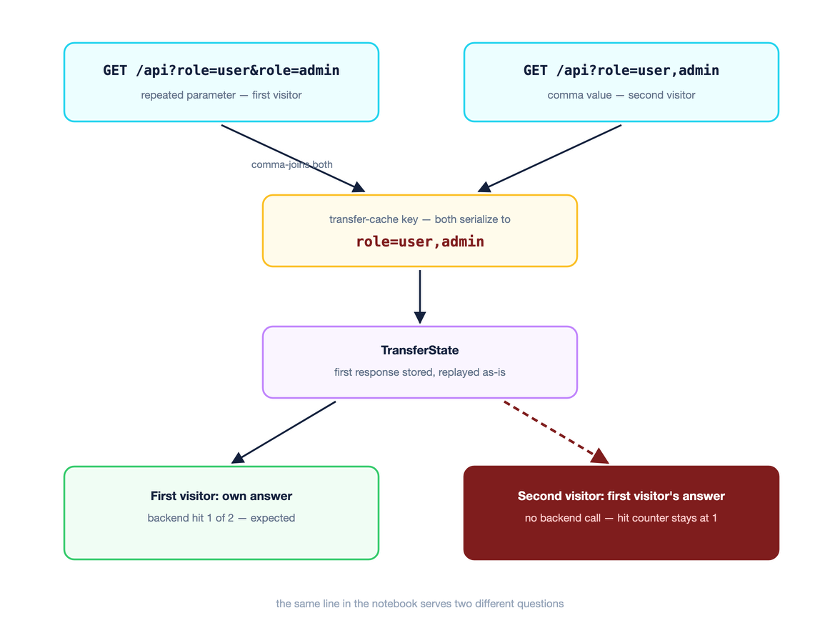
The proof. The oracle was a backend hit-counter, and two distinct requests produced exactly one backend call. The second visitor was served the first visitor’s cached response straight from the transfer cache, never reaching the backend’s authorization check. Angular fixed the key serialization in 20.3.27, 21.2.19, and 22.0.2 (PR #68571).
CVE-2026-69151: a translation file that could inject a script
Advisory: GHSA-jj27-h5hq-8×99. Rated HIGH (CVSS v4.0) by the assigning authority.
The assumption, from history. Angular’s template compiler treats internationalization (i18n) files as lower-trust: translators are supposed to supply text, not code. That’s a trust boundary, and trust boundaries are exactly what threat modeling tells you to test.
The invariant. Lower-trust translation content must never compile into an event handler.
The hypothesis. An earlier fix had already closed one hole where translated content bypassed the normal attribute checks. So, what other attributes still slip through the same translation path? Event handlers did. The compiler accepted i18n-onerror and other i18n-on* attributes, which meant a tampered translation file could drop live JavaScript into a static event handler.
The proof. The demonstration is a compile-time differential rather than a memory trace. Bind onerror on an element directly and the compiler rejects it. Mark the same attribute i18n-onerror and it passes the i18n collection path and compiles into the localized build intact. A translation file supplying that attribute’s value then controls a live handler, which is exactly what the advisory documents, a lower-trust translation file replacing a benign onerror=”void 0″ with arbitrary JavaScript that runs in the application’s origin. Angular fixed it in 20.3.27, 21.2.19, and 22.0.1 (PRs #68821 and #69306).
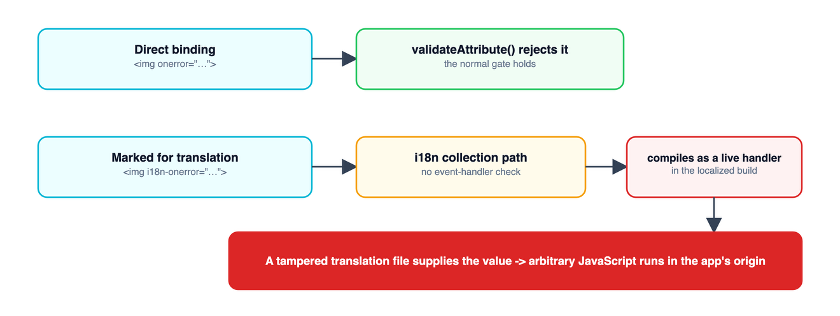
The bug wasn’t a sanitization slip but a broken contract between the compiler and untrusted input, and that input is realistic: localization bundles routinely come from outside translators or a shared repository. As with the cache-key bug, the fix seeds the next cycle, because patching one attribute is an invitation to check every sibling attribute immediately.
Candidate Classification
The fastest way to sink a valid report is to overstate it, so I rate a finding by one thing only: the security boundary its runtime proof actually crosses.
That’s why the graphics example earlier was a Medium, not a High. The writes stayed inside memory the page already owned, so nothing crossed an allocation, process, origin, or authority boundary. Both Angular bugs cross a real one: CVE-2026-68945 serves a response across users, and CVE-2026-69151 runs script in the application’s origin. A scanner’s score is only an interpretation of it, but the breached boundary is a fact, so document the boundary and let the rating follow.
Conclusion
The cost of generating a hypothesis, writing a negative control, and checking a patch’s variants has collapsed. What’s scarce now is the discipline to throw the bad ones away quickly and prove the good ones are real.
In practice, that comes down to a few habits: threat-model before you prompt, so every question is anchored to one rule; never report a finding without a negative control and a fixed-version comparison; and run every candidate past a fresh, independent model session whose only job is to disprove it. That session is only a filter, though, and the final sign-off on any finding is always a person’s.
This doesn’t automatically favor defenders. The same tools are a download away for anyone, and patch-diff variant farming rewards whoever moves first after a commit ships. This means the takeaway for anyone shipping code is direct: run these passes on your own patches before you release, because someone outside will run them after you ship.