

Phishing simulations lose value when operators spend their time on setup instead of scenario design. IOActive built a Python CLI for Microsoft Attack Simulation Training that uses Microsoft Graph, YAML campaign definitions, and an AI agent skill layer to automate drafting, resource discovery, and reporting. The AI operates the tools; humans keep control of scenario design, targeting, privacy, and interpreting results.
How a Python client for Microsoft Attack Simulation Training can reduce operational friction through structured templates and AI-assisted workflows.
Security teams already understand the value of phishing simulations. They use them to test reporting behavior, measure engagement, and identify areas where resilience still needs improvement.
The challenge here is consistency. Preparing campaigns, selecting the right assets, managing target lists and available resources, scheduling exercises, and exporting results can turn a legitimate defensive workflow into a time-consuming operational task.
That is where this project becomes useful. It consists of an operator-focused Python client for Microsoft’s Attack Simulation Training workflows, built for internal or external security exercises. Its purpose is simple: reduce the friction involved in running simulations so operators can spend more time improving the exercise itself.
Key Takeaways
- Phishing simulations lose value when operators spend more time on platform setup than on scenario design. Reused templates and pretexts teach employees to recognize the exercise rather than real attacks, which inflates awareness results.
- IOActive built an operator-focused Python client that manages Microsoft Attack Simulation Training through the Microsoft Graph API, authenticating with Microsoft Entra ID.
- The tool follows a three-layer pattern: a well-documented CLI does the work, a lightweight skill encodes safe operating rules (including which actions are destructive or need approval), and an agent harness lets AI drive the CLI repeatably.
- YAML campaign definitions make phishing exercises repeatable, reviewable, and easy to follow. The AI prepares draft campaigns, but nothing is scheduled or sent until the operator approves it.
- Running simulations through Microsoft’s native platform removes much of the SMTP, allowlisting, mail-routing, and deliverability work that often blocks exercises.
- Human experts remain responsible for scenario design, target audience, realism, timing, safety and privacy boundaries, and interpreting results. AI handles repetitive platform work.
- Per-user results are personal data. Teams should minimize or pseudonymize what the model sees, understand data retention, and involve privacy or legal teams early, especially under GDPR.
- Mature programs measure more than click rate, including reporting speed, scenario engagement, and repeatedly phished users, and use the results to improve training rather than single out individuals.
The Operational Problem
An operator preparing a phishing exercise usually has to answer the same questions again and again, every time a new ruse is prepared.
Which domains are available? Which sender sources can be used? Which payloads already exist? Which landing pages are suitable? Which resources are global? Which target list is in scope? How should the campaign be scheduled? How should the results be exported afterward? And many more, all aimed at creating a tailored scenario that targets the right audience with the appropriate pretext, and addresses the awareness concerns of the organization.
None of these tasks are technically difficult, but together they have a huge impact on the strategic approach to this kind of exercise. They consume time and attention that would otherwise go to the strategic decisions that add value to the exercise.
This operational drag slows campaign preparation, complicates iteration, and increases the chance of avoidable mistakes. Even worse, it discourages operators and teams from refining and customizing the scenarios, pretexts, and infrastructure needed in these exercises. Too often, operators end up fighting the tooling instead of refining the exercise and improving its value. If teams keep using the same templates and pretexts, people get used to them and learn how to recognize the exercise, and results become distorted, creating a false sense of awareness that does not reflect the real potential to detect real-world attacks.
For mature security programs, this is more than a usability problem. It pushes teams to reuse campaigns, run ruses less often, and produce inaccurate analysis outcomes. Last, but not least, all these aspects end up distorting lessons learned, which can eventually weaken the awareness program and lower the organization’s resilience against these attacks.
Much of this friction also comes from the email architecture and protocols themselves. SMTP-based workflows, domain allowlisting, mail-routing exceptions, and deliverability tuning can become hard blockers when executing these exercises.
How to avoid that friction? That is the question this post tries to answer. At a high level, running approved simulations through Microsoft’s native Attack Simulation Training removes much of that plumbing, and allows operators to focus on what actually matters: scenario design, message content, targeting, reporting quality, and other strategic decisions that could turn these programs into a useful tool for measuring an organization’s actual level of awareness.
How the Tool Works
The tool authenticates against Microsoft Entra ID and manages Attack Simulation Training through the Microsoft Graph API.
It also provides a practical command-line interface for campaign preparation, resource discovery, campaign management, statistics retrieval, and export-oriented reporting. All these features are designed to be driven by an AI agent, while remaining fully usable by hand.
The technical pattern behind this is relatively simple: a layered combination of a well-documented CLI, a lightweight skill, and a capable agent harness.
The CLI here does the real work and exposes its commands, flags, and examples through its own –help output, so the tool remains fully usable by a human operator.
The skill sits on top of the CLI as an operational layer. It encodes when to use each command, how to chain operations safely, which actions are destructive, and which may require confirmation or approval.
Finally, the harness layer ties both together and allows the AI to read the tool’s documentation, follow the operational guidance encoded in the skill, and drive the CLI in a repeatable way.
This layered approach leaves the human in control, but releases them from tedious, repetitive, non-strategic actions and decisions. AI replaces neither the tools nor the human; it operates the tools while the human stays in command.
Believe it or not, that distinction matters: the AI component here enhances human-designed workflows and orchestrates CLI commands. Well-documented software along with a thin layer of encoded expertise provides a reliable way to make an existing workflow AI-assisted without turning it into an opaque autonomous system.
That is where AI is genuinely useful, while the human operator remains in the loop to make the significant decisions.
Structured Campaign Definitions
Natural language is very useful here, but it is structure that keeps the workflow disciplined.
Instead of relying on portal clicks or manually rebuilding the same context for every campaign, this project uses YAML files as input for the workflow. An operator can describe the intended exercise in a structured file and let the tool translate that definition into a valid workflow.
For example:
campaign:
  name: "Quarterly credential awareness exercise"
  status: "draft"
  technique: "credential_harvest"
  scheduled_start: "2026-04-15T09:00:00Z"
  target_csv: "./targets/finance_users.csv"
content:
  domain: "contoso-login-example.com"
  payload: "Payroll Update Notification"
  landing_page: "Microsoft 365 Sign-in Training Page"
  sender: "HR Notifications"
This YAML-driven approach makes campaign preparation repeatable, reviewable, and easier to follow.
Setting up campaigns this way allows operators to focus on crafting the exercise itself. Once the plan is ready, the operator can describe the exercise in natural language, and the assistant will prepare a valid draft campaign, attach a CSV target list, select known resources, and present the draft configuration for review.
> Okay, it's perfect. Now leave them created in draft on the platform in the dashboard, pending to tell you when they will be sent.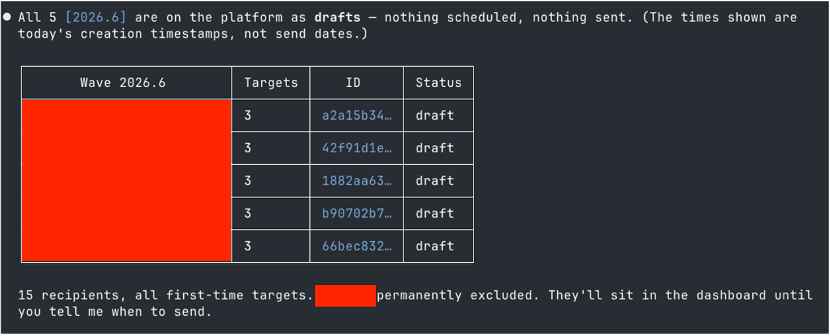
Turning phishing simulation operations into autopilot is not the added value here. The real gain is in reducing the repetitive platform handling required to move from an operator’s intention to a validated campaign configuration.
What Still Requires Human Expertise
The toughest part of a phishing simulation program has never been typing the right command; it is designing the campaign itself that takes the biggest effort. As mentioned before, these exercises need to be realistic, safe, and aligned with the organization’s awareness concerns.
Operators still need to decide which behavior should be tested, the target audience, the level of realism, and the business context. An appropriate balance among all of them will avoid any unnecessary disruption.
Appropriate lures, accurate landing pages, ruse timing, and the correct interpretation of the results still fall under the operator’s judgment.
As it happens in other areas, AI provides huge help with repetitive handling work, but it should not replace the human role in the strategic design of these exercises.
Letting machines help with context retrieval, template preparation, resource discovery, and reporting mechanics, while experienced security professionals remain responsible for scenario quality, safety and privacy boundaries, and the decisions that actually affect the exercise seems to be the right approach.
Reporting and Continuous Improvement
The phishing exercise workflow does not stop once a campaign has been launched. The tool is also capable of retrieving campaign statistics, revealing aggregated and per-user outcomes, exporting data, and supporting the reporting process after a simulation has been completed.
> Give me the results of the previous wave we launched. First overall results and then results by wave and user.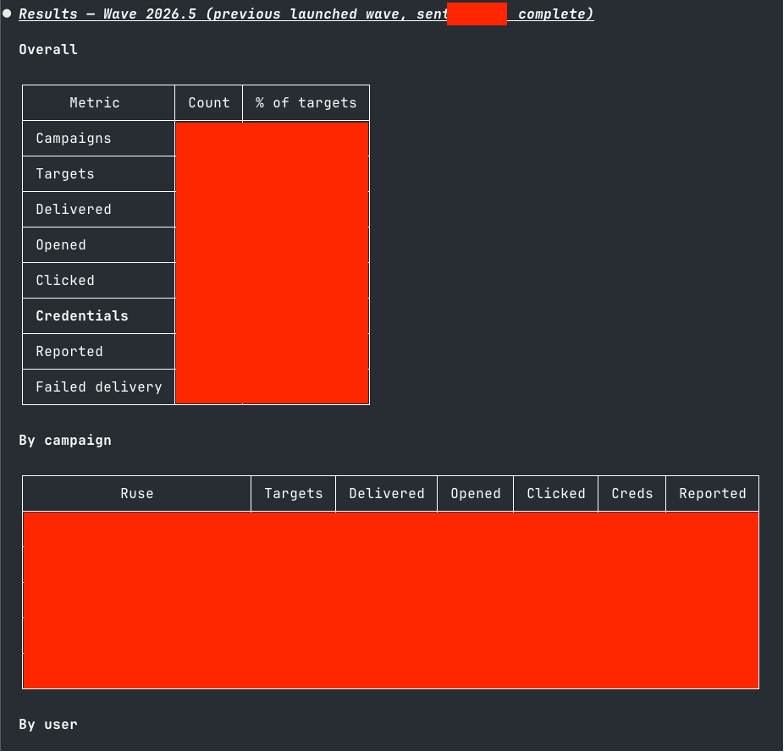
A traditional, compliance-oriented checkbox exercise ends with a click rate. On the other hand, a mature phishing awareness program addresses more complex questions, such as: Which groups reported the message quickly? Which scenarios generated engagement without encouraging risky behavior? Which users have been phished repeatedly? These show how awareness efforts are improving over time, and what areas of the campaigns should be refined.
> Analyze the campaigns carried out during 2026 using the CSV, extract the approximate number of users per campaign, the number of campaigns that are sent, and select a specific number to conduct the monthly test for the month of October. Use your logic to apply the most appropriate campaign to that user, do not repeat the target yet.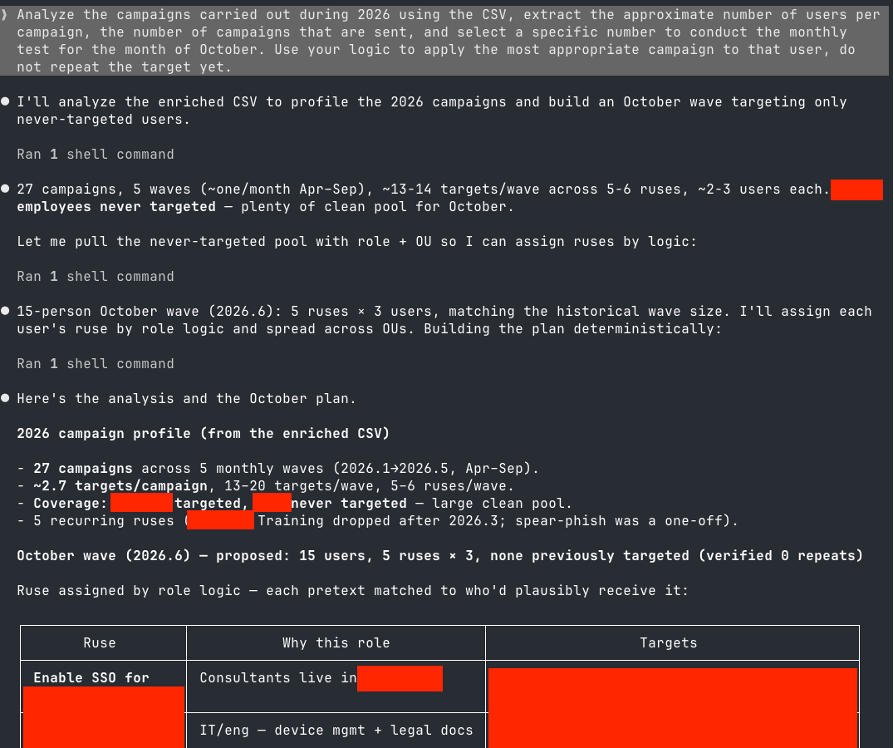
A word on data protection. Per-user results, roles, and organizational units are personal data, and in an AI-assisted workflow some of that data reaches the model. Before adopting this approach, teams should decide which data the agent really needs, minimize or pseudonymize it where possible (for example, user IDs instead of names), know where the model runs and how prompts and outputs are retained, and involve their privacy or legal function early, especially under GDPR.
The same care applies to how results are used. The goal is to improve the program, not to single out individuals: a user who is repeatedly phished needs better training and support, not a reputation.
Reducing the workload of collecting and exporting campaign data and deploying AI-assisted workflows can help teams spend less time on minor tasks and more on identifying lessons learned that ultimately improve the awareness program.
Final Thoughts
Phishing simulation programs should focus on scenario design, not on struggling with tedious mechanical procedures and interfaces.
AI-assisted workflows can remove much of the repetitive operational work while keeping humans exactly where they belong: scenario design, safety and privacy boundaries, targeting, and interpretation of results.
AI augmentation, not autopilot, should be the ultimate goal for security teams. That is where AI delivers the most leverage in these scenarios.
Frequently Asked Questions
How can AI help run phishing simulations?
AI agents can handle repetitive phishing simulation tasks such as resource discovery, drafting campaigns, attaching target lists, and exporting results. Human operators still decide scenario design, targeting, realism, and how to interpret results.
Can Microsoft Attack Simulation Training be automated?
Yes. Microsoft Attack Simulation Training can be managed through the Microsoft Graph API after authenticating with Microsoft Entra ID. A command-line client can create draft campaigns, discover payloads and landing pages, retrieve statistics, and export reports.
Does AI-assisted phishing simulation mean the campaigns run on autopilot?
No. In this approach the AI operates the tools while the human stays in command. The AI prepares draft campaigns for review, and scheduling, sending, and other significant decisions require operator approval.
Why use YAML files to define phishing campaigns?
YAML campaign definitions make phishing simulations repeatable, reviewable, and version-controllable. Operators describe the technique, schedule, targets, payload, landing page, and sender in a structured file instead of rebuilding settings in a portal each time.
Why do repeated phishing simulation templates distort results?
When teams reuse the same templates and pretexts, employees learn to recognize the exercise rather than real attacks. Results then overstate awareness and create a false sense of resilience.
What privacy concerns apply to AI-assisted phishing simulations?
Per-user results, roles, and organizational units are personal data. Teams should minimize or pseudonymize what the AI model sees, understand where the model runs and how data is retained, and involve privacy or legal teams early, especially under GDPR.
What metrics matter beyond phishing click rate?
Mature programs track how quickly groups report suspicious messages, which scenarios drive engagement without encouraging risky behavior, and which users are repeatedly phished, so training can be targeted and improved over time.