ADVISORIES | July 1, 2013

ProSoft Technology RadioLinx ControlScape PRNG Vulnerability

The RadioLinx ControlScape application is used to configure and installradios in a FHSS radio network and to monitor their performance. ProSoft Technology states that default values built into the software work well for initial installation and testing. The software generates a random passphrase and sets the encryption level to 128-bit AES when it creates a new radio network. (more…)

INSIGHTS | June 14, 2013

Red Team Testing: Debunking Myths and Setting Expectations

The term “cyber” seems to be overused in every corner of the information security industry. Now there is a new buzz phrase in computer security, “red team engagements.” Supposedly (to get “cyber” on you), you can have a red team test, and it will help move your organization in the correct “cyber direction.”
But what is red team testing really? And what is it not? In this post I’ll try to make some sense of this potent term.
The red team concept has been around for ages. It started as a military term for a team dedicated to simulating all of an enemy’s activities, including everything from methodology to doctrine, strategy, techniques, equipment, and behaviors. The red team was tasked with mastering how the adversary thinks and operates, and then executing the enemy’s strategies and tactics in the field. This allows your own forces to experience what it would be like to combat this enemy in real life − without the risk of getting injured or killed.
Fast forward 10-12 years and red teams are being used in civilian industry as well as in the military. In private industry, red teams simulate adversaries (not necessarily foreign armies) that could impact the organization. The adversary could be criminals vying to get your money, competitors trying to get their hands on your latest designs, or random attackers who want to exploit, destroy, or simply harm your organization. Their motivations can range from social activism, political strategy, financial gain, and so on.

When IOActive is asked to conduct a red team test, our main goal is to accurately and realistically simulate these types of adversaries. So the first, and probably most important, element of a red team test is to define the threat model:

·      Who is your adversary?
·      What are their motivations?
·      Which adversaries are you most afraid of? (This is usually any party that wants to put you out of business.)
Defining the threat model is crucial to the success of a red team engagement, because it determines the value your organization will get from the project.
After we articulate the threat model, the fun part of the engagement begins.
Fun? Yes, because in the real world most tests, such as penetration tests do not really depict a persistent adversary. Instead, engagements such as pen tests simulates specific strategies that a persistent adversary will use as part of an overall attack.
The red team engagement, on the other hand, includes all possible elements that an adversary might use in such an attack (which is why it is often referred to as “no scope” or “full scope” testing).
In this context, everything including your employees, your infrastructure, the physical office locations, your supply chain − that’s every third party you use as part of your ongoing operations  − and more. When developing attack scenarios for red team engagements, every element has to fit in perfectly.

Think of it as an “Ocean’s Eleven” type of attack that can include:

·      Social engineering
·      Electronic and digital attacks
·      Bypassing physical controls
·      Equipment tampering
·      Getting into the supply chain to access your assets
·      And more

This is full scope testing. Unlike in other types of engagement, all or almost all assets are “in scope”.

Note: Red team engagements do commonly use “reverse scoping” techniques to identify assets that are critical to operations and the types of tampering, access, or removal that are off limits for these assets. These sensitive assets are still in scope. But reverse scoping defines and restricts actions that may substantially disrupt operations.)
So far this sounds like a fun game. But hold on, it isn’t just about the attack. What I like the most is seeing how an organization’s ongoing security operations handle red team attacks.
In a red team test, very few people in the organization know about the test, and even fewer actually know when the test will happen. This means that from an operational security view, all red team activities are treated as if they involve a real adversary.

We gain a lot of insights from the actions and reactions of the organization’s security team to a red team attack. These are the types of insights that matter the most to us:

  • Observing how your monitoring capabilities function during the intelligence gathering phase. The results can be eye opening and provide tremendous value when assessing your security posture.
  • Measuring how your first (and second) responders in information security, HR, and physical security work together. Teamwork and coordination among teams is crucial and the assessment allows you to build processes that actually work.
  • Understanding what happens when an attacker gains access to your assets and starts to exfiltrate information or actually steals equipment. The red team experience can do wonders for your disaster recovery processes.
These are some of the rewards and benefits of a red team test. As you can see, they go well above and beyond what you would get from other types of focused tests.
I hope this explanation eliminates some of the confusion about red team testing that I have seen lately in Internet discussions. I am not saying that there is no value in pen tests, social engineering engagements, physical assessments, or anti-phishing campaign. However, to see how all of these different types of security considerations work in the real world, they also need to be considered as part of a larger (and relevant) context so that you can see how well your organization is prepared for any type of attack.
Last but not least, if you’d like to get hands-on training in how red team engagements are conducted, considering attending our two-day Red Team Training (https://www.blackhat.com/us-13/training/red-team-training.html) at BlackHat 2013 in Las Vegas.
Chris Nickerson and I will cover everything discussed in this post, with particular focus on the elements that go beyond penetration testing. Our topics will include lock picking, social engineering, physical assessments, and, most importantly, how to combine all of these elements into a realistic and successful simulation of an adversary. We also plan to give each of our students a very interesting goodie bag.
Hint: You’ll have fun walking through airport security with that bag :-).

INSIGHTS | February 6, 2013

The Anatomy of Unsecure Configuration: Reality Bites

As a penetration tester, I encounter interesting problems with network devices and software. The most common problems that I notice in my work are configuration issues. In today’s security environment, we can accept that a zero-day exploit results in system compromise because details of the vulnerability were unknown earlier. But, what about security issues and problems that have been around for a long time and can’t seem to be eradicated completely? I believe the existence of these types of issues shows that too many administrators and developers are not paying serious attention to the general principles of computer security. I am not saying everyone is at fault, but many people continue to make common security mistakes. There are many reasons for this, but the major ones are:

  • Time constraints: This is hard to imagine, because an administrator’s primary job is to manage and secure the network. For example: How long does it take to configure and secure a network printer? If you ask me, it should not take much time to evaluate and configure secure device properties unless the network has significant complex requirements. But, even if there are complex requirements, it is worth investing the time to make it harder for bad guys to infiltrate the network.
  • Ignorance, fear, and a ‘don’t care’ attitude: This is a human problem. I have seen many network devices that are not touched or reconfigured for years and administrators often forget about them. When I have discussed this with administrators they argued that secure reconfiguration might impact the reliability and performance of the device. As a result, they prefer to maintain the current functionality but at the risk of an insecure configuration.
  • Problems understanding the issue: If complex issues are hard to understand, then easy problems should be easy to manage, right? But it isn’t like that in the real world of computer security. For example, every software or network device is accompanied by manuals or help files. How many of us spend even a few minutes reading the security sections of these documents? The people who are cautious about security read these sections, but the rest just want to enjoy the device or software’s functionality. Is it so difficult to read the security documentation that is provided? I disagree.  For a reasonable security assessment of any new product and software, reading the manuals is one key to impressive results. We cannot simply say we don’t understand the issue­­­ and if we ignore the most basic security guidance, then attackers have no hurdles in exploiting the most basic known security issues.


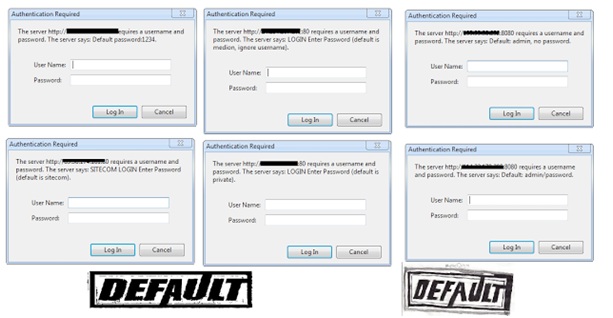
Default Configuration – Basic Authentication


Here are a number of examples to support this discussion:

The majority of network devices can be accessed using Simple Network Management Protocol (SNMP) and community strings that typically act as passwords to extract sensitive information from target systems. In fact, weak community strings are used in too many devices across the Internet. Tools such as snmpwalk and snmpenum make the process of SNMP enumeration easy for attackers. How difficult is it for administrators to change default SNMP community strings and configure more complex ones? Seriously, it isn’t that hard.

A number of devices such as routers use the Network Time Protocol (NTP) over packet-switched data networks to synchronize time services between systems. The basic problem with the default configuration of NTP services is that NTP is enabled on all active interfaces. If any interface exposed on the Internet uses UDP port 123 the remote user can easily execute internal NTP readvar queries using ntpq to gain potential information about the target server including the NTP software version, operating system, peers, and so on.

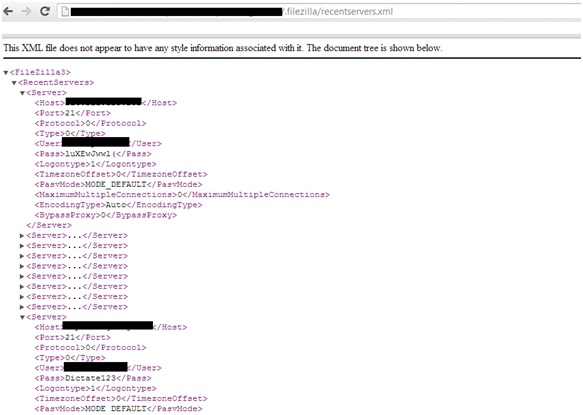
Unauthorized access to multiple components and software configuration files is another big problem. This is not only a device and software configuration problem, but also a byproduct of design chaos i.e. the way different network devices are designed and managed in the default state. Too many devices on the Internet allow guests to obtain potentially sensitive information using anonymous access or direct access. In addition, one has to wonder about how well administrators understand and care about security if they simply allow configuration files to be downloaded from target servers. For example, I recently conducted a small test to verify the presence of the file Filezilla.xml, which sets the properties of FileZilla FTP servers, and found that a number of target servers allow this configuration file to be downloaded without any authorization and authentication controls. This would allow attackers to gain direct access to these FileZilla FTP servers because the passwords are embedded in these configuration files.


FileZilla Configuration File with Password

It is really hard to imagine that anyone would deploy sensitive files containing usernames and passwords on remote servers that are exposed on the network. What results do you expect when you find these types of configuration issues?


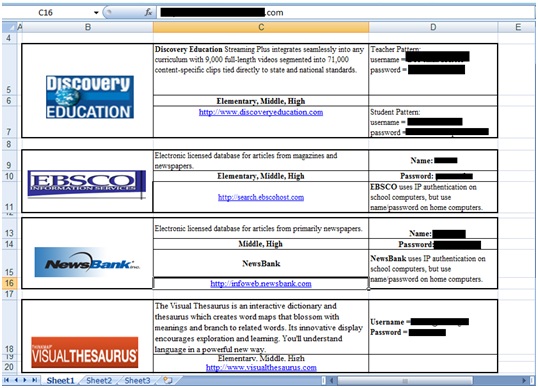
XLS File Containing Credentials for Third-party Resources
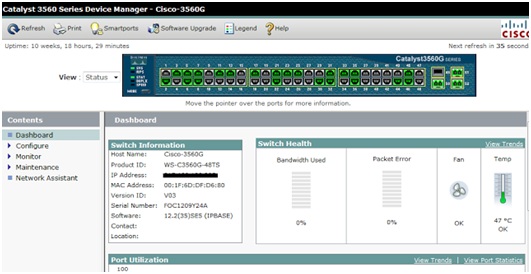
The presence of multiple administration interfaces widens the attack surface because every single interface makes available different attack vectors. A number of network-based devices have SSH, Telnet, FTP, and Web administration interfaces. The default installation of a network device activates at least two or three different interfaces for remote management. This allows attackers to attack network devices by exploiting inherent weaknesses in the protocols used. In addition to that, the presence of default credentials can further ease the process of exploitation. For example, it is easy to find a large number of unmanaged network devices on the Internet without proper authentication and authorization.


Cisco Catalyst – Insecure Interface
How can we forget about backend databases? The presence of default and weak passwords for the MS SQL system administrator account is still a valid configuration that can be found in the internal networks of many organizations. For example, network proxies that require backend databases are configured with default and weak passwords. In many cases administrators think internal network devices are more secure than external devices. But, what happens if the attacker finds a way to penetrate the internal network
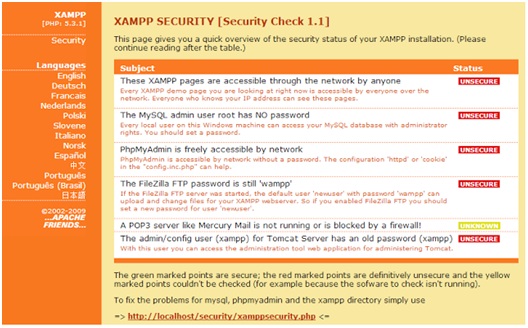
Thesimple answer is: game over. Integrated web applications with backend databases using default configurations are an “easy walk in the park” for attackers. For example, the following insecure XAMPP installation would be devastative.


XAMPP Security – Web Page
The security community recently encountered an interesting configuration issue in the GitHub repository (http://www.securityweek.com/github-search-makes-easy-discovery-encryption-keys-passwords-source-code), which resulted in the disclosure of SSH keys on the Internet. The point is that when you own an account or repository on public servers, then all administrator responsibilities fall on your shoulders. You cannot blame the service provider, Git in this case. If users upload their private SSH keys to the repository, then whom can you blame? This is a big problem and developers continue to expose sensitive information on their public repositories, even though Git documents show how to secure and manage sensitive data.
Another interesting finding shows that with Google Dorks (targeted search queries), the Google search engine exposed thousands of HP printers on the Internet (http://port3000.co.uk/google-has-indexed-thousands-of-publicly-acce). The search string “inurl:hp/device/this.LCDispatcher?nav=hp.Print” is all you need to gain access to these HP printers. As I asked at the beginning of this post, “How long does it take to secure a printer?” Although this issue is not new, the amazing part is that it still persists.
The existence of vulnerabilities and patches is a completely different issue than the security issues that result from default configurations and poor administration. Either we know the security posture of the devices and software on our networks but are being careless in deploying them securely, or we do not understand security at all. Insecure and default configurations make the hacking process easier. Many people realize this after they have been hacked and by then the damage has already been done to both reputations and businesses.
This post is just a glimpse into security consciousness, or the lack of it. We have to be more security conscious today because attempts to hack into our networks are almost inevitable. I think we need to be a bit more paranoid and much more vigilant about security.


ADVISORIES | November 9, 2012

SIEMENS Sipass Integrated 2.6 Ethernet Bus Arbitrary Pointer Dereference

This vulnerability exists within AscoServer.exe during the handling of RPC messages over the Ethernet Bus. Insufficient sanity checking allows remote and unauthenticated attackers to corrupt a Heap-Allocated Structure and then dereference an arbitrary pointer.

When manipulating an IOCP message, it is possible to alter the behavior of message parsing. This allows another IOCP message to subvert the listener of IOCP messages, which leads to export of a write-n primitive.

This flaw allows remote attackers to execute arbitrary code on the target system, under the context of the SYSTEM account, where the vulnerable versions of SIEMENS SiPass Integrated are installed. (more…)

ADVISORIES | July 13, 2012

Invensys Wonderware InTouch 10 DLL Hijack

ICS-CERT originally released Advisory ICSA-12-177-01P on the US-CERT Portal on July 05, 2012. The web page’s release was delayed to provide the vendor with enough time to contact customers concerning this information.

Independent researcher Carlos Mario Penagos Hollmann has identified an uncontrolled search path element vulnerability, commonly referred to as a DLL hijack, in the Invensys Wonderware InTouch application. Successfully exploiting this vulnerability could lead to arbitrary code execution.

ICS-CERT has coordinated the report with Invensys, which has produced an upgrade to address this vulnerability. Mr. Hollmann has validated that the upgrade resolves the reported vulnerability. (more…)

ADVISORIES | July 3, 2012

WellinTech KingView and KingHistorian Multiple Vulnerabilities

Independent researchers Carlos Hollmand and Dillon Beresford identified multiple vulnerabilities in WellinTech’s KingView and a single vulnerability in WellinTech’s KingHistorian applications. These vulnerabilities can be exploited remotely. WellinTech has created a patch, and the researchers have validated that the patch resolves these vulnerabilities in the KingView and KingHistorian applications. (more…)

ADVISORIES | July 1, 2012

Wonderware Archestra ConfigurationAccessComponent ActiveX stack overflow

The Wonderware Archestra ConfigurationAccessComponent ActiveX control that is marked “safe for scripting” is suffering from a stack-overflow vulnerability. The UnsubscribeData method of the IConfigurationAccess interface is using wcscpy() to copy its first parameter into a static-sized local buffer. Attackers can exploit this vulnerability to overwrite arbitrary stack data and gain code execution. (more…)

ADVISORIES |

XBMC File Traversal Vulnerability

XBMC is an award-winning, free, and open source (GPL) software media player and entertainment hub for digital media. XBMC is available for Linux, OSX, and Windows. Created in 2003 by a group of like-minded programmers, XBMC is a nonprofit project run and was developed by volunteers located around the world. More than 50 software developers have contributed to XBMC, and 100-plus translators have worked to expand its reach, making it available in more than 30 languages. (more…)

ADVISORIES |

Multiple Vulnerabilities in Fwknop

Fwknop stands for the “FireWall KNock OPerator” and implements an authorization scheme called Single Packet Authorization (SPA). This method of authorization is based on a default-drop packet filter and libpcap. A server might appear to have no open ports available, but it could still grant access to certain services if authorized fwknop packets are received. Companies commonly use this service on exposed systems and need to diminish the attack surface of this service.

wknop contains several vulnerabilities. The most critical of these might allow remote, authenticated attackers to leverage flaws to execute code and produce denial-of-service conditions. (more…)

ADVISORIES |

IBM Informix XML functions overflows

Informix is one of the world’s most widely used database servers, with users ranging from the world’s largest corporations to startups. Informix incorporates design concepts that are significantly different from traditional relational platforms. This results in extremely high levels of performance and availability, distinctive capabilities in data replication and scalability, and minimal administrative overhead.

Informix contains two vulnerabilities affecting several versions. Attackers can exploit these vulnerabilities to execute arbitrary code or cause denial-of-service conditions. (more…)