

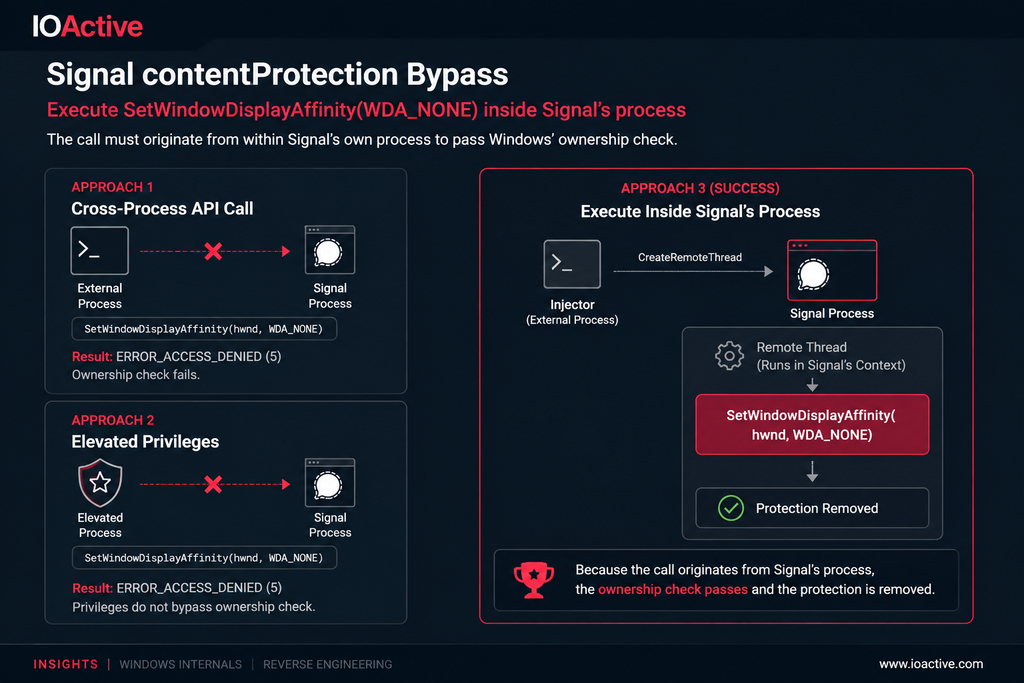
Signal Desktop on Windows ships a screen-capture protection feature that prevents the application window from appearing in screenshots or screen recordings. In this post, we walk through how we identified the underlying Windows API powering that feature, why naïve attempts to disable it fail even from a privileged process, and how we ultimately bypassed the protection by executing code within Signal’s own process context using CreateRemoteThread.
In this post we cover two distinct phases of the research:
- Static analysis — locating the contentProtection API chain through Signal’s open source code and Electron documentation.
- Kernel internals — reverse engineering
win32kfull!NtUserSetWindowDisplayAffinityto confirm the ownership check that enforces the protection and understand exactly why cross-process calls are rejected.
Background
During an internal discussion, a colleague mentioned noticing that Signal’s window did not appear during a screen-share session. This prompted us to investigate the mechanism behind it and, naturally, to ask whether that mechanism could be bypassed.
Finding the API Behind contentProtection
Signal Desktop is an Electron application and its source code is publicly available on GitHub. A ripgrep search for contentProtection across the codebase quickly identified the relevant call site:
C:\Users\tahai\code\Signal-Desktop>rg contentProtection
app\main.main.ts
566:  const contentProtection = ephemeralConfig.get('contentProtection');
571:    (contentProtection ?? isContentProtectionEnabledByDefault(OS, os.release()))
3022:  if (name !== 'contentProtection') {
3026:  const contentProtection = ephemeralConfig.get('contentProtection');
3029:    if (typeof contentProtection === 'boolean') {
3030:      window.setContentProtection(contentProtection);

ts\windows\preload.preload.ts
6:installEphemeralSetting('contentProtection');

ts\util\createIPCEvents.preload.ts
208:        ((await getEphemeralSetting('contentProtection')) ??
216:      await setEphemeralSetting('contentProtection', value);
The call at line 3030, window.setContentProtection(contentProtection), is the Electron API responsible for the behaviour. Checking the Electron documentation reveals how this maps to platform-specific system calls:
On Windows, setContentProtection(true) calls SetWindowDisplayAffinity with the flag WDA_EXCLUDEFROMCAPTURE. On Windows 10 version 2004 and later the window is excluded from capture entirely. On older versions the flag falls back to WDA_MONITOR behaviour, which renders the window as a black rectangle in any capture.
This setContentProtection path is a well-trodden one outside Signal, and community write-ups describing it match what we observed. On Windows the call resolves to SetWindowDisplayAffinity(WDA_EXCLUDEFROMCAPTURE) (and on macOS to CGWindowSetSharingType(kCGWindowSharingNone)), it requires Windows 10 build 19041 — the May 2020 Update — or newer for true exclusion rather than the black-rectangle WDA_MONITOR fallback, and the exclusion happens at the Desktop Window Manager (DWM) / kernel display layer rather than in the application. As a result the window is omitted from every user-mode capture pipeline that goes through Windows Graphics Capture (WGC) — Zoom, Teams, Meet, OBS, Game Bar, and ordinary PrintScreen and BitBlt captures alike. One documented caveat worth noting for defenders is that certain DXGI / direct-GPU capture paths can, on some GPU and driver combinations, still capture a window flagged this way — the exclusion is strong but not literally universal.
Windows SetWindowDisplayAffinity()
The API signature is straightforward — a window handle followed by a DWORD affinity value:
WDA_NONE (0x00000000)— no restrictionsWDA_MONITOR (0x00000001)— content displayed only on a monitorWDA_EXCLUDEFROMCAPTURE (0x00000011)— content excluded from all capture
To disable the protection, we need to call this API with a valid top-level window handle for Signal and pass WDA_NONE. Obtaining the handle is straightforward: EnumWindows() paired with GetWindowTextW() and GetWindowThreadProcessId() lets us identify Signal’s window by cross-matching title text and process name.
Disabling the Protection — Three Approaches
Approach 1 — Cross-Process API Call
With a valid handle in hand, the first attempt was direct: call SetWindowDisplayAffinity(hwnd, WDA_NONE) from a separate process. This returns immediately with ERROR_ACCESS_DENIED (5). Windows is enforcing an ownership check — a process cannot modify the display affinity of a window it does not own.
Approach 2 — Elevated Privileges
The same call was retried from a process running as Administrator. The result is identical: ERROR_ACCESS_DENIED. The check is not privilege-gated. Even a fully elevated process is rejected when calling SetWindowDisplayAffinity against a window it does not own.
Approach 3 — Remote Thread Injection (Successful)
The key constraint the previous two attempts revealed is that the call must originate from within Signal’s own process. We satisfied this using CreateRemoteThread to execute SetWindowDisplayAffinity(hwnd, WDA_NONE) inside Signal’s process context. Because the call is issued from Signal’s process, it passes the ownership check and the protection is silently removed. The proof of concept is available on GitHub.
SetWindowDisplayAffinity() — Kernel Internals
Having confirmed the ownership constraint empirically, we verified it through static analysis of the kernel implementation. The userland call chain is:
user32!SetWindowDisplayAffinity
  └─ win32u!NtUserSetWindowDisplayAffinity   [syscall boundary]
SetWindowDisplayAffinity in user32.dll is a thin wrapper around the NtUserSetWindowDisplayAffinity syscall exported by win32u.dll:
Locating the Implementation in the Kernel
In the kernel the syscall is handled across two modules. We confirmed this with the WinDbg x command:
1: kd> x win32*!*SetWindowDisplayAffinity*
fffff805`5d55ad40 win32k!stub_UserSetWindowDisplayAffinity
fffff805`5d51d320 win32k!_win32kstub_NtUserSetWindowDisplayAffinity
fffff805`5d4fe5ac win32k!NtUserSetWindowDisplayAffinity
fffff805`618bb180 win32kfull!NtUserSetWindowDisplayAffinity
Disassembling win32k!NtUserSetWindowDisplayAffinity shows it calls win32k!W32GetSessionState for a desktop-session sanity check, then dispatches through nt!KscpCfgDispatchUserCallTargetEsSmep — a first-layer check with no ownership logic. The ownership enforcement lives in win32kfull!NtUserSetWindowDisplayAffinity.
The Ownership Check
Working through the disassembly, the sequence is:
; Resolve the target window to its internal struct (via ValidateReceivingHwnd)
fffff805`618bb1ac  call  win32kfull!ValidateReceivingHwnd
fffff805`618bb1b3  mov   rdi, rax          ; rdi = window object

; Get the Win32 process object of the *current* (calling) process
fffff805`618bb1c2  call  nt!PsGetCurrentProcessWin32Process
fffff805`618bb1c7  mov   r8, rax            ; r8 = current process

; Compare: does the window's owning process match the calling process?
fffff805`618bb1db  mov   rax, [rdi+10h]     ; rax = window's thread info
fffff805`618bb1df  cmp   [rax+1D0h], r8    ; owning process == calling process?
fffff805`618bb1e6  jne   +0xe2              ; NO -> ACCESS_DENIED

; ACCESS_DENIED path
fffff805`618bb262  mov   ecx, 5             ; ERROR_ACCESS_DENIED
fffff805`618bb267  jmp   win32kfull!UserSetLastError
The check is explicit: PsGetCurrentProcessWin32Process returns the Win32 process object for the calling thread, and that value is compared against the process stored at offset 0x1D0 of the window’s owning thread structure. If they differ, the call is rejected. Administrator privilege does not factor into this path — the check is purely about process identity, which is why elevated callers receive the same ERROR_ACCESS_DENIED as unprivileged ones.
CreateRemoteThread satisfies this check because it causes the API call to execute on a thread within Signal’s own process, making PsGetCurrentProcessWin32Process return Signal’s process object — an exact match.
Going Below the API — Kernel-Level Enforcement
The ownership check above lives in the syscall handler for SetWindowDisplayAffinity, but that syscall is only the documented front door. The exclusion state it sets is ultimately applied deeper in the graphics stack, inside DWM. Independent kernel-mode research reinforces this: a proof-of-concept driver (DWMShield) skips the public API entirely and calls the undocumented internal routine win32kfull!GreProtectSpriteContent directly, passing a target HWND and the same 0x11 (WDA_EXCLUDEFROMCAPTURE) flag. It works from kernel mode by exposing a device and symbolic link, taking the target window handle over an IOCTL from a non-elevated client, and invoking GreProtectSpriteContent on its behalf — after which DWM applies the same capture-exclusion state that the official path would have produced.
That work is the mirror image of ours. Where CreateRemoteThread bypasses the kernel ownership check by making the call originate from inside the target process, the driver bypasses it from the other side — by dropping below the user-mode API to the routine that actually enforces the flag, where the per-process identity comparison never runs. It carries the usual kernel-research friction: because GreProtectSpriteContent is not exported, its address must be resolved manually and shifts on every reboot under KASLR, and the driver depends on an internal signature that Windows updates can change. But the takeaway is the same one the ownership check hints at: the capture-exclusion decision is made by DWM in kernel space, and it can be reached — by moving code into the owning process, as we did, or by reaching the enforcing routine directly, as the driver does.
Conclusion
EnumWindows is a powerful Win32 API: it allows any process, regardless of privilege, to enumerate top-level windows within the current desktop session and receive a handle to each. Those handles do not, by themselves, grant meaningful access — what can be done with a handle is gated separately by each target API’s own access controls. In the case of SetWindowDisplayAffinity, the gate is a kernel-level ownership check that correctly rejects cross-process calls from any caller, including administrators.
However, the check is bounded by process identity rather than a broader integrity or trust model. CreateRemoteThread — a documented, widely-available Windows API — provides a straightforward way to move code execution into the target process and thereby satisfy that identity check. The result is a silent, runtime removal of screen-capture protection with no indication to the user.
This finding illustrates a recurring theme in Windows security: individual API-level checks are often well-implemented, but the combination of legitimate APIs can produce outcomes the checks were not designed to prevent. Defence-in-depth controls like screen-capture protection are most effective when the device is uncompromised. Once an attacker has local code execution they are in a position to erode multiple such controls through in-process execution. Signal’s protection is a solid user-mode control. What these two paths show is only that, like any capture-exclusion built on the same DWM mechanism, it rests on the integrity of the endpoint rather than on a boundary the local attacker cannot cross.
References
- Electron — BrowserWindow.setContentProtection()
- MSDN — SetWindowDisplayAffinity
- MSDN — EnumWindows
- MSDN — GetWindowTextW
- MSDN — GetWindowThreadProcessId
- MSDN — CreateRemoteThread
- GhostDesk — How to Make an Electron Window Invisible to Screen Capture (setContentProtection / SetWindowDisplayAffinity)
- ahossu/DWMShield — Kernel-mode PoC calling win32kfull!GreProtectSpriteContent directly